




Here's how it works



How to use or fill out mylicensesite with our platform

- Click ‘Get Form’ to open the mylicensesite application in the editor.
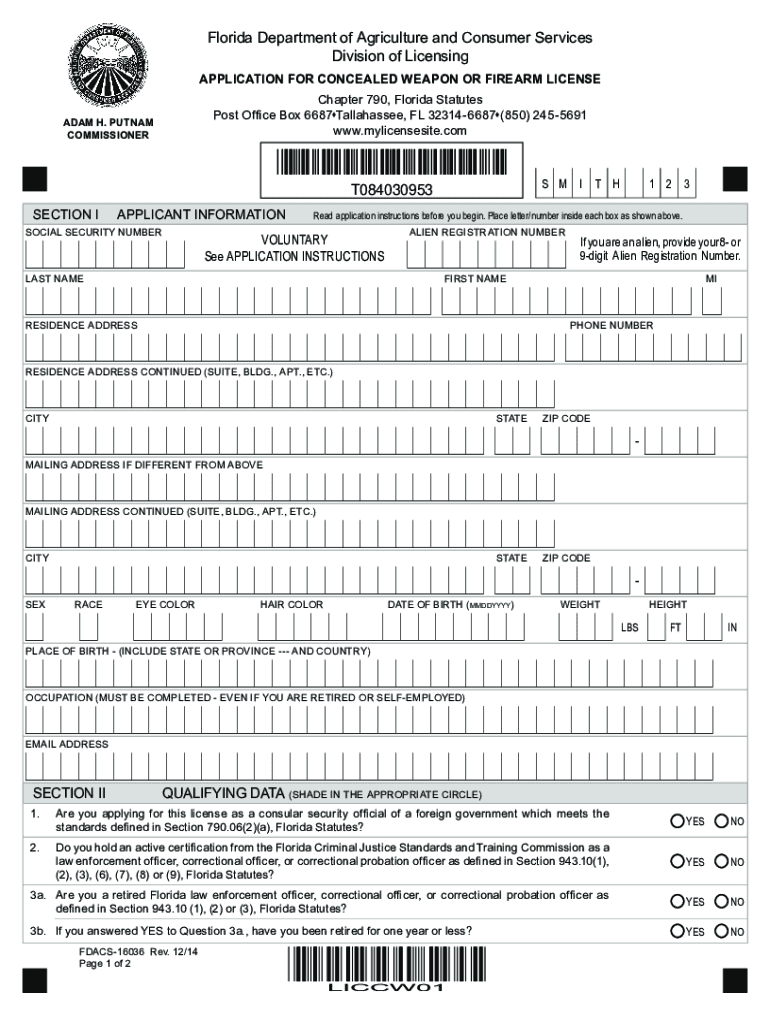
- Begin by filling out SECTION I: APPLICANT INFORMATION. Enter your Social Security Number, Last Name, First Name, and Middle Initial as instructed. Ensure accuracy in your Residence Address and contact details.
- Proceed to provide your Date of Birth, Place of Birth, Occupation, and other personal identifiers such as Sex, Race, Eye Color, Hair Color, Weight, and Height.
- Move on to SECTION II: QUALIFYING DATA. Carefully read each question and select 'YES' or 'NO' as applicable. This section is crucial for determining your eligibility.
- Finally, complete SECTION III: OATH OF APPLICANT. Review your information for accuracy before signing and dating the application. Ensure you have a notary present if required.
Start using our platform today to streamline your application process for free!
It's free
Got questions?
Can I sign my mylicensesite security license status on a mobile?
Sure, you’ll find many different apps for this on the web. Nevertheless, if you need to eSign your mylicensesite security license status without installing additional software, DocHub is the best choice you can make. This robust editor works on mobile devices just like on desktops. Open our editor in any internet browser, register or sign in to your account, and start processing your forms.
How do you complete mylicensesite com online?
You can complete and eSign your mylicensesite com on the internet, even on a tight deadline. All you need to access high quality editing tools on any device is a DocHub profile, which you can sign up in just a couple of moments. Once you register, add your document or find what you are looking for in our catalog, complete it using the editing tools you need, and put your electronic signature on it at the end.
How long does a gun background check take in FL?
How much does it cost to renew a Florida concealed weapons permit?
Can a non Florida resident have a gun in Florida?
Security and compliance
At DocHub, your data security is our priority. We follow HIPAA, SOC2, GDPR, and other standards, so you can work on your documents with confidence.
Learn more


