




Here's how it works



How to use or fill out 2011 Permit Renewal Application with DocHub

- Click ‘Get Form’ to open the 2011 Permit Renewal Application in our editor.
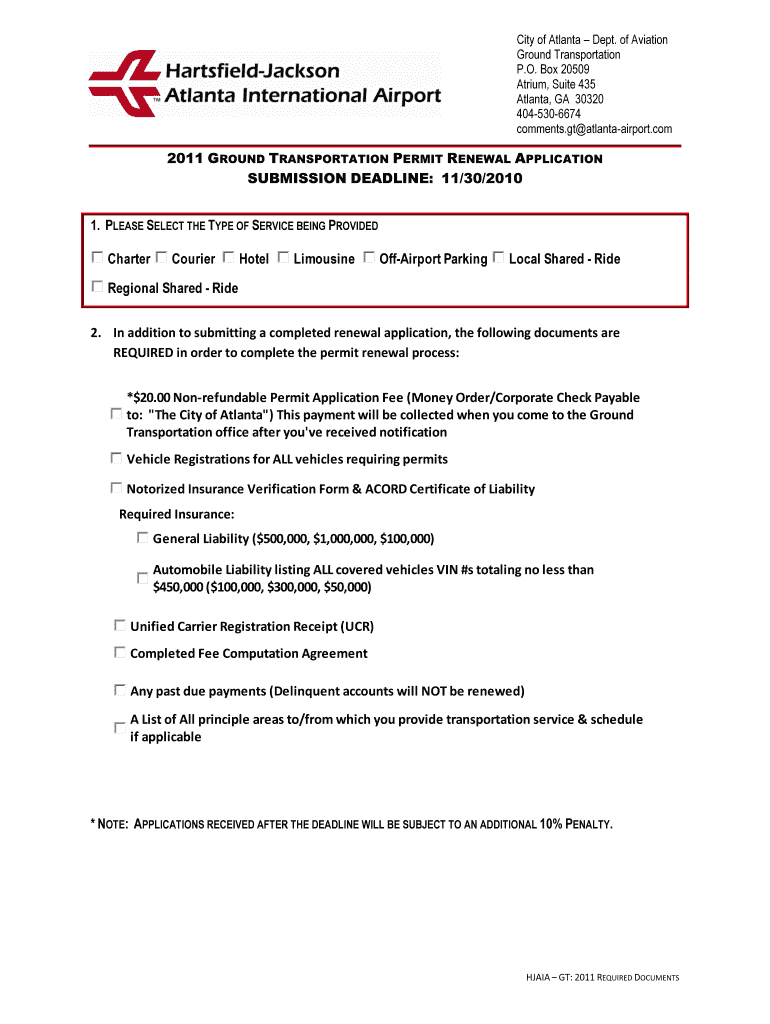
- Begin by selecting the type of service you provide from the options listed, such as Charter or Limousine. This is crucial for categorizing your application correctly.
- Fill in your company information, including Business Name, DBA (if applicable), and Form of Business. Ensure all details are accurate to avoid processing delays.
- Complete the Insurance Policy Information section by entering details about your General and Automobile Liability insurance policies, including policy numbers and expiration dates.
- List all drivers operating at the airport along with their Date of Birth and Driver's License numbers. This ensures compliance with airport regulations.
- Provide a detailed Authorized Vehicle List, including Fleet Number, Year, Make, Model, Color, VIN, and License Plate Number for each vehicle requiring decals.
- Review all sections thoroughly to ensure completeness before submitting your application via email or mail as instructed at the end of the form.
Start using our platform today to fill out your 2011 Permit Renewal Application online for free!
It's free
Got questions?
How can I create an electronic signature in my 2011 Permit Renewal Application on Android?
Signing documents on a mobile device is fast, simple, and doesn’t require software installation when you have an account with DocHub. Log in from any browser, fill in your empty fields with your information, and click on Sign → Create your signature. You can draw your eSignature the same way you usually do on paper, add its picture to your 2011 Permit Renewal Application, or type in your name and stylize its look. Whatever option you select, your form will be valid.
How do you edit 2011 Permit Renewal Application on Android?
Document editing with DocHub is equally convenient on desktop and mobile devices. You only need an internet browser to revise your 2011 Permit Renewal Application on Android. Open our site and sign in to access the instruments you need. Add your document and introduce your intended modifications. Next, you can keep your form in your document storage or send it out right away.
Security and compliance
At DocHub, your data security is our priority. We follow HIPAA, SOC2, GDPR, and other standards, so you can work on your documents with confidence.
Learn more


