




01. Edit your rekisteröintitodistus osa 2 online
Type text, add images, blackout confidential details, add comments, highlights and more.

Type text, add images, blackout confidential details, add comments, highlights and more.

Draw your signature, type it, upload its image, or use your mobile device as a signature pad.

Send rekisteröintitodistus via email, link, or fax. You can also download it, export it or print it out.
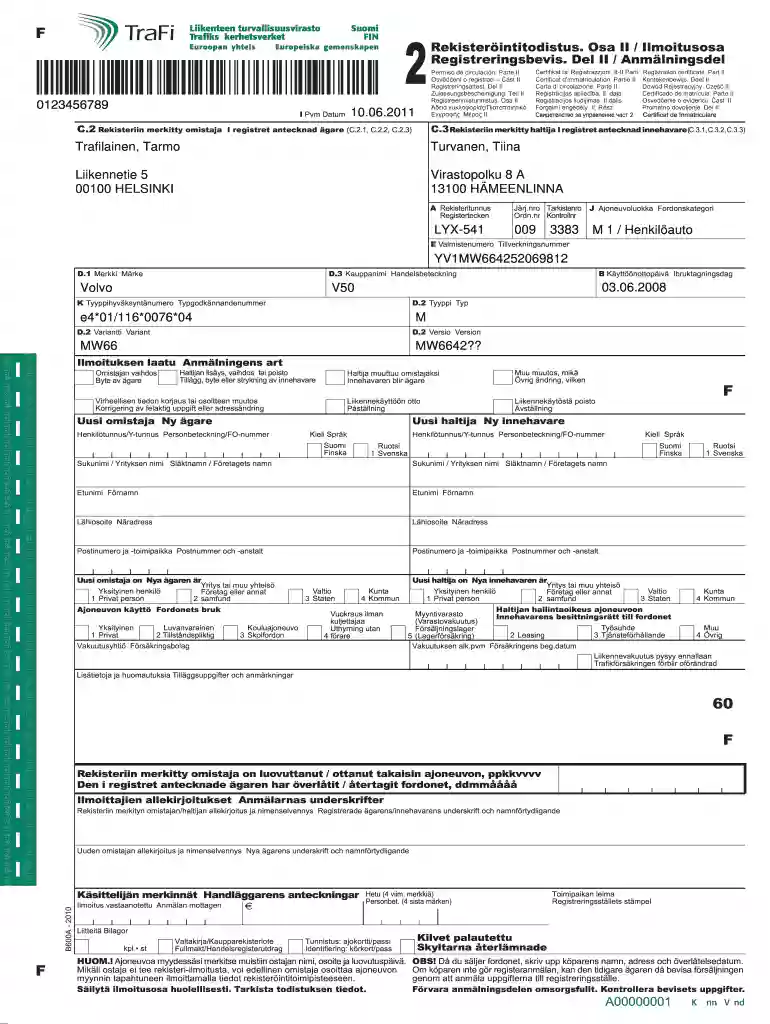
Ilmoitusosa, or notification part, typically refers to a section of a registration certificate, relevant in various administrative and legal contexts. In the United States, it can pertain to specific forms or documents related to ownership, such as vehicle registration or property ownership. This component often captures important changes or transfers of ownership and can be essential for compliance with state regulations.
In the context of vehicle registration, for example, the ilmoitusosa would be used to indicate ownership transfer, change of address, or other significant updates concerning the registered vehicle. This section may require detailed information about the previous and new owners, vehicle identification numbers, and any changes in registration status. Understanding this section’s role is vital for fulfilling legal obligations related to property and vehicle ownership.
To obtain an ilmoitusosa, individuals must follow specific procedures that vary by state or municipality. Generally, the process involves a few key steps:
Identify the Issuing Authority: Determine which local government office or agency issues the registration certificate or related documents. This could be the Department of Motor Vehicles (DMV) for vehicles or a local property tax office for real estate.
Collect Required Documentation: Depending on the type of ilmoitusosa needed, gather necessary documents such as proof of ownership (e.g., title, bill of sale), identification, and any prior registration information.
Complete the Required Forms: Some jurisdictions may require specific forms to be filled out when requesting the ilmoitusosa. This could include forms mentioning the type of notification being filed (e.g., ownership transfer).
Submit the Request: This can typically be done through various methods such as online submission, in-person visits, or mailing physical forms to the relevant office.
Pay Any Associated Fees: Check if there are any fees related to obtaining the ilmoitusosa, as many jurisdictions may charge a nominal fee for processing.
Different states may have additional requirements or may allow for expedited processing, particularly for vehicle-related notifications. It is advised to always verify the specific steps relevant to the local regulations.
Completing the ilmoitusosa involves systematic steps to ensure accuracy and compliance. Here’s a breakdown of the process:
Access the Appropriate Form: Obtain the correct ilmoitusosa form from the relevant authority's website or office. This will ensure that you have the most updated version.
Fill in Applicant Information: Provide personal details such as name, address, and contact information of the person completing the form. For vehicle-related forms, include registration numbers.
Detail the Ownership Information: Include specific information about the vehicle or property, such as VIN (Vehicle Identification Number) or property address. If applicable, specify the previous owners.
Indicate Nature of Notification: Clearly state what the notification is for—this can be a transfer of ownership, changes in holder status, or corrections to previous data.
Review and Validate Information: Double-check all entered data to ensure accuracy, as any errors may delay processing or lead to compliance issues.
Submit the Completed Form: Submit as directed, whether online, by mail, or in person, and keep a copy of the filled ilmoitusosa for personal records.
Follow Up if Necessary: If you do not receive confirmation or if there is a delay, contact the issuing authority for updates regarding your submission.
By adhering to these steps, individuals can ensure that their notification processes are straightforward and legally compliant.
The ilmoitusosa plays a crucial role in various administrative and legal processes for several reasons:
Compliance: Many jurisdictions mandate timely notifications regarding ownership changes to ensure compliance with state regulations, preventing legal issues related to property or vehicle ownership.
Record Keeping: Utilizing the ilmoitusosa helps maintain accurate records with state or local authorities, ensuring that information reflects actual ownership and status.
Liability Protection: Failing to submit necessary notifications may expose individuals to liabilities, such as tax penalties or legal claims. Filing this form helps safeguard against such risks.
Ease of Transactions: Having an up-to-date ilmoitusosa can streamline future transactions involving the property or vehicle, such as selling or transferring ownership.
Legal Clarity: It provides clarity on ownership status, helping resolve disputes by producing clear, documented evidence of changes in ownership or other notifications.
Utilizing the ilmoitusosa not only meets legal requirements but also facilitates smoother future dealings regarding assets.
The ilmoitusosa is utilized by a diverse group of individuals and organizations, often depending on the context of the notification required. Typical users include:
Property Owners: Individuals who own or manage real estate properties often use the ilmoitusosa when transferring ownership or reporting changes in property status.
Vehicle Owners: Those who buy, sell, or transfer vehicles need to complete the ilmoitusosa to comply with local vehicle registration laws.
Businesses: Companies with multiple assets may need to submit this form to maintain accurate records for inventory tracking and liability.
Legal Representatives: Attorneys or legal advisors may use the ilmoitusosa while handling property disputes or estate management to ensure proper documentation of ownership transitions.
Government Agencies: Various governmental entities utilize the ilmoitusosa to update public records and maintain accurate databases for taxation and regulatory purposes.
Overall, anyone involved in the buying, selling, or transferring of ownership should be familiar with the ilmoitusosa to comply with legal requirements effectively.


Of course, it is possible with DocHub. This secure and compliant online solution has a phone-based signing option. When you log in to your DocHub account and import your rekisteröintitodistus osa 2 hinta to our editor, complete all blank areas and use the Sign tool on the upper barf. Click on Create your signature and select Phone from the available options. Here, you scan a QR code with your smartphone and draw your signature on your phone display, as you normally do when signing hard copies. If you access DocHub right from your mobile device, you can electronically sign your template by drawing your eSignature, adding its image, or simply with a typed name.
It is a no-brainer on a computer or via a mobile phone to fill out a ilmoitusosa with DocHub. All you need to do is open any installed internet browser on your smartphone and go to the DocHub website. Once authenticated, add your file and open it in editing mode. Use our toolbar to make your edits and save adjustments. Optionally, keep your document in your files or send it to a recipient immediately.
At DocHub, your data security is our priority. We follow HIPAA, SOC2, GDPR, and other standards, so you can work on your documents with confidence.
Ilmoitusosa on puhujan, Jumalan eli tekstin minn, ilmoitus asemastaan herrana, kuulijan eli tekstin sinn Jumalana. 35 Katolisissa ja luterilaisissaRead more
ATSC-M/H on mobiilitelevisiolaajennus olemassa olevaan maanplliseen TV-lhetysstandardiin ATSC A/53. Se vastaa eurooppalaisia DVB-H- ja 1seg- laajennuksia DVB


