
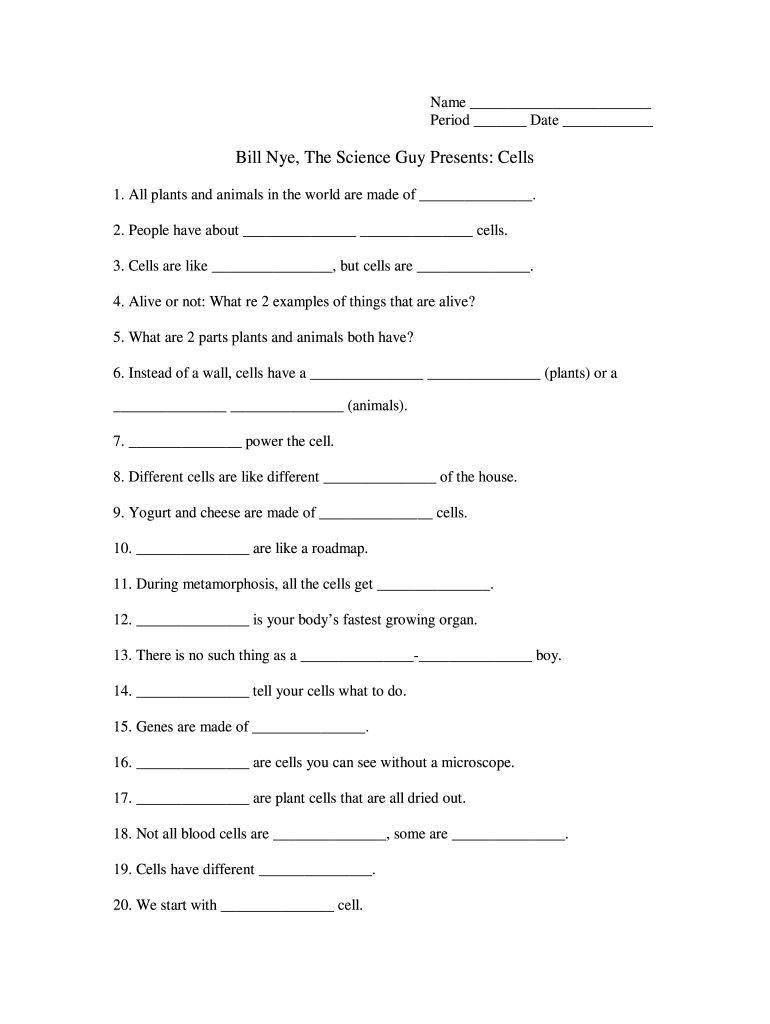




Here's how it works



How to use or fill out bill nye cells with our platform

- Click ‘Get Form’ to open it in the editor.
- Begin by entering your name in the designated field at the top of the form.
- Next, fill in your period and date to keep track of your submission.
- Proceed to answer each question by typing directly into the blank spaces provided. For example, for question 1, write 'cells' as all plants and animals are made of cells.
- Continue filling out the form by providing answers based on your knowledge or research. Ensure you complete all questions for a comprehensive understanding of cell biology.
- Once finished, review your answers for accuracy and completeness before saving or sharing your document.
Start using our platform today to easily fill out your bill nye cells form for free!
It's free
Got questions?
What is the simplest way to electronically sign my bill nye cells worksheet pdf?
A lot of software applications are available out there for document editing and signing. DocHub is one of the most in-demand online solutions that comply with all security and compliance standards and guarantees your electronically signed paperwork is legally enforceable. All you need to give it a try is to create an account, add your bill nye cells worksheet pdf, fill out the required information, and click Sign. Generate your electronic signature by typing, drawing it, uploading its picture to your template, or scanning a unique QR code.
Can I print my bill nye genes worksheet and complete it on my own?
If you go for analog ways of completing your bill nye genes worksheet, it is simple to download your file for printing. Search DocHub’s Forms & Templates catalog to get the exact file template you need and open it for editing or download it on your device in the format of your choice. It is easy to complete your form electronically and place your handwritten signature on it right after printing or eSign your file with DocHub.
How many cells are in a dot?
What are 2 cell parts that both plants and animals have?
What cells should not do Bill Nye?
Security and compliance
At DocHub, your data security is our priority. We follow HIPAA, SOC2, GDPR, and other standards, so you can work on your documents with confidence.
Learn more


