Type text, add images, blackout confidential details, add comments, highlights and more.
02. Sign it in a few clicks
Draw your signature, type it, upload its image, or use your mobile device as a signature pad.
03. Share your form with others
Send skv7750 via email, link, or fax. You can also download it, export it or print it out.
How to use or fill out skv 7750 with our platform
Ease of Setup
DocHub User Ratings on G2
Ease of Use
DocHub User Ratings on G2
Click ‘Get Form’ to open the skv 7750 in the editor.
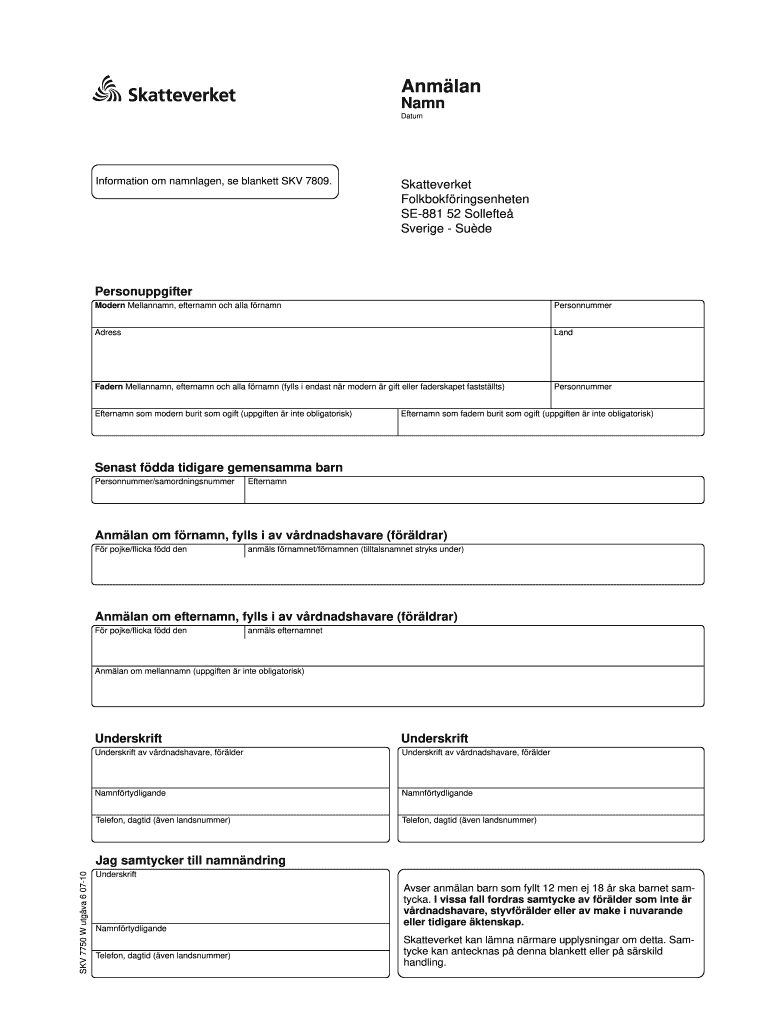
Begin by entering your name, date, and personal details in the 'Personuppgifter' section. Ensure you include all names as required.
If applicable, fill in the father's details only if the mother is married or paternity has been established. This includes their full name and personal number.
For previously born children, provide their personal number and surname in the designated fields.
In the 'Anmälan om förnamn' section, indicate the child's first name(s) clearly, underlining the preferred name.
Complete the 'Anmälan om efternamn' section by stating the child's surname.
If desired, fill out any middle name information in the optional section provided.
Ensure all signatures are completed by guardians or parents where indicated, along with their printed names and contact numbers.
Start filling out your skv 7750 form online for free today!
SamordningsnummerSwedish coordination numberSwedenabroad seSwedish passport USASwedish passport renewal San FranciscoSwedish passport San FranciscoHow to get a Swedish passport as an AmericanFrnya pass USA
Security and compliance
At DocHub, your data security is our priority. We follow HIPAA, SOC2, GDPR, and other standards, so you can work on your documents with confidence.
ATTACHMENT A Lockport-Batavia Line 112 Rebuild Project
Nov 18, 2022 National Grids existing Lockport-Batavia Line 112 is a 11 SkV electric transmission line approximately 35 miles in length, running betweenRead more
Cookie consent notice
This site uses cookies to enhance site navigation and personalize your experience.
By using this site you agree to our use of cookies as described in our Privacy Notice.
You can modify your selections by visiting our Cookie and Advertising Notice.