




Here's how it works



How to use or fill out nelson county occupation form 501q with our platform

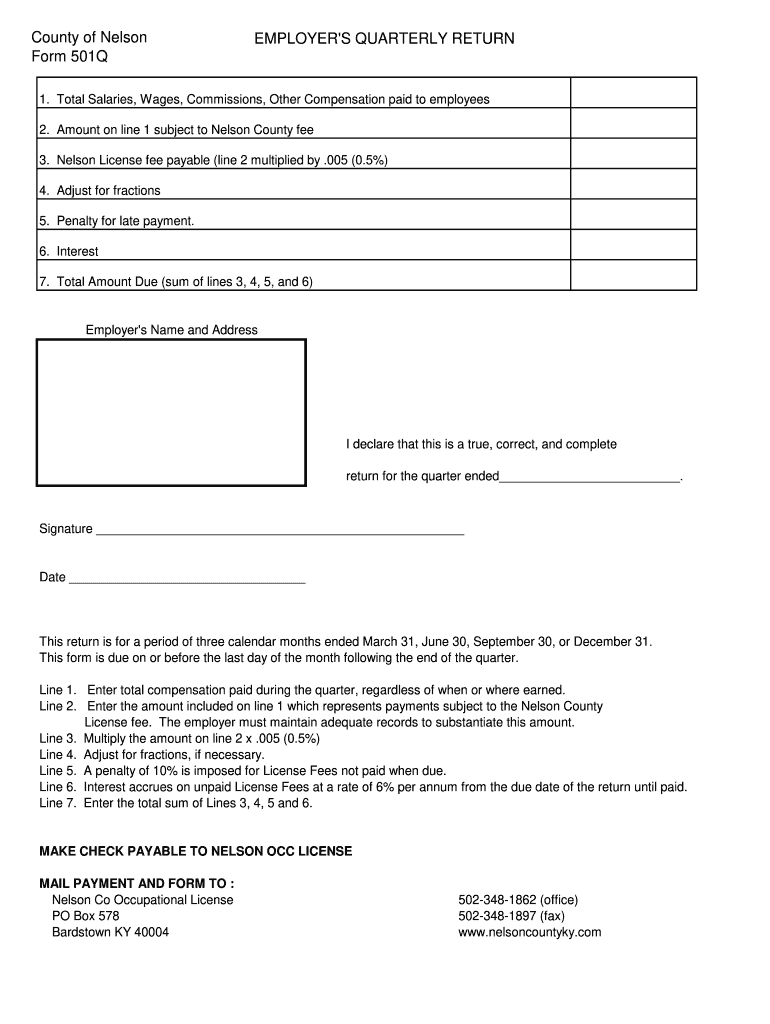
- Click ‘Get Form’ to open the Nelson County Occupation Form 501Q in the editor.
- Begin by entering the total salaries, wages, commissions, and other compensation paid to employees in Line 1. This should reflect all compensation for the quarter.
- In Line 2, specify the amount from Line 1 that is subject to the Nelson County fee. Ensure you have adequate records to support this figure.
- Calculate the Nelson License fee in Line 3 by multiplying the amount on Line 2 by 0.005 (0.5%).
- If necessary, adjust for any fractions in Line 4.
- For late payments, include a penalty of 10% in Line 5 and calculate interest at a rate of 6% per annum for unpaid fees in Line 6.
- Finally, sum Lines 3, 4, 5, and 6 to determine the total amount due in Line 7.
- Complete your employer's name and address at the top of the form and sign and date it before submission.
Start using our platform today for free to streamline your document editing and form completion!
It's free
Got questions?
What do I need to sign my 501q electronically?
Electronic document approval requires a software solution that complies with data security and eSignature laws. DocHub is a perfect tool for that, because it fulfills all the aforementioned requirements. Whatever method you prefer to sign your 501q in DocHub, your eSignature will be legally binding and court-admissible.
How do you fill out occupation for tax return online?
You can find and edit your occupation for tax return online with the help of DocHub. Its simple but feature-rich design enables you to begin effective work right after you register your account. Create your profile and add your document, then our interface will guide you through our stress-free form completion experience.
Security and compliance
At DocHub, your data security is our priority. We follow HIPAA, SOC2, GDPR, and other standards, so you can work on your documents with confidence.
Learn more


