




Here's how it works



How to use or fill out graduate student handbook academic - University of Houston with our platform

- Click ‘Get Form’ to open the Ph.D. Dissertation Committee Report in the editor.
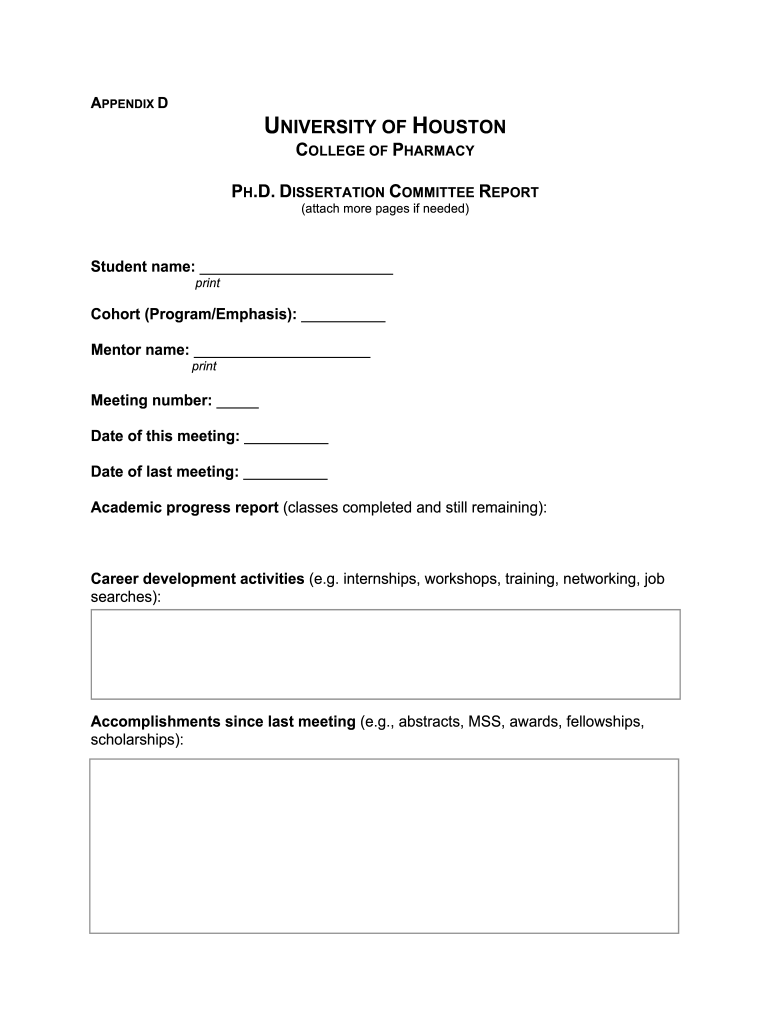
- Begin by entering your name in the 'Student name' field. Ensure it is printed clearly for identification.
- Fill in your cohort information under 'Cohort (Program/Emphasis)' to specify your program details.
- Input your mentor's name in the designated field, ensuring accurate spelling for proper acknowledgment.
- Record the meeting number and dates for both this meeting and the last meeting to maintain a clear timeline of progress.
- Provide an academic progress report detailing completed classes and those still required for graduation.
- Outline any career development activities you have engaged in, such as internships or workshops, to highlight your professional growth.
- List accomplishments since the last meeting, including any awards or fellowships received, to showcase your achievements.
- Detail your project progress report and future plans for completing your degree, ensuring clarity on next steps.
- Finally, indicate your projected completion date and obtain signatures from both you and your mentor to finalize the document.
Start using our platform today to streamline your document editing process for free!
It's free
Got questions?
Can I use DocHub to create legal electronic signatures on my graduate student handbook academic - University of Houston?
Yes, you can utilize DocHub for signing any business and personal documentation, including your graduate student handbook academic - University of Houston. All electronic signatures you create with our service are legally binding and court-admissible, as DocHub complies with standards required by ESIGN and UETA. Save your accomplished paperwork with a detailed Audit Trail if needed.
Can I sign my graduate student handbook academic - University of Houston while I edit it?
If you edit your graduate student handbook academic - University of Houston with DocHub, you simply will not need to look for other software or solutions to sign it. An electronic signature is part of DocHub’s extensive editing toolset, which allows you to implement changes in your form without switching between platforms. Simply complete your form, double-check the correctness of your information and put your electronic signature at the end to make it submission-ready quickly.
What are the odds I get into grad school?
What GPA do you need for University of Houston Masters?
What happens if you fail a class at UH?
Security and compliance
At DocHub, your data security is our priority. We follow HIPAA, SOC2, GDPR, and other standards, so you can work on your documents with confidence.
Learn more


