Bmatrade downloadsSUB-ACCOUNTOPENINGFORMSUB-ACCOUNT OPENING FORM FOR INDIVIDUALS 2026

Get Form
cdc sub account opening Preview on Page 1

Here's how it works

01. Edit your cdc sub account opening online
Type text, add images, blackout confidential details, add comments, highlights and more.

02. Sign it in a few clicks
Draw your signature, type it, upload its image, or use your mobile device as a signature pad.

03. Share your form with others
Send cdc sub account opening form via email, link, or fax. You can also download it, export it or print it out.

How to use or fill out bmatrade downloadsSUB-ACCOUNTOPENINGFORMSUB-ACCOUNT OPENING FORM FOR INDIVIDUALS with our platform

Form edit decoration
9.5
Ease of Setup
DocHub User Ratings on G2
9.0
Ease of Use
DocHub User Ratings on G2
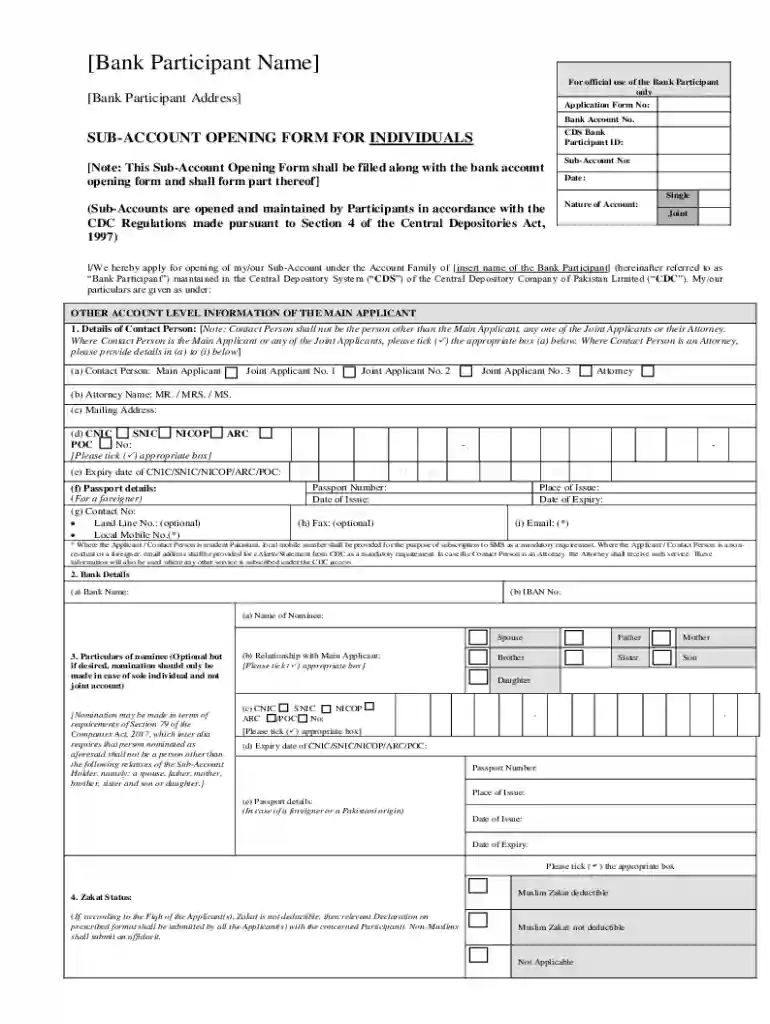
  1. Click ‘Get Form’ to open it in the editor.
  2. Begin by entering your personal details in the 'Bank Participant Name' and 'Address' sections. Ensure accuracy as this information is crucial for identification.
  3. Fill in the 'Application Form No' and 'Bank Account No.' fields, which are essential for processing your application.
  4. Select the nature of your account (Single or Joint) and provide the date of application.
  5. Complete the section regarding contact person details, ensuring to tick the appropriate box if they are a main applicant or attorney.
  6. Provide bank details including Bank Name and IBAN No. This is vital for linking your sub-account with your banking services.
  7. If applicable, fill out nominee details, ensuring that you comply with the nomination requirements outlined in the form.
  8. Indicate your Zakat status by selecting one of the options provided.
  9. Review all entered information for accuracy before submitting. Utilize our platform's features to save progress if needed.

Start filling out your form today using our platform for free!

be ready to get more

Complete this form in 5 minutes or less

Get form

Got questions?

We have answers to the most popular questions from our customers. If you can't find an answer to your question, please contact us.
Contact us
An account opening form should include sections for personal information (name, address, contact details), identification documents (such as a copy of a drivers license or passport), employment information, and any additional information required by the bank or institution.
How to fill a DRF? Contact Number and Date. Enter your existing phone number along with and date of submitting the DRF. Specific Client ID. Every client has a unique client ID, and you need to mention the same here. Account Holder(s) Face value. Quantity of Shares. ISIN. Details of Security. Folio Details.
follow 3 easy steps. Step 1 : Enter DP ID + Client ID + PAN . OTP on mobile number registered in your demat account. Step 2 : Select Nominate OR Opt Out . Step 3 : e-sign using AADHAAR. OTP on mobile number registered with UIDAI (AADHAAR).
Documents required for Demat Account Nepali Citizenship/Passport/Driving License/Govt-issued ID. Recent Passport Sized Photographs. Birth Certificate and Guardians CItizenship for Minors. Permanent Account Number (PAN) card.
Minimum initial deposit for Rs. 5,000/- will be required as a crossed cheque in favor of BMA Capital Management Limited.

Security and compliance

At DocHub, your data security is our priority. We follow HIPAA, SOC2, GDPR, and other standards, so you can work on your documents with confidence.

Learn more
ccpa2
pci-dss
gdpr-compliance
hipaa
soc-compliance

People also ask

Steps for Opening A Demat Account Online Step 1: Choose a DP Website. Step 2: Choose the Option Open Demat Account Step 3: Fill Out the Demat Account Opening Form with Proper Details and Submit It. Step 4: You Will Receive a One Time OTP. Step 5: Submit the Required Documents for Demat Account Opening.
How to open Demat account online Step 1: Search for depository participant. Select a DP with whom you want to open your Demat account. Step 2: Provide basic details. Step 3: Add bank details. Step 4: Document upload. Step 5: In-person verification. Step 6: E-sign. Step 7: Form submission.