




Here's how it works



How to use or fill out Open EnrollmentFiscal Services - College of Marin Athletics with our platform

- Click ‘Get Form’ to open it in the editor.
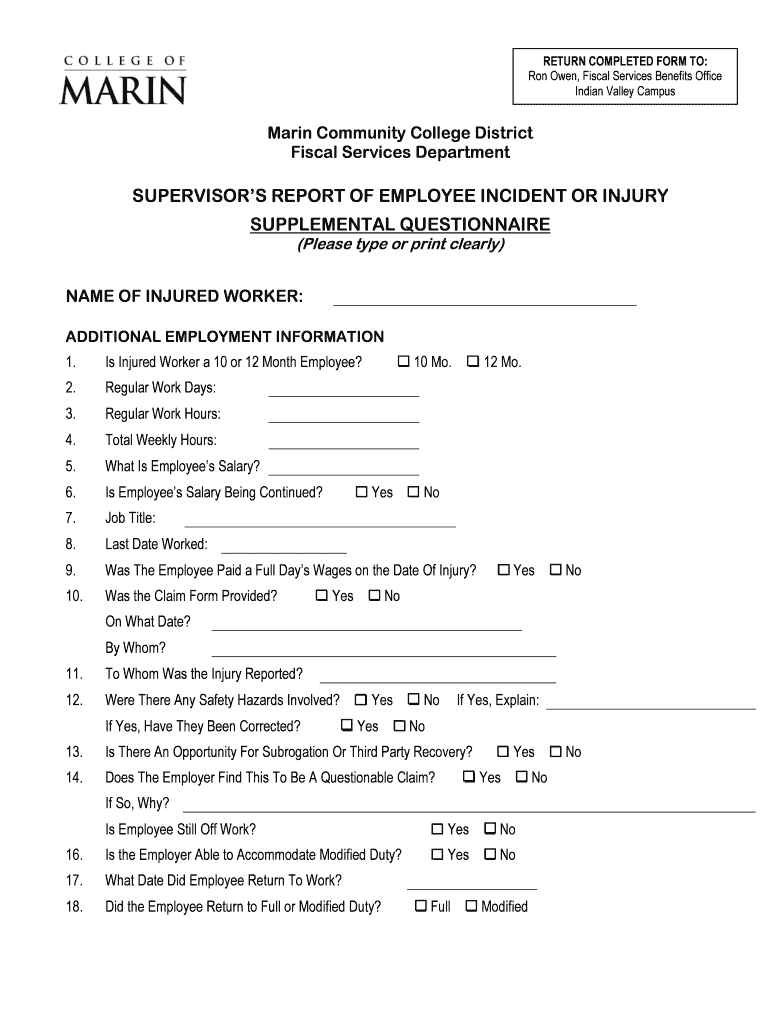
- Begin by entering the 'Name of Injured Worker' clearly at the top of the form. This is essential for identifying the individual involved.
- Next, indicate whether the injured worker is a 10 or 12-month employee by selecting the appropriate checkbox.
- Fill in the 'Regular Work Days' and 'Regular Work Hours' to provide context about the employee's schedule.
- Input 'Total Weekly Hours' and 'Employee’s Salary' to give a complete overview of their employment status.
- Answer whether the employee's salary is being continued during their absence, and provide details on their job title and last date worked.
- Respond to questions regarding payment on the date of injury, claim form provision, and reporting of the injury.
- Address safety hazards involved in the incident and whether they have been corrected, along with any potential for subrogation or third-party recovery.
- Finally, confirm if modified duty can be accommodated and note when the employee returned to work, specifying if it was full or modified duty.
Start using our platform today for free to streamline your document editing and completion process!
It's free
Got questions?
Is it secure to sign my Open EnrollmentFiscal Services - College of Marin Athletics electronically?
You should use only trusted software solutions with strong security compliance to approve your paperwork electronically. DocHub is just the type of software you need! It stores data on Amazon Web Servers and complies with all essential security requirements and eSignature laws, so it’s a trusted way to eSign your Open EnrollmentFiscal Services - College of Marin Athletics or other forms with this tool.
How do you complete Open EnrollmentFiscal Services - College of Marin Athletics on Android?
It is a no-brainer on a computer or via a mobile phone to complete a Open EnrollmentFiscal Services - College of Marin Athletics with DocHub. All you need to do is open any installed browser on your smartphone and go to the DocHub site. Once authenticated, add your document and open it in editing mode. Use our toolbar to make your edits and save adjustments. Optionally, keep your document in your files or send it to a recipient immediately.
How much does it cost to go to college of Marin for a year?
Who is the CEO of College of Marin?
What college is $90,000 a year?
Security and compliance
At DocHub, your data security is our priority. We follow HIPAA, SOC2, GDPR, and other standards, so you can work on your documents with confidence.
Learn more


