Type text, add images, blackout confidential details, add comments, highlights and more.
02. Sign it in a few clicks
Draw your signature, type it, upload its image, or use your mobile device as a signature pad.
03. Share your form with others
Send it via email, link, or fax. You can also download it, export it or print it out.
How to use or fill out Graduate Learning Extended and State - SUNY New Paltz with our platform
Ease of Setup
DocHub User Ratings on G2
Ease of Use
DocHub User Ratings on G2
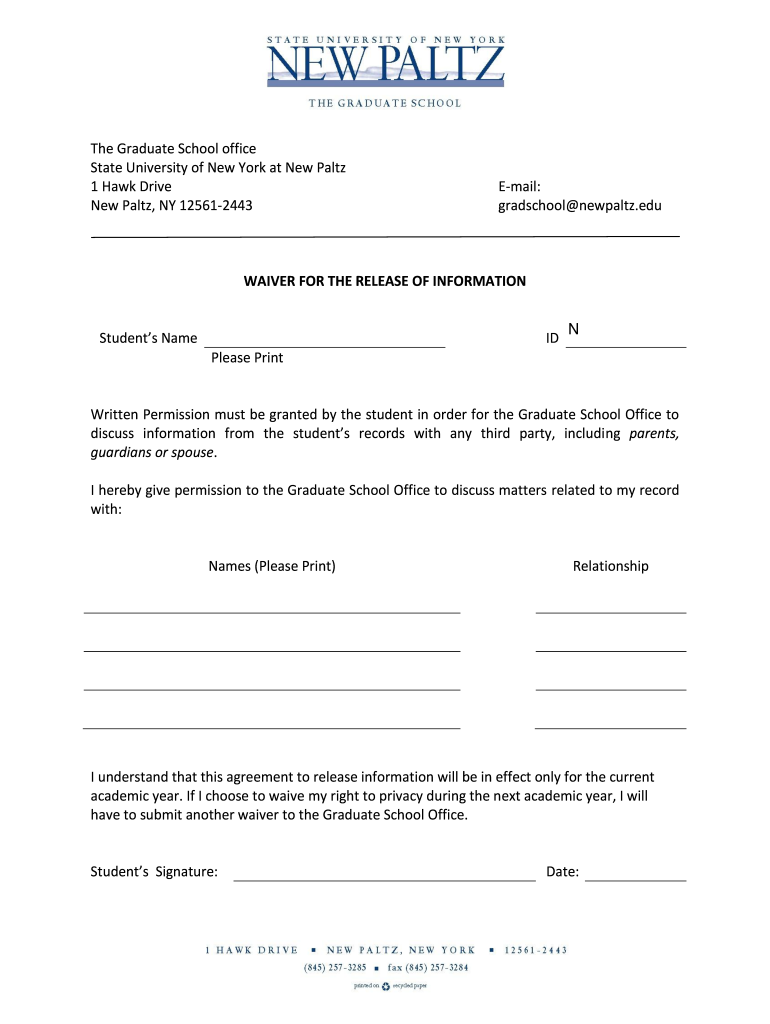
Click ‘Get Form’ to open the Graduate Learning Extended and State - SUNY New Paltz document in the editor.
Begin by entering your name in the 'Student’s Name' field. Ensure that you print clearly for legibility.
Next, input your Student ID number in the designated 'ID' field. This is crucial for identification purposes.
In the section requesting permission, list the names of individuals with whom you authorize the Graduate School Office to discuss your records. Be sure to include their relationship to you.
Review your entries for accuracy. Once confirmed, sign and date the form at the bottom to validate your consent.
Finally, save your completed form and utilize our platform's sharing features to submit it directly to the Graduate School Office.
Start using our platform today for free and streamline your document completion process!
Fill out Graduate Learning Extended and State - SUNY New Paltz online It's free
Graduate learning extended and state suny new paltz loginSUNY New Paltz loginNew Paltz CollegeSUNY New Paltz BrightspaceSUNY New Paltz majors and minorsSUNY New Paltz email loginMy Schedule Planner New PaltzSuny new Paltz Calendar
Security and compliance
At DocHub, your data security is our priority. We follow HIPAA, SOC2, GDPR, and other standards, so you can work on your documents with confidence.
Governor Hochul Announces SUNY to Adopt System-Wide
Jan 28, 2026 Governor Hochul announced that the State University of New York (SUNY) system is updating expectations for all educator preparation programs
Extended Learning has been merged with the Graduate School 800 Hawk Drive New Paltz, NY 12561-2442 Phone: 845-257-3947. Office Hours: Monday Friday, 8:30 a
Cookie consent notice
This site uses cookies to enhance site navigation and personalize your experience.
By using this site you agree to our use of cookies as described in our Privacy Notice.
You can modify your selections by visiting our Cookie and Advertising Notice.