Bpa release form 2026

Get Form
bpa release form Preview on Page 1

Here's how it works

01. Edit your bpa release form online
Type text, add images, blackout confidential details, add comments, highlights and more.

02. Sign it in a few clicks
Draw your signature, type it, upload its image, or use your mobile device as a signature pad.

03. Share your form with others
Send bpa release form 2025 via email, link, or fax. You can also download it, export it or print it out.

How to use or fill out bpa release form with our platform

Form edit decoration
9.5
Ease of Setup
DocHub User Ratings on G2
9.0
Ease of Use
DocHub User Ratings on G2
  1. Click ‘Get Form’ to open the bpa release form in the editor.
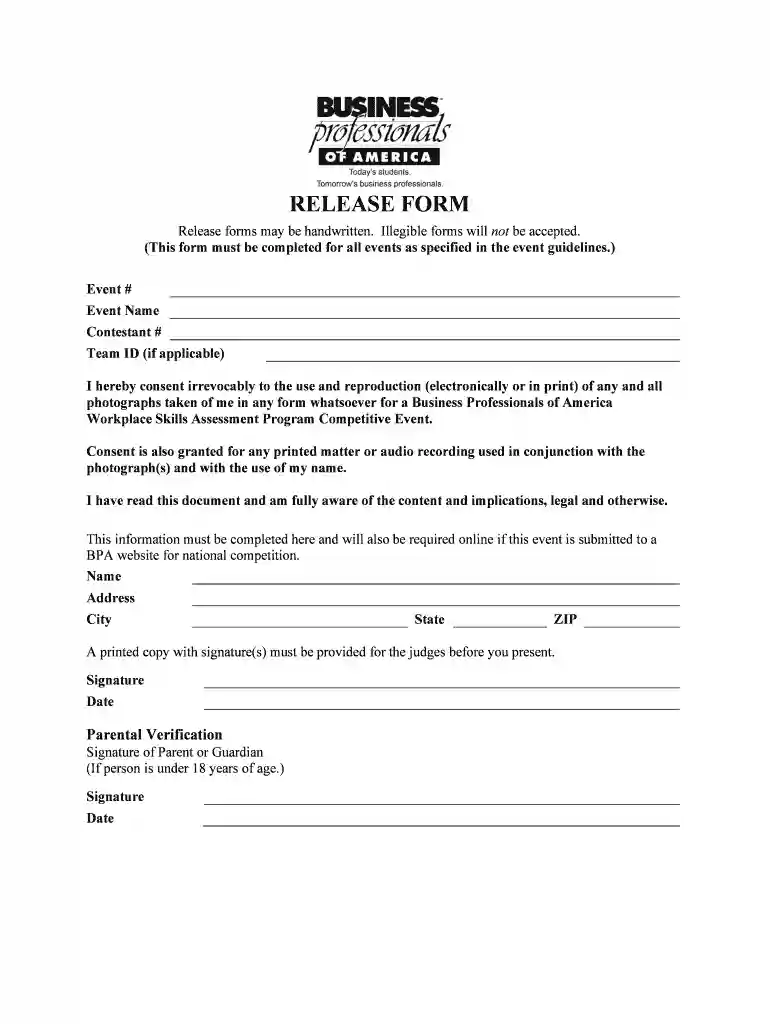
  2. Begin by entering the Event # and Event Name at the top of the form. This information is crucial for identifying your participation.
  3. Next, fill in your Contestant # and Team ID if applicable. Ensure these details are accurate to avoid any confusion during the event.
  4. Read through the consent statement carefully. This section grants permission for the use of photographs and recordings taken during the event.
  5. Complete your personal information by filling in your Name, Address, City, State, and ZIP code. Make sure all entries are legible.
  6. Sign and date the form at the designated areas to confirm your understanding and agreement with its contents.
  7. If you are under 18, ensure that a parent or guardian signs in the Parental Verification section along with their date.
  8. Finally, download or print a copy of your completed form for submission before presenting it to judges.

Start using our platform today to easily complete your bpa release form online for free!

be ready to get more

Complete this form in 5 minutes or less

Get form

Got questions?

We have answers to the most popular questions from our customers. If you can't find an answer to your question, please contact us.
Contact us

If you frequently deal with documents kept in your Google Drive, DocHub is an excellent solution for you to easily and quickly complete, edit, and approve them. This editor integrates well with Google services, so you can export your release form bpa from your Google Drive to the editor without the need of downloading and re-uploading it. Right-click on your file, choose Open With → DocHub PDF Sign and Edit. In our editor, add and assign Signature Fields for all parties involved, then click on the Menu button above → Send → decide on how you want to share your form.

With a swift editing system like DocHub, you do not need anything but a web browser and internet connection to modify your bpa release forms on the internet quickly. Add your file or find the appropriate form in DocHub’s catalog, open our editor with one click, and complete it electronically. To edit your forms anytime, sign up a free account with DocHub.

Students begin with a Regional competition. The top qualifiers compete at State conference, and finally, those ranked the best of the best compete at the National Leadership Conference in May of each year. Competitions range from individual to team, from objective tests to judged presentations.
With 45,000 members in over 1,800 chapters across 25 states and Puerto Rico, as well as an international presence in China, Haiti and Peru, BPA is an organization that supports business and information technology educators by offering co-curricular exercises based on national standards.
Middle Level Division. For middle school students enrolled or formerly enrolled in initial, refresher, or upgrading business, career technical and career or related education programs. Alumni Division. For former active members of any student division.

Security and compliance

At DocHub, your data security is our priority. We follow HIPAA, SOC2, GDPR, and other standards, so you can work on your documents with confidence.

Learn more
ccpa2
pci-dss
gdpr-compliance
hipaa
soc-compliance
be ready to get more

Complete this form in 5 minutes or less

Get form

People also ask

When you join Business Professionals of America you make friends, explore new interests, are exposed to real-world experiences and learn skills that will help you succeed wherever you go. Not to mention, its a good thing to put on your resume as it can give you the edge when applying for jobs right out of college.
Students prepare for and compete in contests under six Assessment Areas including: Finance, Business Administration, Management Information Systems, Digital Communication Design, Management, Marketing Communication, and Health Administration. Judging criteria will vary by event.

Related links