




Here's how it works

01. Edit your nremt accommodations online
Type text, add images, blackout confidential details, add comments, highlights and more.

02. Sign it in a few clicks
Draw your signature, type it, upload its image, or use your mobile device as a signature pad.

03. Share your form with others
Send it via email, link, or fax. You can also download it, export it or print it out.
How to use or fill out nremt accommodations with our platform

- Click ‘Get Form’ to open the nremt accommodations questionnaire in the editor.
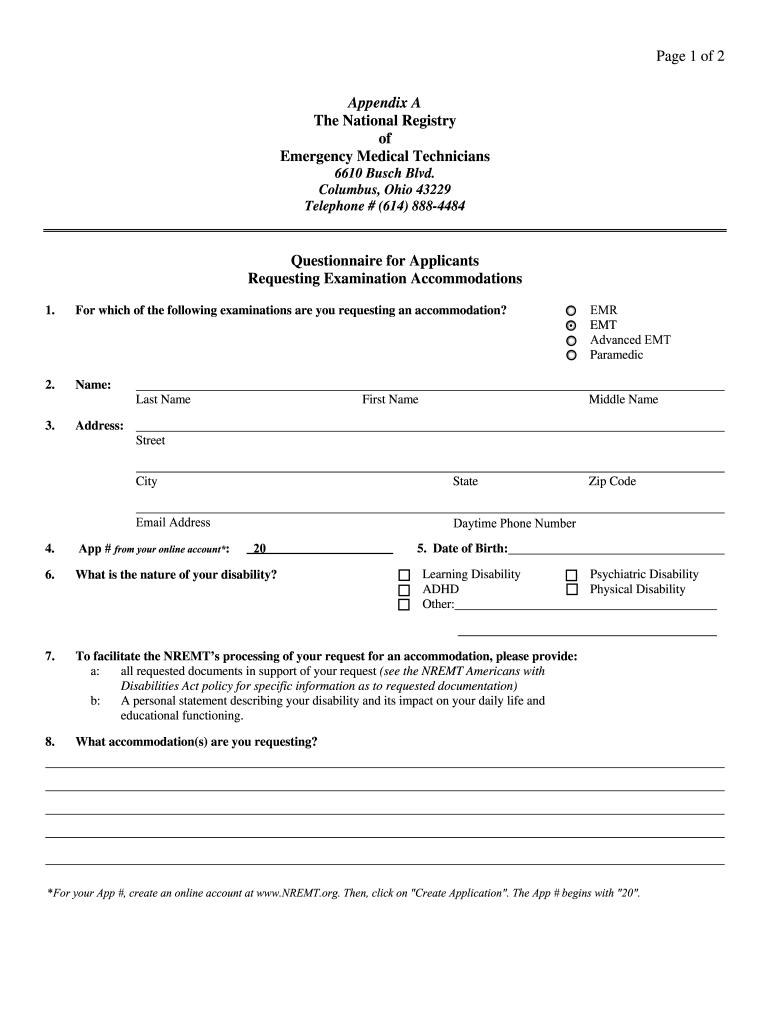
- Begin by selecting the examination for which you are requesting an accommodation. Options include EMR, EMT, Advanced EMT, and Paramedic.
- Fill in your personal information: Last Name, First Name, Middle Name, Address, Email Address, Daytime Phone Number, and Date of Birth.
- Enter your Application Number from your online account. If you don’t have one yet, create an account at www.NREMT.org.
- Describe the nature of your disability by selecting from options such as Learning Disability, ADHD, Psychiatric Disability, or Physical Disability.
- Provide all requested documents that support your request for accommodation and include a personal statement detailing how your disability affects your daily life and educational functioning.
- List any prior classroom or test accommodations you have received throughout your education and training.
- Review the certification section to confirm that all information is accurate before signing and dating the form.
- Submit the completed questionnaire along with supporting documentation via email to accommodations@nremt.org.
Start using our platform today to easily fill out your nremt accommodations form for free!
Fill out nremt accommodations online
It's free
It's free
Security and compliance
At DocHub, your data security is our priority. We follow HIPAA, SOC2, GDPR, and other standards, so you can work on your documents with confidence.
Learn more


