




Here's how it works



How to use or fill out Family Diagnostic Clinic in Tomball, TX with Reviews - YP

- Click ‘Get Form’ to open it in the editor.
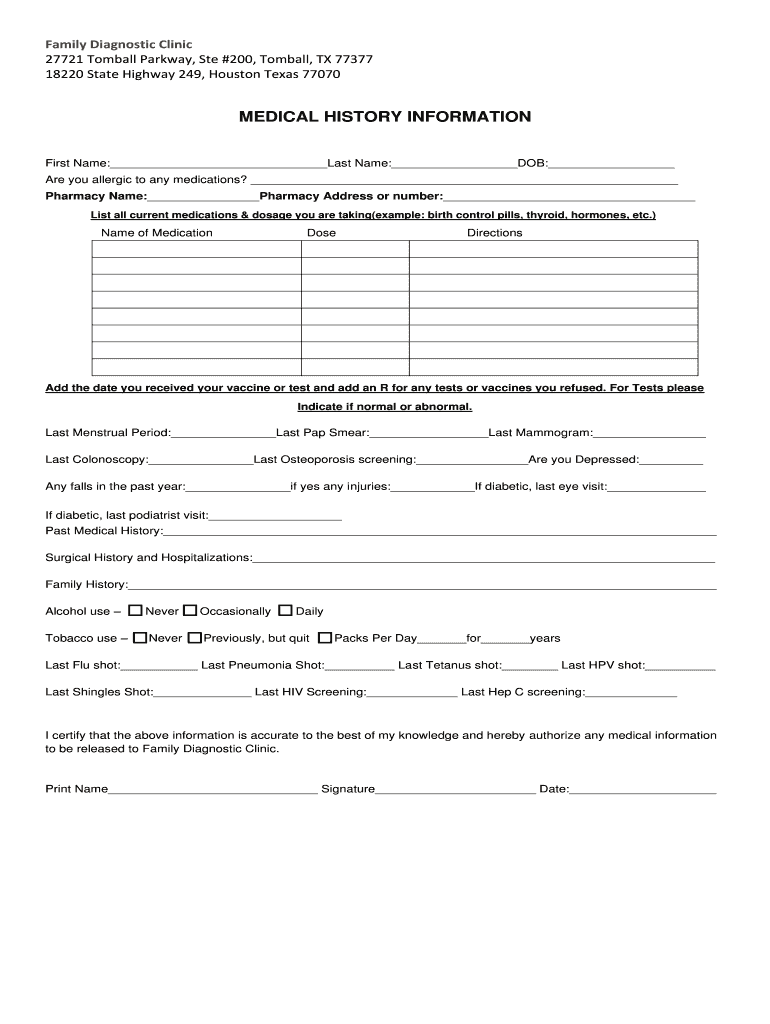
- Begin by entering your personal information in the designated fields, including your first and last name, date of birth, and contact details.
- Fill out the medical history section thoroughly. Indicate any allergies, current medications, and past medical history as required.
- Complete the insurance information section accurately. Ensure you provide both primary and secondary insurance details if applicable.
- Review the consent forms for medical treatment and release of protected health information. Sign where indicated to authorize these agreements.
- Finally, ensure all sections are filled out completely before submitting the form through our platform for processing.
Start using our editor today to streamline your form completion process!
It's free
Got questions?
Can I sign my Family Diagnostic Clinic in Tomball, TX with Reviews - YP on a mobile?
Sure, you’ll find numerous applications for this on the web. Nonetheless, if you need to eSign your Family Diagnostic Clinic in Tomball, TX with Reviews - YP without installing additional software, DocHub is the best choice you can make. This powerful editor works on mobile devices just as on desktops. Open our editor in any internet browser, register or log in to your account, and start managing your forms.
How to fill out and sign Family Diagnostic Clinic in Tomball, TX with Reviews - YP online?
You may easily complete, edit, and even eSign your Family Diagnostic Clinic in Tomball, TX with Reviews - YP using DocHub. Create a new account and begin your free trial. After that, you may upload the document with the form and simply make all the necessary edits. No need to print on paper or use a third-party application to sign it, as you can place your electronic signature on your document faster via DocHub.
Security and compliance
At DocHub, your data security is our priority. We follow HIPAA, SOC2, GDPR, and other standards, so you can work on your documents with confidence.
Learn more


