




Here's how it works



How to use or fill out fnha counselling form with our platform

- Click ‘Get Form’ to open the fnha counselling form in the editor.
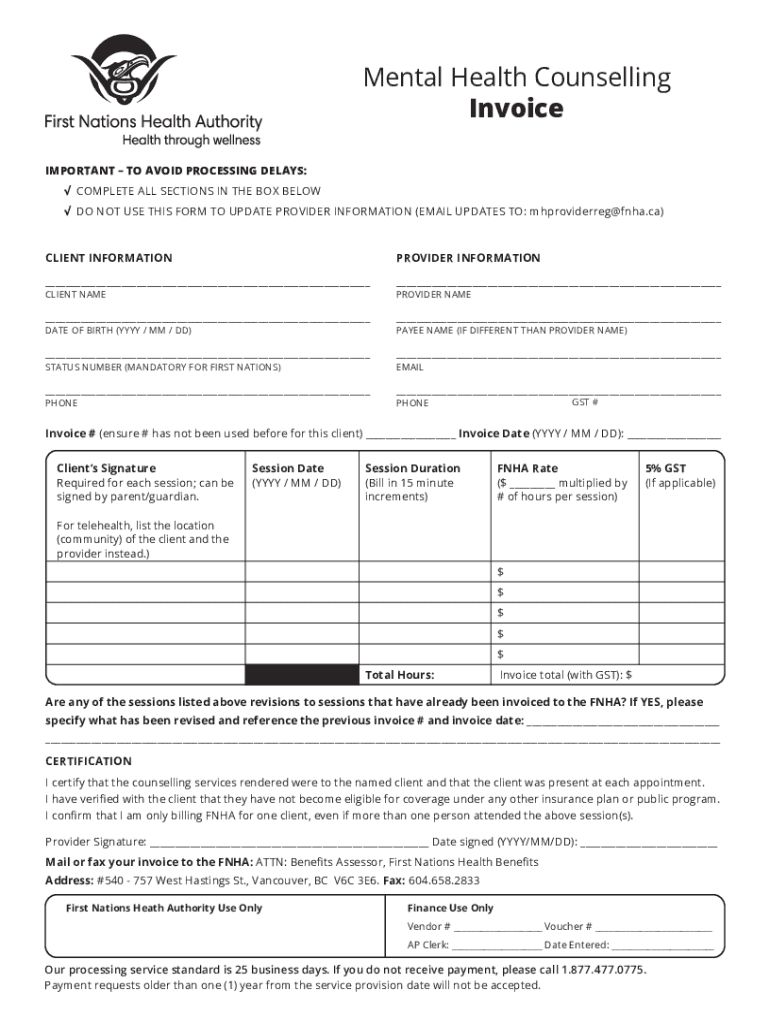
- Begin by filling out the CLIENT INFORMATION section. Enter the client's name, date of birth, status number (mandatory for First Nations), and phone number.
- Next, complete the PROVIDER INFORMATION section. Input the provider's name, payee name (if different), email, GST number, and phone number.
- In the INVOICE section, ensure you provide a unique invoice number and date. Include details about session dates, duration, FNHA rate, and applicable GST.
- If any sessions are revisions to previously invoiced sessions, specify those changes clearly in the designated area.
- Complete the CERTIFICATION section by signing and dating it to confirm that all information is accurate and that services were rendered as stated.
- Finally, save your completed form and utilize our platform’s features to easily share or submit your invoice directly.
Start using our platform today for free to streamline your fnha counselling form completion!
It's free
Got questions?
What is the simplest way to electronically sign my fnha counselling form?
A lot of software solutions are available out there for document modifying and signing. DocHub is one of the most widely used online solutions that comply with all data protection and compliance standards and guarantees your eSigned paperwork is legally enforceable. All you need to try it out is to create an account, add your fnha counselling form, fill out the required information, and click Sign. Create your electronic signature by typing, drawing it, uploading its image to your form, or scanning a unique QR code.
How to fill out and sign fnha counselling form online?
You can easily fill out, edit, and even eSign your fnha counselling form using DocHub. Create a new account and start your free trial. After that, you can upload the document with the form and simply make all the required edits. No need to print on paper or use a third-party application to sign it, as you can place your electronic signature on your document faster via DocHub.
Security and compliance
At DocHub, your data security is our priority. We follow HIPAA, SOC2, GDPR, and other standards, so you can work on your documents with confidence.
Learn more


