01. Edit your industrial emergency response specialist online
Type text, add images, blackout confidential details, add comments, highlights and more.
02. Sign it in a few clicks
Draw your signature, type it, upload its image, or use your mobile device as a signature pad.
03. Share your form with others
Send it via email, link, or fax. You can also download it, export it or print it out.
How to use or fill out teex industrial emergency response specialist with our platform
Ease of Setup
DocHub User Ratings on G2
Ease of Use
DocHub User Ratings on G2
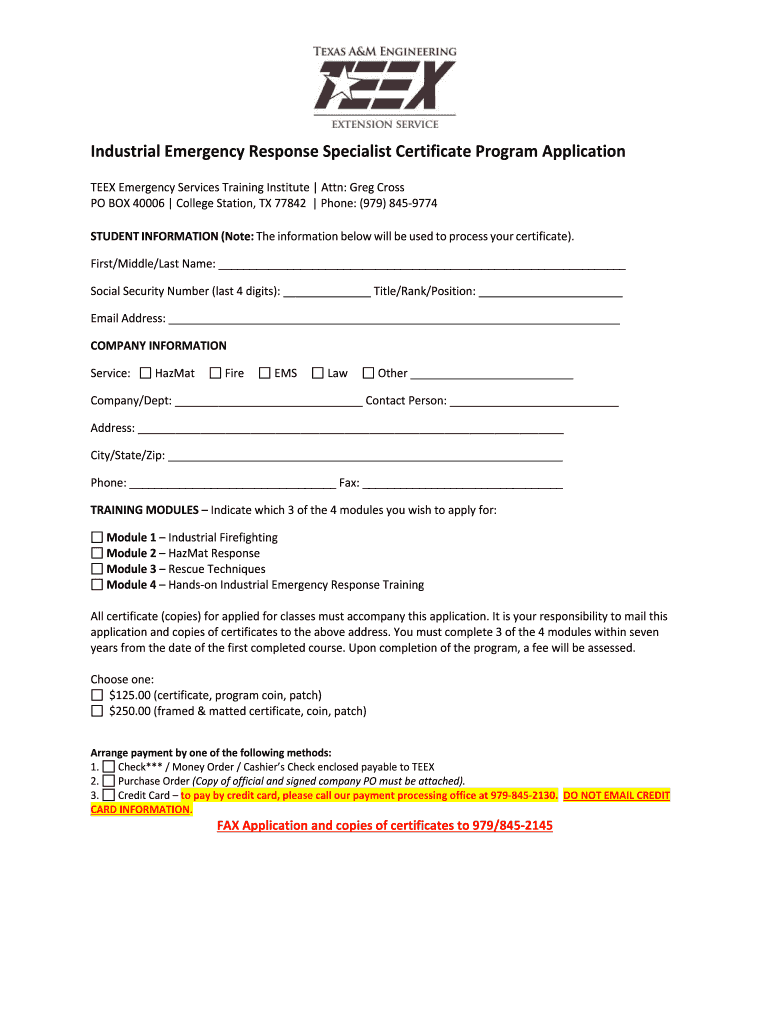
Click ‘Get Form’ to open the teex industrial emergency response specialist application in the editor.
Begin by filling out the STUDENT INFORMATION section. Enter your First, Middle, and Last Name, followed by the last four digits of your Social Security Number. Include your Title/Rank/Position and Email Address.
Next, move to the COMPANY INFORMATION section. Select your service type (HazMat, Fire, EMS, Law, or Other) and provide your Company/Department name along with a Contact Person's name.
Complete the address fields including Address, City/State/Zip, Phone, and Fax numbers.
In the TRAINING MODULES section, indicate which three of the four modules you wish to apply for by checking the appropriate boxes.
Finally, choose your payment option from the provided choices and ensure that all required certificates are attached before submitting your application.
Start using our platform today to streamline your application process for free!
Fill out teex industrial emergency response specialist online It's free
Texas AM Engineering Extension Service (TEEX, pronounced teeks) is a state extension agency that offers training programs and technical assistance to public safety workers, both in Texas and around the world.
Does TEEX help with tcole?
TEEX is licensed as a training academy by TCOLE and offers practice licensing exams. Note: Live online instructor-led (webinar) courses are NOT eligible for TCOLE credit.
Is TEEX accredited?
As an accredited agency, TEEX must complete a self-assessment and receive a site visit every five years by the Pro Board to maintain this accreditation.
Are TEEX courses free?
Available Online Free! Over the past twenty years, active attack response training has focused on training law enforcement to arrive quickly on scene and engage violent suspects. In recent years that focus has shifted to the fire and EMS community with the introduction of different casualty
What does an emergency response specialist do?
Emergency response specialists collaborate with officials and emergency response employees during events to analyze damage, perform assessments and conduct surveys to determine emergency-related needs.
In your student portal, you can view, download and print your certificates, view TEEX courses you are enrolled in as well as your TEEX course history. Select Print Certificate. Your certificate will open in your browser for you to download or print.
Related links
Articulation Agreement
Industrial Emergency Response Specialist program for college credit. Maintain, deliver and administer the Industrial Emergency Response Specialist program.
Senior Emergency Preparedness Response Specialist, Major Projects. Responsible for coordinating emergency preparedness and response-related activities inRead more
Cookie consent notice
This site uses cookies to enhance site navigation and personalize your experience.
By using this site you agree to our use of cookies as described in our Privacy Notice.
You can modify your selections by visiting our Cookie and Advertising Notice.