




Here's how it works



How to use or fill out The News Tribune with our platform

- Click ‘Get Form’ to open The News Tribune in the editor.
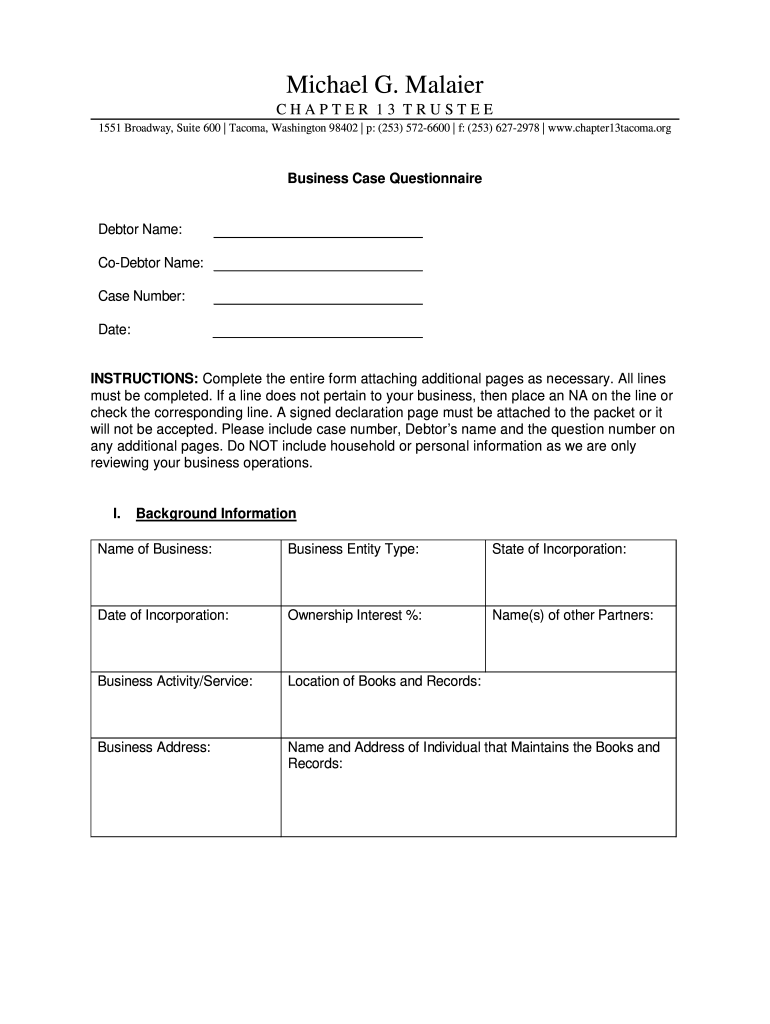
- Begin by entering the Debtor Name, Co-Debtor Name, Case Number, and Date at the top of the form. Ensure all fields are filled accurately.
- Proceed to Section I: Background Information. Fill in details such as Name of Business, Business Entity Type, State of Incorporation, and Ownership Interest %. If any field does not apply, mark it as 'NA'.
- In Section II: Assets of the Business, provide information on inventory value and any liens. For equipment, list each item along with its value and lien holder if applicable.
- Complete Section III: Employees by indicating the number of employees and confirming payroll status. In Section IV: Taxes, specify any outstanding federal or state taxes owed.
- Finally, ensure you sign the Declaration section at the end of the form. Attach any additional pages as necessary before submitting.
Start using our platform today to streamline your document editing experience for free!
It's free
Got questions?
Can I draw my eSignature to sign my The News Tribune?
Yes, electronically drawing your signature is appropriate, but only if you utilize a tool that complies with industry regulations and policies. Consider DocHub, which ensures eSignature validity under ESIGN and UETA requirements. All you need to eSign your The News Tribune is an account with DocHub and an internet connection. When you open your paperwork in our editor, click Sign and select the Draw option.
Can I sign my The News Tribune while I edit it?
If you edit your The News Tribune with DocHub, you simply will not need to look for other software or services to sign it. An electronic signature is a component of DocHub’s comprehensive editing toolset, which enables you to apply changes in your form without jumping between platforms. Simply complete your form, double-check the correctness of the information and put your electronic signature at the end to make it submission-ready in minutes.
Security and compliance
At DocHub, your data security is our priority. We follow HIPAA, SOC2, GDPR, and other standards, so you can work on your documents with confidence.
Learn more


