




Here's how it works



How to use or fill out Northwest Spokane Pediatrics, PLLC - Better Business Bureau with Our Platform

- Click ‘Get Form’ to open it in the editor.
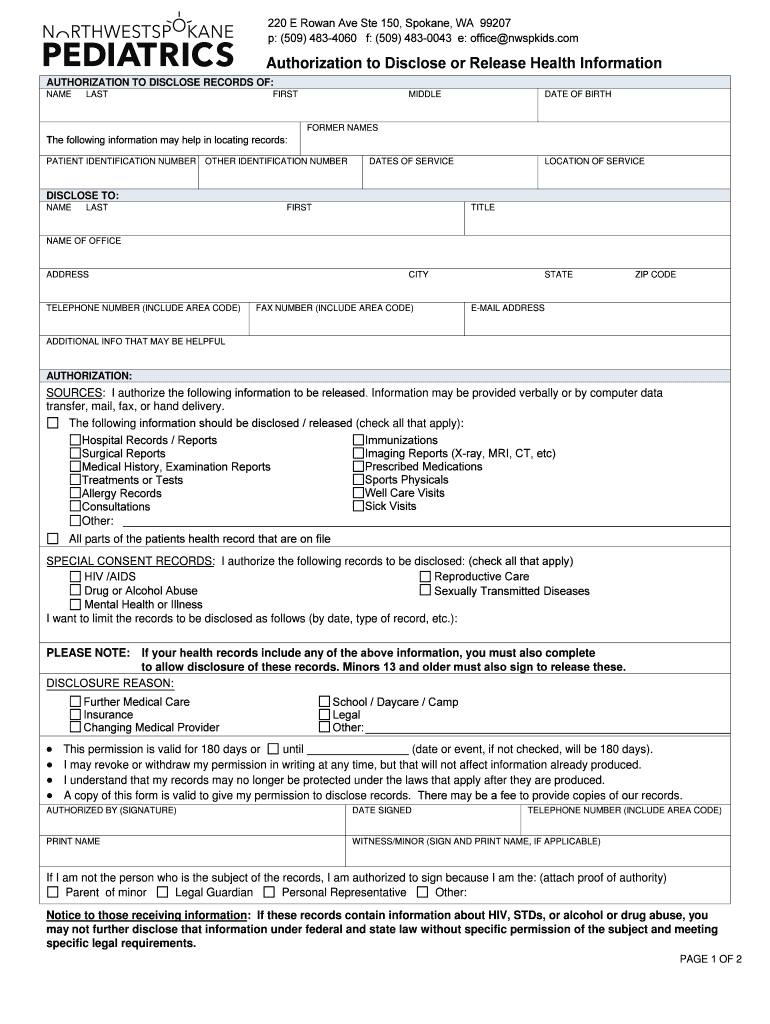
- Begin by filling in the 'Authorization to Disclose Records' section. Enter the patient's full name, including last, first, and middle names.
- Provide additional patient identification details such as date of birth, former names, and any identification numbers that may assist in locating records.
- In the 'Disclose To' section, enter the recipient's full name, title, office name, address, and contact information to ensure proper delivery of records.
- Select which specific records you authorize for disclosure by checking the appropriate boxes under 'Sources.' This includes options like hospital records and immunizations.
- Complete the 'Disclosure Reason' section to specify why you are requesting this information. This is essential for certain sensitive records.
- Finally, sign and date the form at the bottom. If applicable, include a witness signature and any necessary proof of authority if you are signing on behalf of someone else.
Start using our platform today to easily fill out your forms online for free!
It's free
Got questions?
How do I sign my Northwest Spokane Pediatrics, PLLC - Better Business Bureau online?
Log in to your DocHub account and import your Northwest Spokane Pediatrics, PLLC - Better Business Bureau to our editor using one of its upload options - from your device, cloud storage, secure URL, or your DocHub folders if you have already processed your document before. Open our editor, click the Sign button in the top toolbar, and decide on your signing method. You can use a picture of your handwritten signature, draw it, enter your name, or utilize a QR code as an alternative.
How to fill out Northwest Spokane Pediatrics, PLLC - Better Business Bureau on the internet free of charge in 2024?
With a swift editing platform like DocHub, you do not require anything but a browser and internet connection to edit your Northwest Spokane Pediatrics, PLLC - Better Business Bureau online quickly. Upload your file or find the appropriate form in DocHub’s catalog, open our editor with a single click, and complete it digitally. To edit your forms at any time, sign up a free account with DocHub.
Are BBB complaints public?
How do I check a company with the Better Business Bureau?
Is better business bureau accreditation worth it?
Security and compliance
At DocHub, your data security is our priority. We follow HIPAA, SOC2, GDPR, and other standards, so you can work on your documents with confidence.
Learn more


