




Here's how it works



How to use or fill out lor therapy with our platform

- Click ‘Get Form’ to open the LOR Physical Therapy Intake Form in the editor.
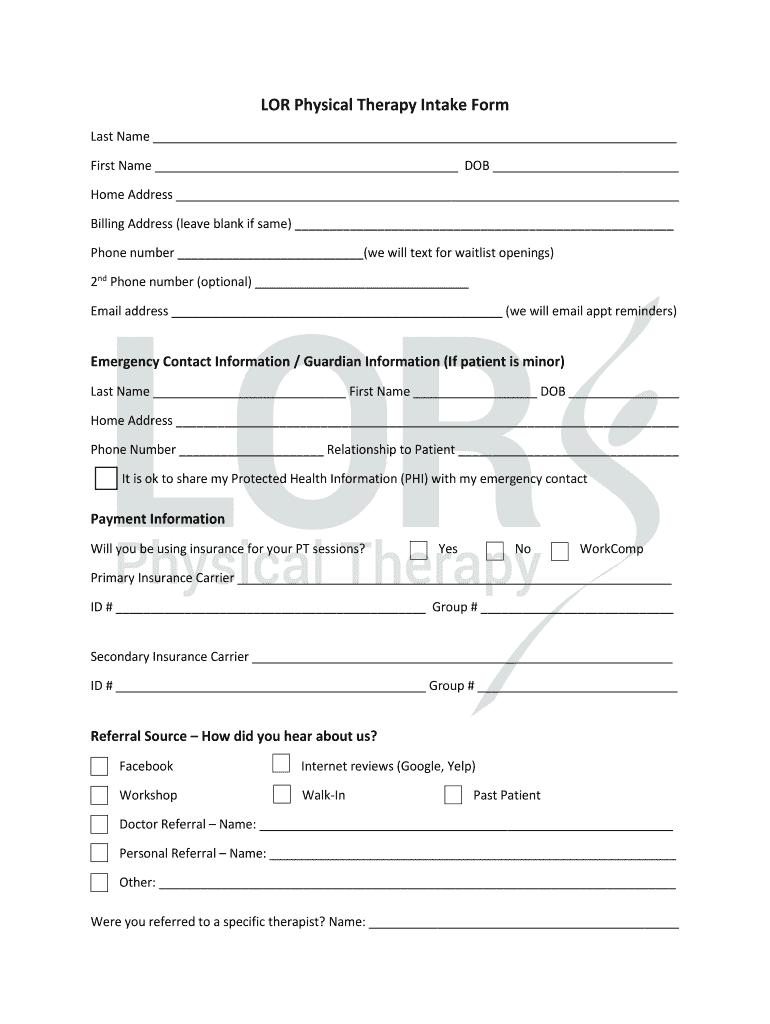
- Begin by filling in your personal information, including your last name, first name, and date of birth. Ensure accuracy as this information is crucial for your treatment.
- Provide your home and billing addresses. If they are the same, you can leave the billing address blank.
- Enter your primary phone number and an optional second phone number for communication regarding appointments.
- Complete the emergency contact section if applicable, especially if the patient is a minor. Include their relationship to you.
- Indicate whether you will be using insurance for your sessions and provide details about your insurance carrier(s) if applicable.
- Fill out the medical history section by marking any relevant conditions that apply to you. This helps therapists understand your health background.
- Rate your pain level on a scale from 1 to 10 in the Neck Disability Index section, ensuring to reflect accurately on how it affects daily activities.
- Review all sections for completeness before submitting. Once finished, submit the form via email as instructed at the end of the document.
Start using our platform today to easily fill out your LOR therapy form online for free!
It's free
Got questions?
Can I complete and sign my lor therapy online?
Sure, and it’s really easy! DocHub is an online PDF editor with advanced document management functions that allow you rapidly modify your paperwork, fill out empty fields and add new ones for others to fill out, and create eSignatures in several ways. Import your lor therapy, provide information as requested, and select how you want to eSign your document - by typing your name, drawing your signature, uploading its image, or utilizing a QR code.
How do you fill out lor therapy on Android?
It is a no-brainer on a computer or via a mobile phone to fill out a lor therapy with DocHub. All you need to do is open any installed internet browser on your smartphone and proceed to the DocHub site. Once authenticated, add your document and open it in editing mode. Use our toolbar to make your edits and save modifications. Optionally, keep your document in your files or send it to a recipient immediately.
Security and compliance
At DocHub, your data security is our priority. We follow HIPAA, SOC2, GDPR, and other standards, so you can work on your documents with confidence.
Learn more


