




Here's how it works



How to use or fill out admissions mbe hand score order form $50 00 $12 50 $62 50 with DocHub

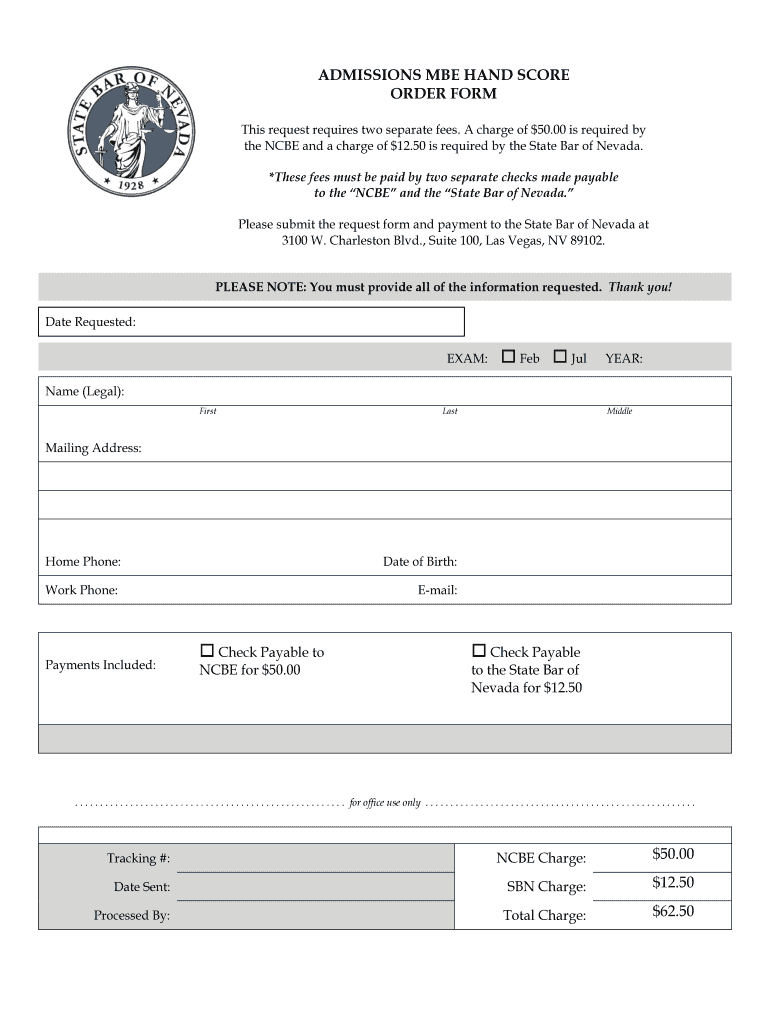
- Click ‘Get Form’ to open the admissions MBE hand score order form in our editor.
- Begin by entering the 'Date Requested' at the top of the form. This helps track your request.
- Select the exam month by checking either 'Feb' or 'Jul'. Then, fill in the year in the designated space.
- Provide your legal name in the fields for First, Last, and Middle names. Ensure accuracy for identification purposes.
- Fill out your mailing address completely, including street, city, state, and zip code.
- Enter your home phone number and work phone number for contact purposes.
- Input your email address to receive updates regarding your request.
- Indicate payments included by checking the appropriate boxes for each fee. Remember to prepare two separate checks as specified.
- Review all entered information for accuracy before submitting. Once confirmed, save and download your completed form.
Start using our platform today to streamline your admissions process effortlessly!
It's free
Got questions?
How do I sign my admissions mbe hand score order form $50 00 $12 50 $62 50 free of charge?
Most eSignature services require users to have a paid subscription. With DocHub, there are two options for you to add an electronic signature to your admissions mbe hand score order form $50 00 $12 50 $62 50 free of charge:
- You can do it during a 7-day trial period;
- You can sign up for a free plan.
The second option, however, has restrictions on the number of signatures, sign requests, emails, and documents for editing available per month. You can check for full details here.
How do you complete admissions mbe hand score order form $50 00 $12 50 $62 50 on iOS?
You need only a web connection and a browser to complete your admissions mbe hand score order form $50 00 $12 50 $62 50 by using an iOS phone. Open the DocHub website and authenticate. Then, add your document or select it from the list in your dashboard. Then use our editing instruments to complete your form and save all your adjustments. You may also send it to a specified recipient immediately.
Security and compliance
At DocHub, your data security is our priority. We follow HIPAA, SOC2, GDPR, and other standards, so you can work on your documents with confidence.
Learn more


