Type text, add images, blackout confidential details, add comments, highlights and more.
02. Sign it in a few clicks
Draw your signature, type it, upload its image, or use your mobile device as a signature pad.
03. Share your form with others
Send k 10 words via email, link, or fax. You can also download it, export it or print it out.
How to use or fill out k10 word document with our platform
Ease of Setup
DocHub User Ratings on G2
Ease of Use
DocHub User Ratings on G2
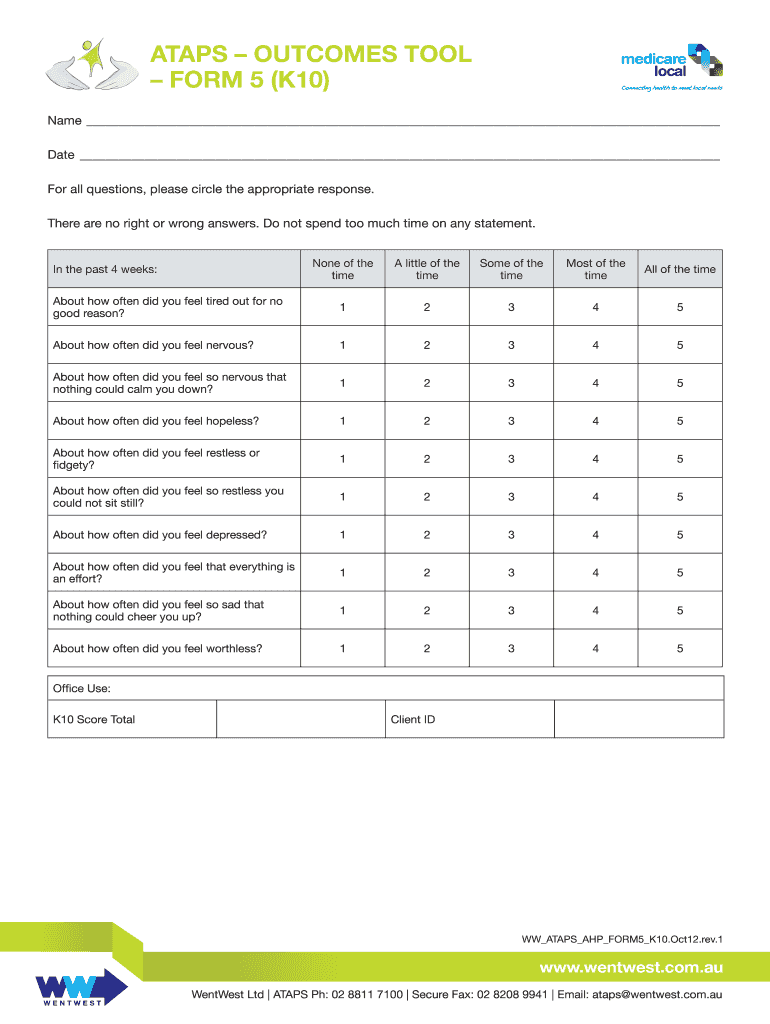
Click ‘Get Form’ to open the k10 word document in the editor.
Begin by entering your name and the date at the top of the form. This personal information is essential for record-keeping.
For each question, circle the response that best reflects your feelings over the past four weeks. The options range from 'None of the time' to 'All of the time'.
Take your time to reflect on each statement before selecting an answer. Remember, there are no right or wrong answers.
Once you have completed all questions, review your responses for accuracy.
If required, note down your K10 score total and client ID in the designated sections at the bottom of the form.
Start using our platform today to easily fill out your k10 word document for free!
Change Preset Mode allows you to view V-memory contents and change them directly from the DV-1000 keypad. We use the word preset because it is normally.Read more
Cookie consent notice
This site uses cookies to enhance site navigation and personalize your experience.
By using this site you agree to our use of cookies as described in our Privacy Notice.
You can modify your selections by visiting our Cookie and Advertising Notice.