




Here's how it works



How to use or fill out patient information sheet - Hand Surgery, PC

- Click ‘Get Form’ to open it in the editor.
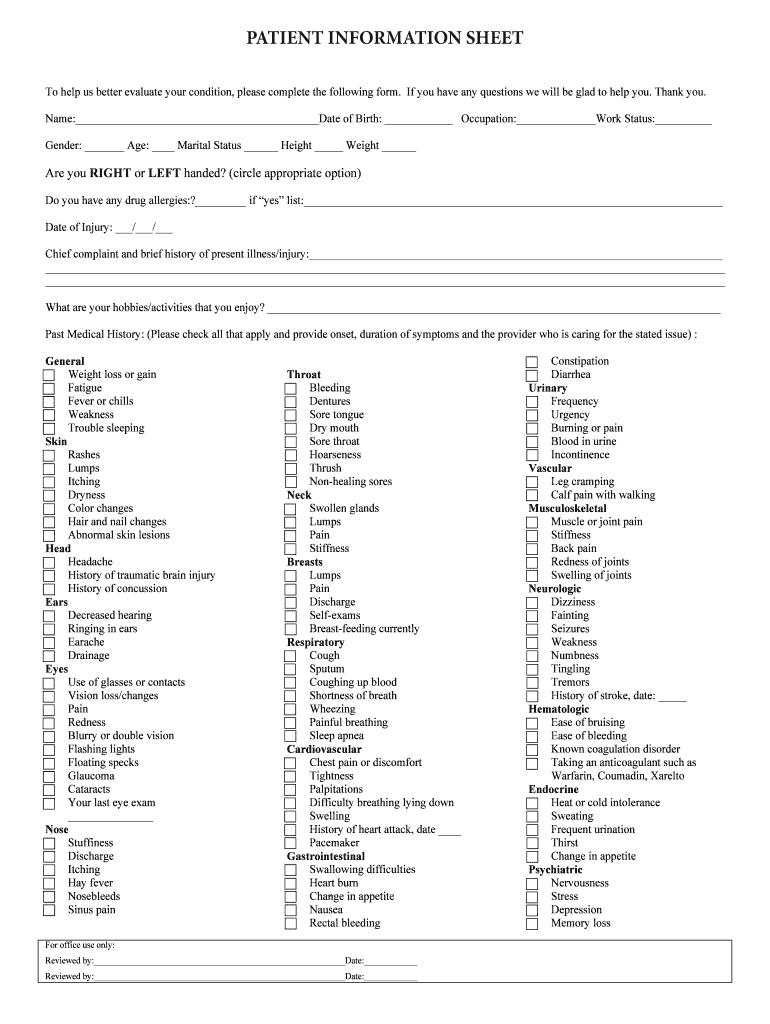
- Begin by entering your personal details in the designated fields. Fill in your name, date of birth, occupation, work status, gender, age, marital status, height, and weight.
- Indicate your dominant hand by circling either 'right' or 'left'. If you have any drug allergies, please specify them in the provided space.
- Record the date of your injury and provide a brief description of your chief complaint and history related to the present illness or injury.
- List your hobbies and activities that you enjoy. This helps us understand your lifestyle better.
- For past medical history, check all applicable conditions and provide details such as onset and duration of symptoms along with the provider's name for each issue listed.
Start filling out your patient information sheet today for free using our platform!
It's free
Got questions?
Can I sign my patient information sheet - Hand Surgery, PC in electronic format?
Based on eSignature laws, documents approved electronically have the same validity as traditionally approved ones. You can electronically sign almost any business and private paperwork. Four types of paperwork still call for handwritten signatures only - wills and testamentary trusts, court orders and other court forms, state statutes governing divorce, adoption, or other family law, and notice of cancellation of utility services. If you adhere to the regulations and utilize a secure and compliant software solution, like DocHub, you can eSign your patient information sheet - Hand Surgery, PC without printing it.
How do you fill out patient information sheet - Hand Surgery, PC on Android?
It is a no-brainer on a computer or via a mobile phone to complete a patient information sheet - Hand Surgery, PC with DocHub. All you need to do is open any installed internet browser on your smartphone and go to the DocHub site. Once authenticated, add your file and open it in editing mode. Use our toolbar to make your edits and save modifications. Optionally, keep your file in your files or send it to a recipient on the spot.
What is CPT code 64721 vs 29848?
How do you take care of someone after hand surgery?
What is the difference between 29848 and 64721?
Security and compliance
At DocHub, your data security is our priority. We follow HIPAA, SOC2, GDPR, and other standards, so you can work on your documents with confidence.
Learn more


