Partner application information 2026

Get Form
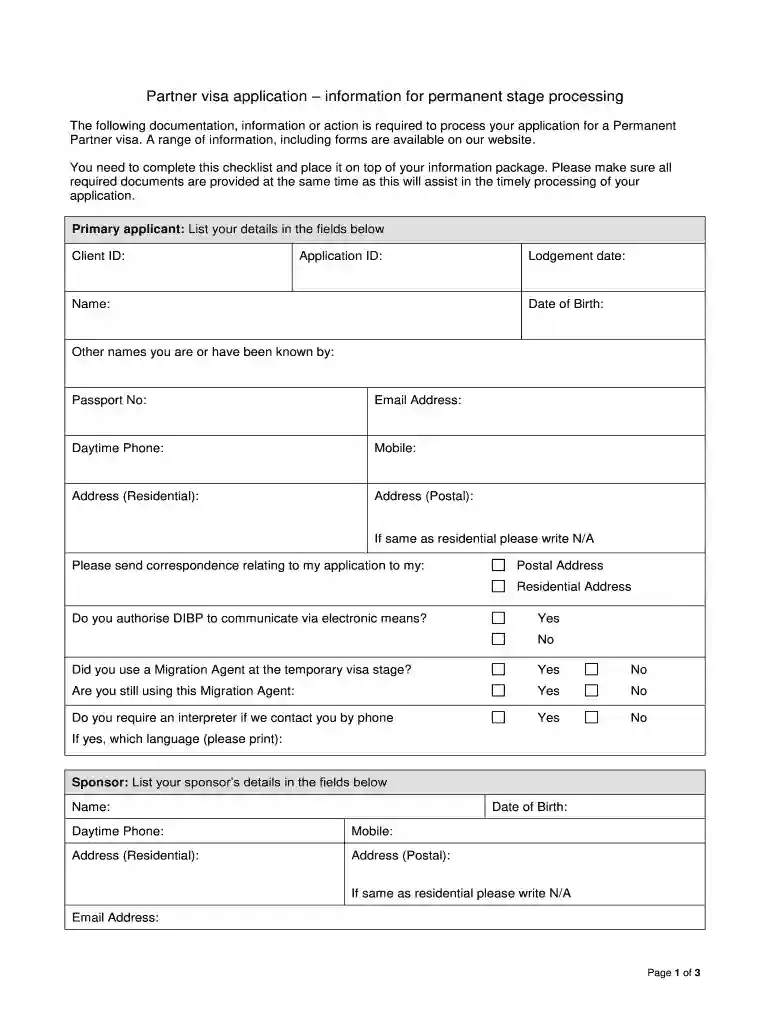
partner application information Preview on Page 1

Here's how it works

01. Edit your form online
Type text, add images, blackout confidential details, add comments, highlights and more.

02. Sign it in a few clicks
Draw your signature, type it, upload its image, or use your mobile device as a signature pad.

03. Share your form with others
Send it via email, link, or fax. You can also download it, export it or print it out.

How to use or fill out partner application information with our platform

Form edit decoration
9.5
Ease of Setup
DocHub User Ratings on G2
9.0
Ease of Use
DocHub User Ratings on G2
  1. Click ‘Get Form’ to open the partner application information in the editor.
  2. Begin by filling in your details as the primary applicant. Enter your Client ID, Application ID, Name, Lodgement date, Date of Birth, and any other names you have been known by.
  3. Provide your Passport Number, Email Address, Daytime Phone, Mobile number, and both Residential and Postal Addresses. If they are the same, simply write 'N/A' for Postal Address.
  4. Indicate where you would like correspondence sent by selecting either your Postal or Residential Address.
  5. Answer whether you authorize DIBP to communicate via electronic means and if you used a Migration Agent during the temporary visa stage.
  6. List all dependent applicants included in this application along with their details such as Surname, Given Name, and Date of Birth.
  7. Detail any immediate family members residing in Australia by providing their relationship to you, Family Name, Given Names, and Date of Birth.
  8. Document any overseas travel undertaken since receiving the temporary Partner visa by entering relevant details for each trip.
  9. If applicable, provide information regarding military service undertaken since the grant of the temporary Partner visa.
  10. Complete your Education Details section by listing any tertiary studies undertaken since receiving the temporary Partner visa.
  11. Finally, certify that all information is complete by signing and dating at the bottom of the form.

Start using our platform today to streamline your partner application process for free!

be ready to get more

Complete this form in 5 minutes or less

Get form

Security and compliance

At DocHub, your data security is our priority. We follow HIPAA, SOC2, GDPR, and other standards, so you can work on your documents with confidence.

Learn more
ccpa2
pci-dss
gdpr-compliance
hipaa
soc-compliance