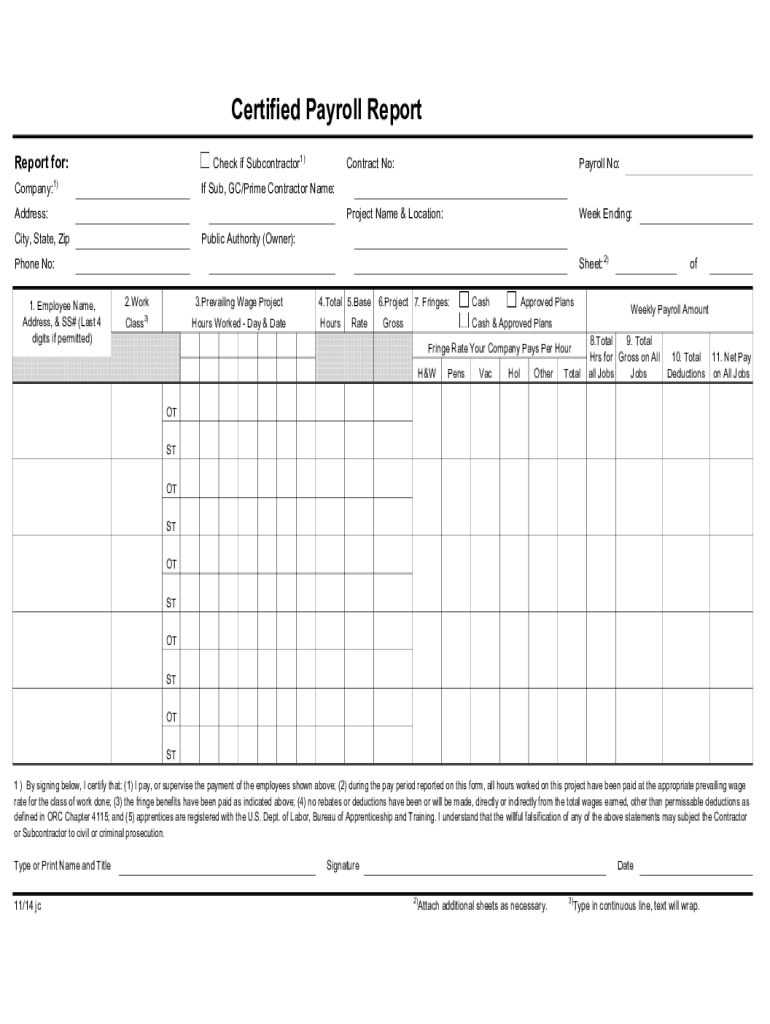
Certified Payroll Report 2026

Get Form
certified payroll Preview on Page 1

Here's how it works

01. Edit your certified payroll online
Type text, add images, blackout confidential details, add comments, highlights and more.
02. Sign it in a few clicks
Draw your signature, type it, upload its image, or use your mobile device as a signature pad.
03. Share your form with others
Send certified payroll reports via email, link, or fax. You can also download it, export it or print it out.

How to use or fill out Certified Payroll Report with our platform

Form edit decoration
9.5
Ease of Setup
DocHub User Ratings on G2
9.0
Ease of Use
DocHub User Ratings on G2
  1. Click ‘Get Form’ to open the Certified Payroll Report in the editor.
  2. Begin by filling in the 'Report for' section, including the company name, contract number, payroll number, project name and location, and week ending date.
  3. If applicable, indicate whether you are a subcontractor and provide the general contractor or prime contractor's name along with their address and contact information.
  4. In the employee section, enter each employee's name, address, and last four digits of their Social Security number. Ensure accuracy as this is crucial for compliance.
  5. Fill out the work details including hours worked per day and date. Record total hours worked and ensure that prevailing wage rates are applied correctly.
  6. Complete sections for cash earnings, fringe benefits, deductions, and net pay. Make sure all calculations are accurate to reflect true payroll amounts.
  7. Finally, certify the report by signing it. Type or print your name and title clearly before adding your signature and date.

Start using our platform today to easily complete your Certified Payroll Report online for free!

be ready to get more

Complete this form in 5 minutes or less

Get form

Got questions?

We have answers to the most popular questions from our customers. If you can't find an answer to your question, please contact us.
Contact us
A certified payroll report must include the following information: Contractor/Subcontractor Details: Name and work classification. Employee Information: Identifying details for all covered employees. Work Hours: Daily and total hours worked, including overtime. Pay Rates: Hourly pay rates for each employee.
Scope of Application: Certified payroll is usually applicable only to workers on public works projects, whereas regular payroll applies to all other employees in the private sector not working on government contracts.

Security and compliance

At DocHub, your data security is our priority. We follow HIPAA, SOC2, GDPR, and other standards, so you can work on your documents with confidence.

Learn more
ccpa2
pci-dss
gdpr-compliance
hipaa
soc-compliance