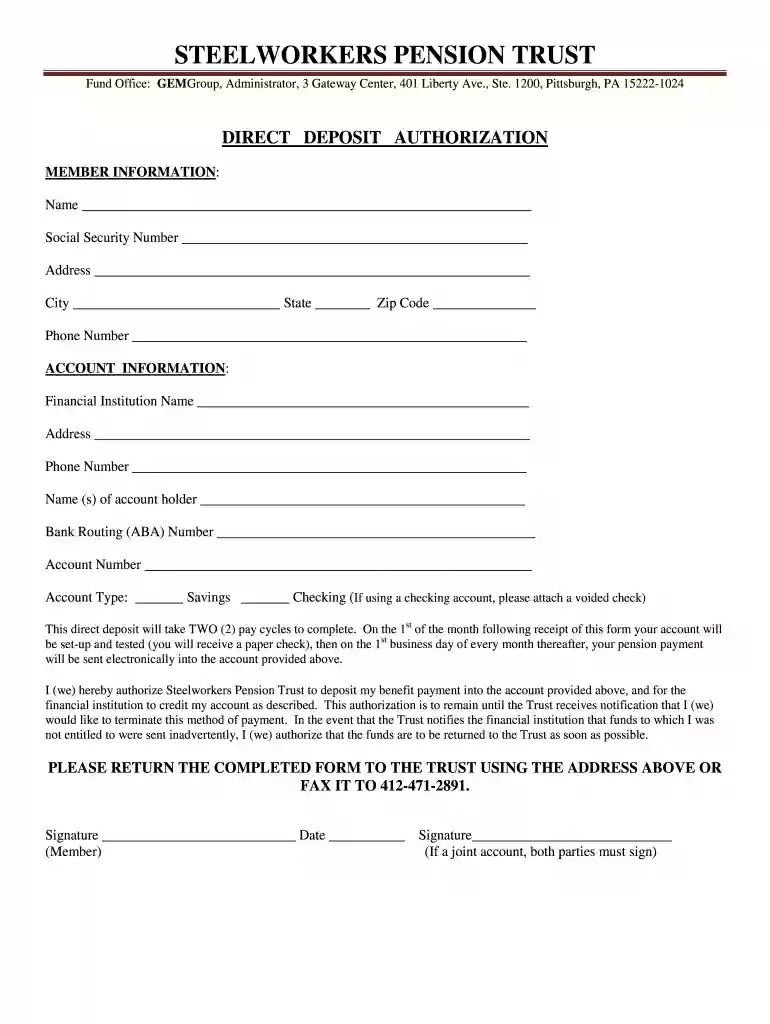
Steelworkers pension direct deposit form 2026

Get Form
steelworkers pension trust login Preview on Page 1

Here's how it works

01. Edit your steelworkers pension trust login online
Type text, add images, blackout confidential details, add comments, highlights and more.

02. Sign it in a few clicks
Draw your signature, type it, upload its image, or use your mobile device as a signature pad.

03. Share your form with others
Send request for direct deposit form via email, link, or fax. You can also download it, export it or print it out.

How to use or fill out steelworkers pension direct deposit form with our platform

Form edit decoration
9.5
Ease of Setup
DocHub User Ratings on G2
9.0
Ease of Use
DocHub User Ratings on G2
  1. Click ‘Get Form’ to open the steelworkers pension direct deposit form in the editor.
  2. Begin by filling out the MEMBER INFORMATION section. Enter your name, Social Security Number, address, city, state, zip code, and phone number accurately.
  3. Next, move to the ACCOUNT INFORMATION section. Provide the financial institution's name and address, along with their phone number.
  4. Fill in the account holder's name(s), bank routing (ABA) number, and account number. Specify whether it is a savings or checking account. If using a checking account, remember to attach a voided check.
  5. Review your entries for accuracy. This direct deposit will take two pay cycles to complete; ensure all information is correct to avoid delays.
  6. Finally, sign and date the form at the bottom. If it's a joint account, both parties must sign.

Start filling out your steelworkers pension direct deposit form online for free today!

be ready to get more

Complete this form in 5 minutes or less

Get form

Got questions?

We have answers to the most popular questions from our customers. If you can't find an answer to your question, please contact us.
Contact us
How to set up direct deposit step-by-step Choose a direct deposit provider. Complete setup paperwork. Gather employee information. Upload employee data. Sync direct deposit with a payroll schedule. Process payroll.
There are two ways to sign up for direct deposit: By mail - Complete and mail the Direct Deposit Authorization (PDF) to CalPERS. Online - Log in to myCalPERS. Go to the Retirement tab and select Payment Options.
FAQs Log in to your BroncoDirect Student Center. Go to the Student Financials section and select Bank Accounts or Enroll in Direct Deposit. Enter your U.S. bank routing and account number. Select the account type (checking or savings). Confirm your information and submit.
Download, print or email the form to your employer.
Sign In to Online Banking. Click on any of your accounts. Select View and Print Payroll Direct Deposit from the right navigation. Select the account you want to deposit your payroll to from the dropdown, then click on View and Print and your customized form will be presented to you.
be ready to get more

Complete this form in 5 minutes or less

Get form

People also ask

Deposits can be as large or as small as you like. Bear in mind that tax-deferred retirement accounts are subject to yearly contribution limits, however. Note that Direct Deposit purchases into an Individual Retirement Account (IRA) are for current-year contributions only.
How to start your own pension Step 1: Check if you can join a workplace pension. Step 2: Understand how personal pensions work. Step 3: Compare pension providers, charges and products. Step 4: Sign up to a pension scheme. Step 5: Decide how much to pay into your pension. Step 6: Regularly review your pension savings.

type accounts