Type text, add images, blackout confidential details, add comments, highlights and more.

02. Sign it in a few clicks
Draw your signature, type it, upload its image, or use your mobile device as a signature pad.

03. Share your form with others
Send it via email, link, or fax. You can also download it, export it or print it out.

How to use or fill out blank pacfa applicaation with our platform
Ease of Setup
DocHub User Ratings on G2
Ease of Use
DocHub User Ratings on G2
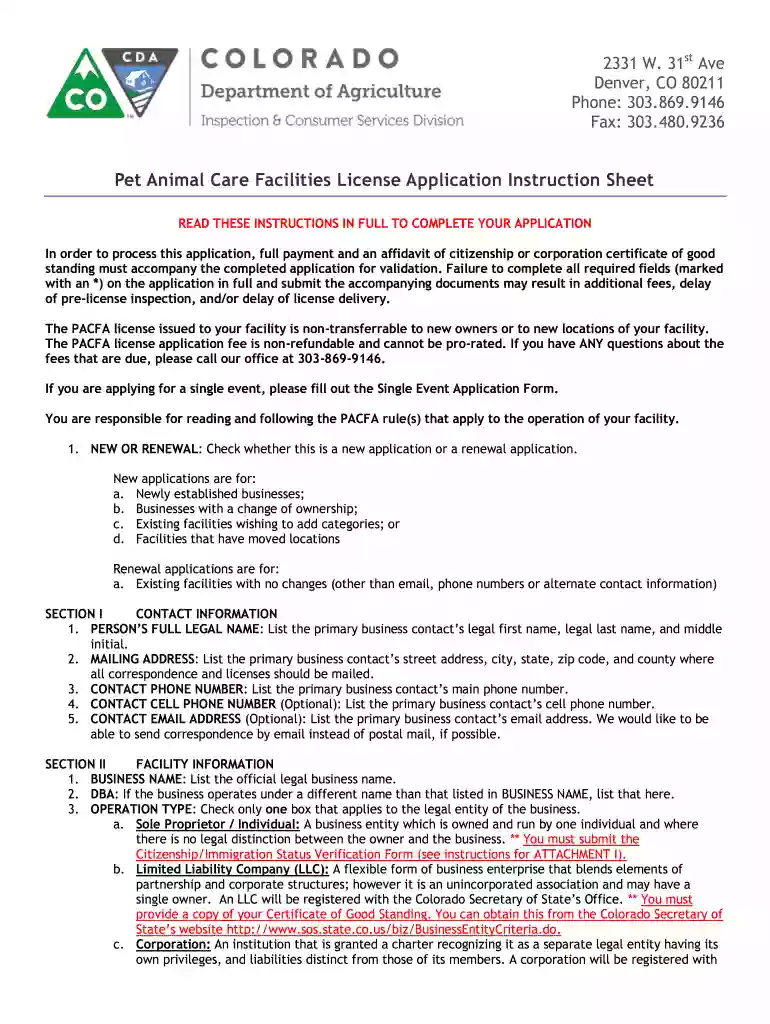
Click ‘Get Form’ to open the blank PACFA application in the editor.
Begin by indicating whether this is a new application or a renewal. Check the appropriate box at the top of the form.
In Section I, provide your contact information. Fill in your full legal name, mailing address, and contact phone number. Optional fields include cell phone and email address.
Move to Section II to enter facility information. List the official business name, DBA (if applicable), operation type, and facility address. Ensure that no P.O. Boxes are used here.
In Section III, check all applicable license categories for your facility operation. Review each category's definition carefully to ensure compliance.
Complete Section IV by certifying that all information is accurate and signing where indicated. Make sure to include any required attachments as specified in the instructions.
Start filling out your PACFA application online for free today!
Fill out blank pacfa applicaation online It's free
Blank pacfa application pdfBlank pacfa application onlineBlank pacfa application formPACFA Meeting8 CCR 1202-15Dog kennel licenseHow to become a dog groomer in ColoradoBreeding license
Security and compliance
At DocHub, your data security is our priority. We follow HIPAA, SOC2, GDPR, and other standards, so you can work on your documents with confidence.
Applications and careers for counsellors and counselling
blank piece of paper and write your name in the middle. Then, radiating requirements for PACFA Member Associations. The ACAs approach emphasisedRead more
Cookie consent notice
This site uses cookies to enhance site navigation and personalize your experience.
By using this site you agree to our use of cookies as described in our Privacy Notice.
You can modify your selections by visiting our Cookie and Advertising Notice.