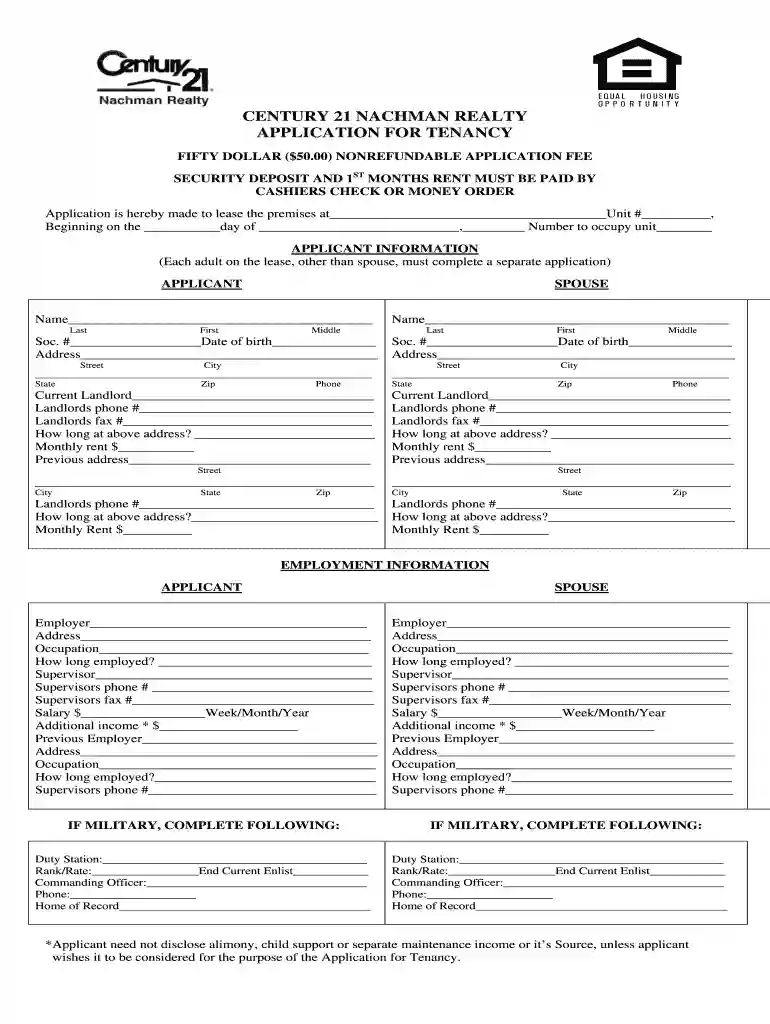
century 21 application form Preview on Page 1

21 nachman tenancy 2026

Here's how it works

  • 01. Edit your century 21 application form online

    Type text, add images, blackout confidential details, add comments, highlights and more.

  • 02. Sign it in a few clicks

    Draw your signature, type it, upload its image, or use your mobile device as a signature pad.

  • 03. Share your form with others

    Send it via email, link, or fax. You can also download it, export it or print it out.

How to use or fill out 21 nachman tenancy with our platform

Form edit decoration
9.5
Ease of Setup
DocHub User Ratings on G2
9.0
Ease of Use
DocHub User Ratings on G2
  1. Click ‘Get Form’ to open the 21 nachman tenancy application in the editor.
  2. Begin by filling in the property details at the top of the form, including the address and unit number. Specify the intended move-in date and number of occupants.
  3. Complete the 'Applicant Information' section for each adult applying. Ensure you provide full names, social security numbers, dates of birth, addresses, and contact information.
  4. In the 'Employment Information' section, list current and previous employers along with their addresses, your occupation, duration of employment, and salary details.
  5. If applicable, fill out military service information. Include duty station, rank/rate, commanding officer's contact details, and home of record.
  6. List all other occupants in the designated section along with their relationships and dates of birth.
  7. Provide banking and credit references as requested. Fill in checking and savings account details along with any credit references.
  8. Complete additional information regarding rental history, vehicle details, insurance disclosure, and any legal disclosures as required.
  9. Finally, review all entries for accuracy before signing at the bottom of the form. Ensure both applicant and spouse sign where indicated.

Start using our platform today to easily complete your 21 nachman tenancy application online for free!

be ready to get more

Complete this form in 5 minutes or less

Security and compliance

At DocHub, your data security is our priority. We follow HIPAA, SOC2, GDPR, and other standards, so you can work on your documents with confidence.

Related links

Spring 2025 Course List - SMU Dedman School of Law

Bar courses cover DocHub subject matter tested on the Multi-State Professional Responsibility Exam, the Multi-state Bar Exam, or the Texas Bar Exam.Read more

Learn more
Case 3:08-cv-04782-AET-DEA Document 126 Filed 04/18/

Apr 18, 2011 On the day of the foreclosure sale, Plaintiffs wife was visited at home by Nachman Taub, an employee 21) [112]. Under New Jersey law,.Read more

Learn more
If you believe that this page should be taken down, please follow our DMCA take down process here