Type text, add images, blackout confidential details, add comments, highlights and more.
02. Sign it in a few clicks
Draw your signature, type it, upload its image, or use your mobile device as a signature pad.
03. Share your form with others
Send blood requisition form via email, link, or fax. You can also download it, export it or print it out.
How to use or fill out lab requisition with our platform
Ease of Setup
DocHub User Ratings on G2
Ease of Use
DocHub User Ratings on G2
Click ‘Get Form’ to open the lab requisition in the editor.
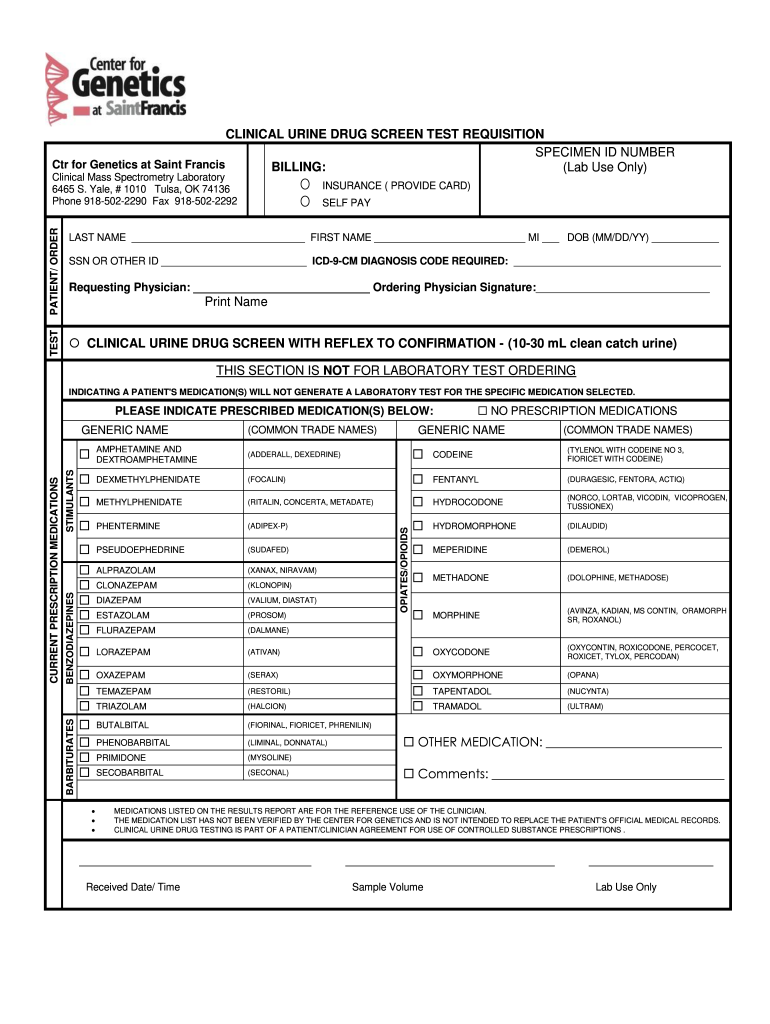
Begin by entering the SPECIMEN ID NUMBER at the top of the form. This is crucial for tracking your sample.
Fill in the PATIENT/ORDER section with the patient's LAST NAME, FIRST NAME, MIDDLE INITIAL, and DATE OF BIRTH (DOB). Ensure accuracy as this information is vital for identification.
Provide the SOCIAL SECURITY NUMBER or other identification in the designated field. This helps in verifying patient identity.
Indicate insurance details or select 'SELF PAY' if applicable. Attach a copy of the insurance card if necessary.
In the REQUESTING PHYSICIAN section, enter the physician's name and ensure they sign where indicated. This confirms that they have authorized the test.
Select any prescribed medications from the list provided. If there are none, check 'NO PRESCRIPTION MEDICATIONS'.
Add any additional comments or notes in the comments section to provide further context for laboratory staff.
Start using our platform today to streamline your lab requisition process for free!
Clinical Pathology Test Order Forms | Laboratory Test Guide
requisition form for laboratory services must clearly identify: Patient name, sex, birth date, include unique ID number, lab reference number; CollectionRead more
Cookie consent notice
This site uses cookies to enhance site navigation and personalize your experience.
By using this site you agree to our use of cookies as described in our Privacy Notice.
You can modify your selections by visiting our Cookie and Advertising Notice.