




Here's how it works



How to use or fill out university diploma sandy template with our platform

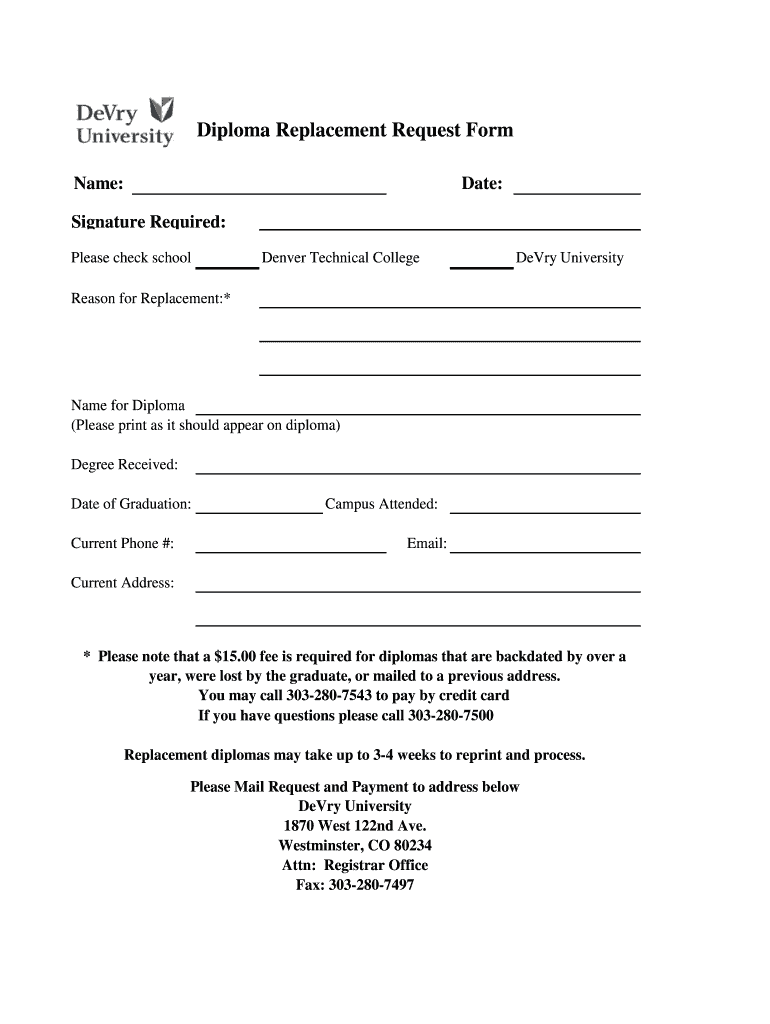
- Click ‘Get Form’ to open the university diploma sandy template in the editor.
- Begin by entering your name in the designated field. Ensure it is printed clearly as it should appear on your diploma.
- Fill in the date of your request. This helps track your application timeline.
- Provide your signature in the required section to authorize the request.
- Select your school from the options provided: Denver Technical College or DeVry University.
- Indicate the reason for replacement and fill in any additional details, such as degree received and date of graduation.
- Enter your current phone number, email address, and mailing address to ensure proper communication regarding your request.
- If applicable, note that a $15.00 fee may be required for certain replacements. You can call to pay by credit card if needed.
Start using our platform today to easily complete your diploma replacement request!
It's free
Got questions?
Can I sign my university diploma sandy template on a mobile?
Of course, you’ll find many different applications for this on the web. Nonetheless, if you need to eSign your university diploma sandy template without installing extra software, DocHub is the optimum choice you can make. This robust editor works on mobile devices just like on desktops. Open our editor in any internet browser, register or log in to your account, and start managing your forms.
How do you complete university diploma sandy template online?
You may complete and sign your university diploma sandy template online, even on a tight deadline. All you need to access high quality editing tools on any device is a DocHub account, that you can sign up within a couple of moments. After you register, upload your file or find what you are searching for in our catalog, complete it using the editing tools you want, and place your electronic signature on it at the end.
Security and compliance
At DocHub, your data security is our priority. We follow HIPAA, SOC2, GDPR, and other standards, so you can work on your documents with confidence.
Learn more


