Type text, add images, blackout confidential details, add comments, highlights and more.
02. Sign it in a few clicks
Draw your signature, type it, upload its image, or use your mobile device as a signature pad.
03. Share your form with others
Send verizon lifeline application via email, link, or fax. You can also download it, export it or print it out.
How to use or fill out Verizon Lifeline with our platform
Ease of Setup
DocHub User Ratings on G2
Ease of Use
DocHub User Ratings on G2
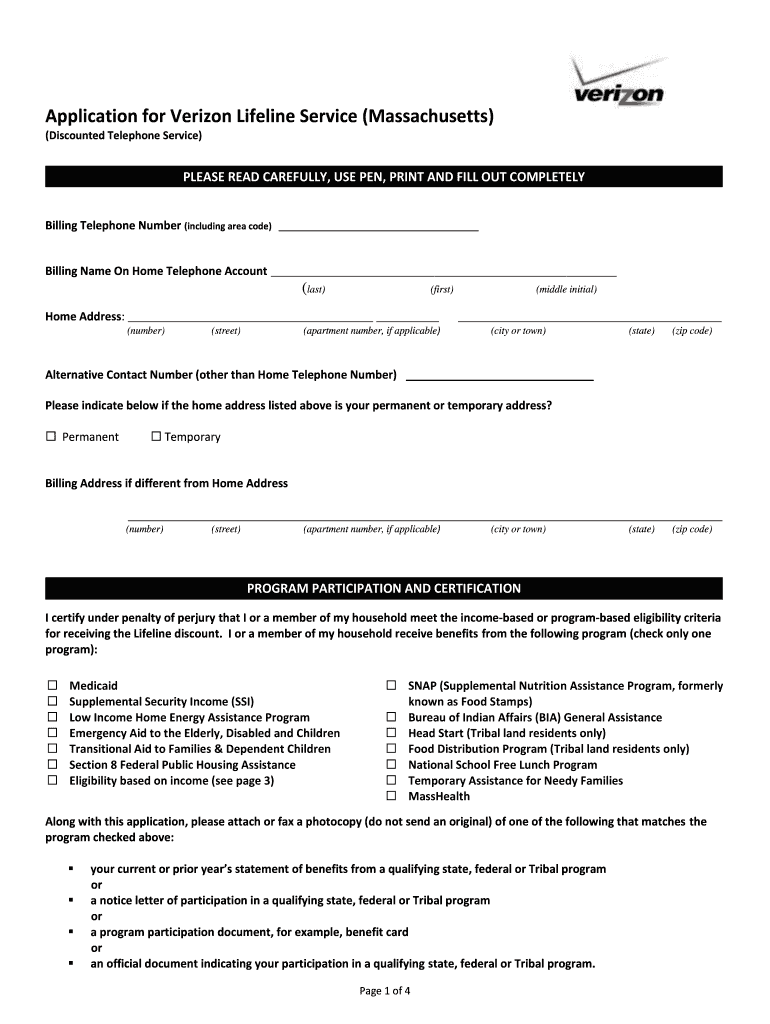
Click ‘Get Form’ to open the Verizon Lifeline application in the editor.
Begin by entering your Billing Telephone Number, including the area code, followed by your Billing Name on the Home Telephone Account. Ensure you print clearly.
Fill in your Home Address, including the number, street, apartment number (if applicable), city or town, state, and zip code.
Provide an Alternative Contact Number that is different from your Home Telephone Number.
Indicate whether your home address is permanent or temporary by checking the appropriate box.
If your Billing Address differs from your Home Address, complete that section with the required details.
In the Program Participation and Certification section, check one program that qualifies you for Lifeline benefits and attach necessary documentation as specified.
Review all statements in the certification section and acknowledge them by checking each box before signing and dating the application at the end.
Start filling out your Verizon Lifeline application today for free using our platform!
For customers choosing the $3399 Lifeline Plan,. Anytime Minutes, Domestic Long Distance and. Per-Minute Rate are for calls from within the. Lifeline LocalRead more
Rutgers, Verizon Team Up to Provide Lifeline for Domestic
Close to 2,000 refurbished cell phones are in the hands of formerly vulnerable women and men thanks to a partnership launched in 2008 between Rutgers and
Cookie consent notice
This site uses cookies to enhance site navigation and personalize your experience.
By using this site you agree to our use of cookies as described in our Privacy Notice.
You can modify your selections by visiting our Cookie and Advertising Notice.