




Here's how it works



How to use or fill out Massage Therapy Intake Form 1 - btmbsb-bsab with our platform

- Click ‘Get Form’ to open it in the editor.
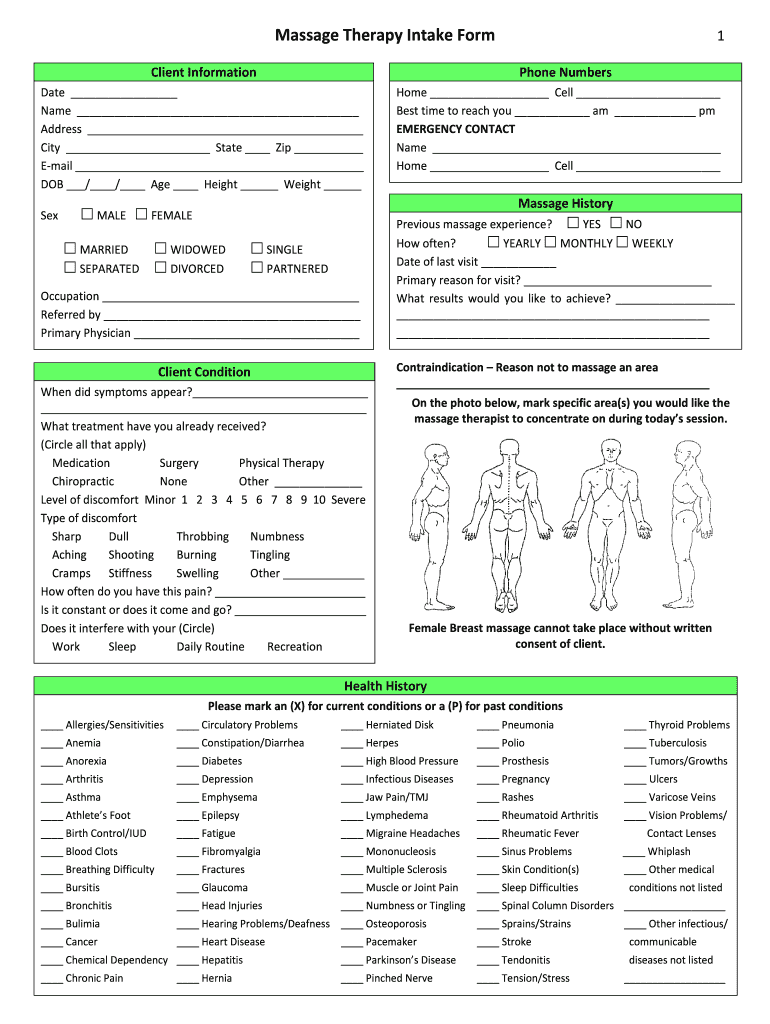
- Begin by filling out the Client Information section. Enter your name, contact details, and date of birth. This information is crucial for your therapist to understand your background.
- In the Massage History section, indicate any previous massage experiences and your primary reason for this visit. Be honest about your discomfort levels and types of pain you may be experiencing.
- Proceed to the Health History section. Mark any current or past medical conditions accurately. This helps ensure a safe and effective massage experience.
- Complete the Medications and Lifestyle sections by listing any medications you take and your daily activities. This information is vital for tailoring your treatment.
- Finally, review the Privacy Information and Authorization sections before signing. Ensure all details are correct before submitting.
Start using our platform today to easily complete your Massage Therapy Intake Form for free!
It's free
Got questions?
How do I sign my Massage Therapy Intake Form 1 - btmbsb-bsab online?
Sign in to your DocHub account and add your Massage Therapy Intake Form 1 - btmbsb-bsab to our editor using one of its upload methods - from your device, cloud storage, secure URL, or your DocHub folders if you have already processed your document before. Open our editor, click the Sign key in the top toolbar, and decide on your signing method. You can upload an image of your handwritten signature, draw it, enter your name, or use a QR code instead.
How do you edit Massage Therapy Intake Form 1 - btmbsb-bsab on iOS?
You can easily edit and complete your Massage Therapy Intake Form 1 - btmbsb-bsab on any iOS gadget. Open an internet browser of your choice, visit the DocHub site, authorize or create a new account, add your file for editing, and make your required alterations. Our service is mobile-friendly, so using its functions on your phone will be a no-brainer, even on the first try.
Security and compliance
At DocHub, your data security is our priority. We follow HIPAA, SOC2, GDPR, and other standards, so you can work on your documents with confidence.
Learn more


