



Here's how it works



How to use or fill out cursive writing worksheets pdf with our platform

- Click ‘Get Form’ to open the cursive writing worksheets PDF in the editor.
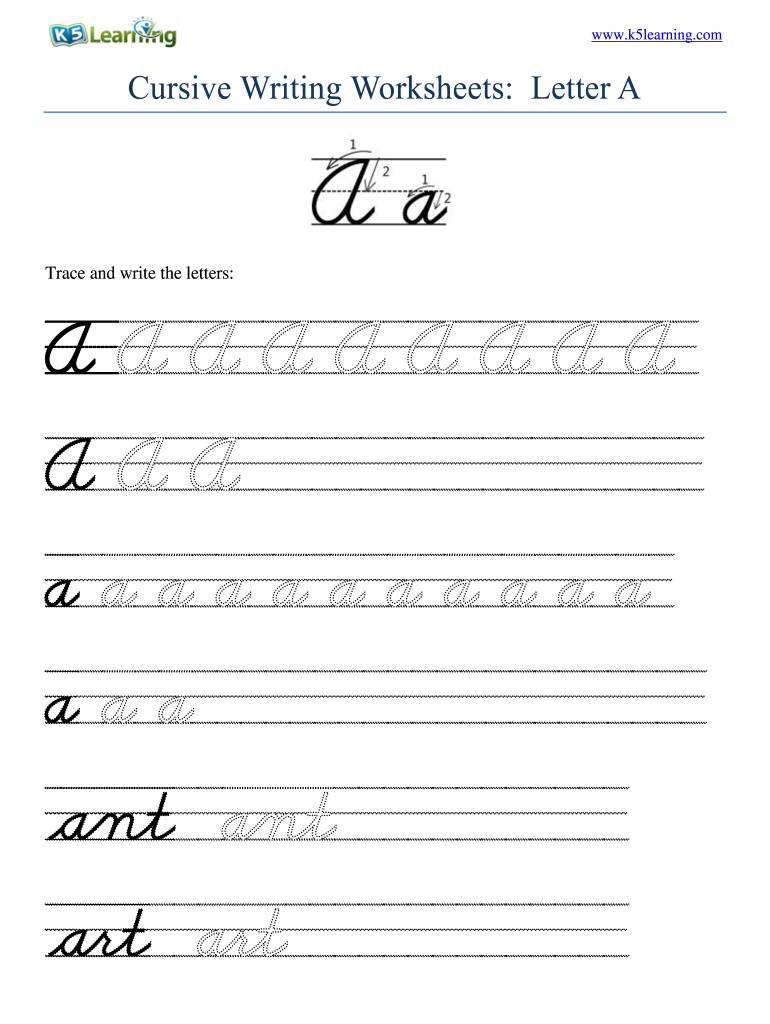
- Begin by tracing the letter 'A' provided in the worksheet. Use your mouse or stylus to follow the dotted lines, ensuring you maintain a steady hand for accurate formation.
- Next, move to the section where you can write the letter 'A' independently. Click on the text box and type or write using your device's input method, focusing on maintaining proper cursive style.
- If there are additional letters or words to practice, repeat steps 2 and 3 for each section of the worksheet. Utilize our platform’s zoom feature for better visibility if needed.
- Once completed, review your work for any corrections. You can easily erase and rewrite sections as necessary before finalizing your document.
Start enhancing your cursive writing skills today by utilizing our platform for free!
It's free
Got questions?
Can I sign my free printable daily cursive handwriting practice pdf on a mobile?
Sure, you’ll find numerous applications for this on the web. Nevertheless, if you need to eSign your free printable daily cursive handwriting practice pdf without installing additional software, DocHub is the best choice you can make. This robust editor works on mobile devices just as on desktops. Open our editor in any internet browser, register or log in to your account, and start processing your paperwork.
Can I sign my daily handwriting practice pdf free while I edit it?
When you edit your daily handwriting practice pdf free with DocHub, you will not need to look for other applications or services to eSign it. An electronic signature is part of DocHub’s extensive editing toolset, which allows you to implement changes in your form without switching between websites. Simply complete your form, double-check the correctness of the information and place your electronic signature at the end to make it submission-ready in minutes.
How do you get cursive on Google?
How do you write a beginner in cursive?
How can I improve my handwriting in cursive?
Security and compliance
At DocHub, your data security is our priority. We follow HIPAA, SOC2, GDPR, and other standards, so you can work on your documents with confidence.
Learn more