







Definition & Meaning
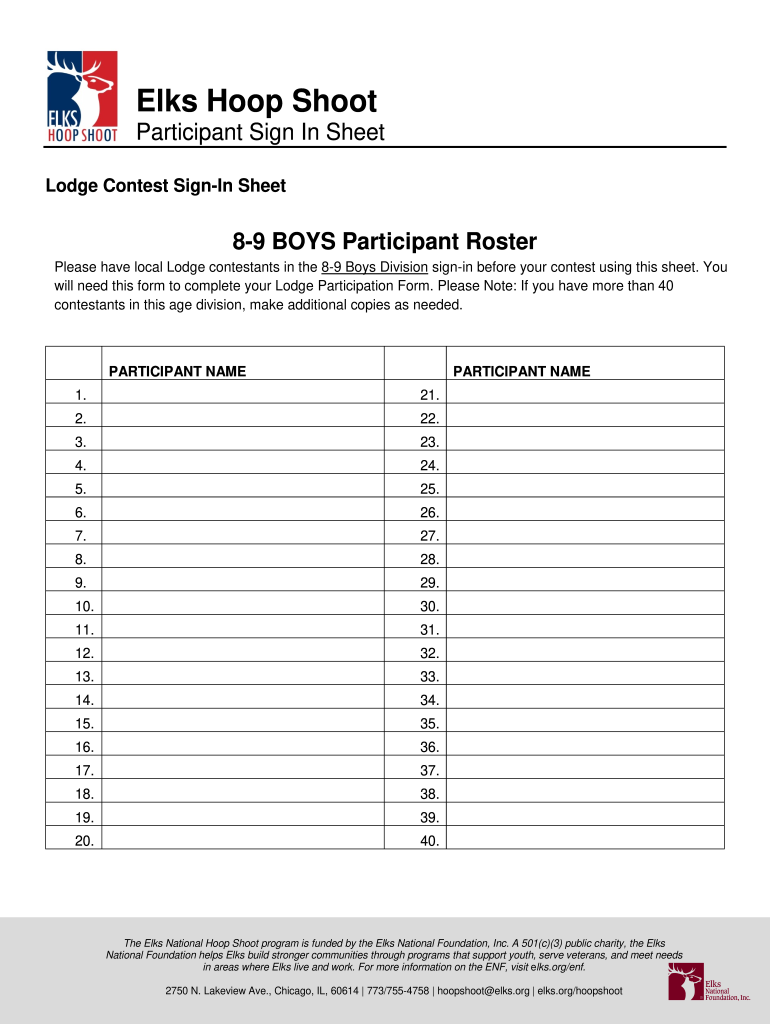
The "Elks Hoop Shoot Sheet" serves as a participant sign-in sheet for the Elks Hoop Shoot contest. This document plays a crucial role in organizing the event by listing contestants in different age categories and ensuring accurate record-keeping. It helps the Elks Lodge manage participant data and streamline the contest flow.
The sheet includes separate rosters for boys and girls across distinct age divisions: 8-9, 10-11, and 12-13. Each section is carefully structured to capture essential details for contest administration. This standardized format ensures consistency in collecting participant information, which is pivotal for both the local Lodges and the overarching management of the contest by the Elks National Foundation.
How to Use the Elks Hoop Shoot Sheet
Utilizing the Elks Hoop Shoot Sheet effectively is key to ensuring a smooth event process. Contestants are required to sign in before the start of the contest. This document helps track participation and maintain an orderly event schedule.
The process involves the following steps:
- Set Up the Sign-In Area: Allocate a visible and accessible space for participants to check in.
- Provide Clear Instructions: Inform participants on how to fill out the sheet, emphasizing the necessity of completing all required sections.
- Monitor Entries: Collect the sign-in sheets and verify entries for completeness and accuracy.
- Manage Overflow: If participants exceed the sheet’s capacity, additional copies should be made available to accommodate all contestants.
Key Elements of the Elks Hoop Shoot Sheet
The Elks Hoop Shoot Sheet is composed of several vital sections that ensure efficient data handling:
- Contestant Information: Includes fields for the contestant's name, age, and division category.
- Gender-Based Rosters: Separate columns for boys and girls ensure clarity and ease of data processing.
- Age Divisions: Distinct sections for ages 8-9, 10-11, and 12-13, simplifying the organizational structure.
These elements ensure streamlined data collection and enable accurate tracking of involvement across diverse categories.
Steps to Complete the Elks Hoop Shoot Sheet
Completing the Elks Hoop Shoot Sheet accurately requires adherence to structured procedures:
- Begin with Basic Information: Enter the contestant’s name and age in the corresponding fields.
- Identify Division and Gender: Select the appropriate division and fill in the related section for boys or girls.
- Validate Entries: Double-check the sheet for completeness; ensure no fields are left blank inadvertently.
- Submit to Event Coordinator: Once filled out, provide the sheet to the responsible coordinator for verification and record-keeping.
Compliance with these steps guarantees the sheet is correctly filled out and reduces room for errors or omissions.
Important Terms Related to the Elks Hoop Shoot Sheet
Understanding key terminology associated with the Elks Hoop Shoot Sheet enhances accuracy and efficiency:
- Elks National Foundation: The funding body for the Hoop Shoot program, supporting community engagement initiatives.
- Sign-In Sheet: A document capturing participant details, integral to managing events.
- Rosters: Lists categorizing contestants based on predefined criteria, such as age and gender.
These terms not only clarify the sheet's purpose but also its integration within the larger event framework.
Who Typically Uses the Elks Hoop Shoot Sheet
The usage of the Elks Hoop Shoot Sheet is primarily intended for:
- Local Elks Lodges: These entities are responsible for organizing the contest at the local level and utilize the sheet for participant registration.
- Event Coordinators: Individuals overseeing the logistical aspects of the competition manage contestant entries and validations using the sheet.
- Contestants: Participants themselves engage with the sign-in process as they arrive for the contest.
This comprehensive utility underscores the sheet’s importance across multiple user groups.


Who Issues the Elks Hoop Shoot Sheet
The Elks Hoop Shoot Sheet is issued by the local Elks Lodges. These lodges are tasked with disseminating the form to potential participants and ensuring its accuracy during the sign-in process. They are responsible for customizing the sheet to align with the specific needs of their event context.
By maintaining control over the distribution and management of these sheets, local lodges can uphold consistency and reliability in data collection and event organization.
Examples of Using the Elks Hoop Shoot Sheet
Consider a scenario where local Lodges must accommodate a high turnout for the contest:
- Preparation: Before the contest, lodges prepare multiple copies of the sheet anticipating more participants than usual.
- Operational Use: During sign-in, sheets are used to smooth the participant verification process, confirming eligibility according to their age and gender.
- Post-Contest Analysis: After the event, the collected sheets assist in analyzing participation trends and demographic engagement, useful for future event planning.
These practical examples illustrate the Elks Hoop Shoot Sheet's versatility and integral role in event management.




