Contractor provisions 2026

Get Form
contractor provisions Preview on Page 1

Here's how it works

01. Edit your form online
Type text, add images, blackout confidential details, add comments, highlights and more.
02. Sign it in a few clicks
Draw your signature, type it, upload its image, or use your mobile device as a signature pad.
03. Share your form with others
Send it via email, link, or fax. You can also download it, export it or print it out.

How to use or fill out contractor provisions with our platform

Form edit decoration
9.5
Ease of Setup
DocHub User Ratings on G2
9.0
Ease of Use
DocHub User Ratings on G2
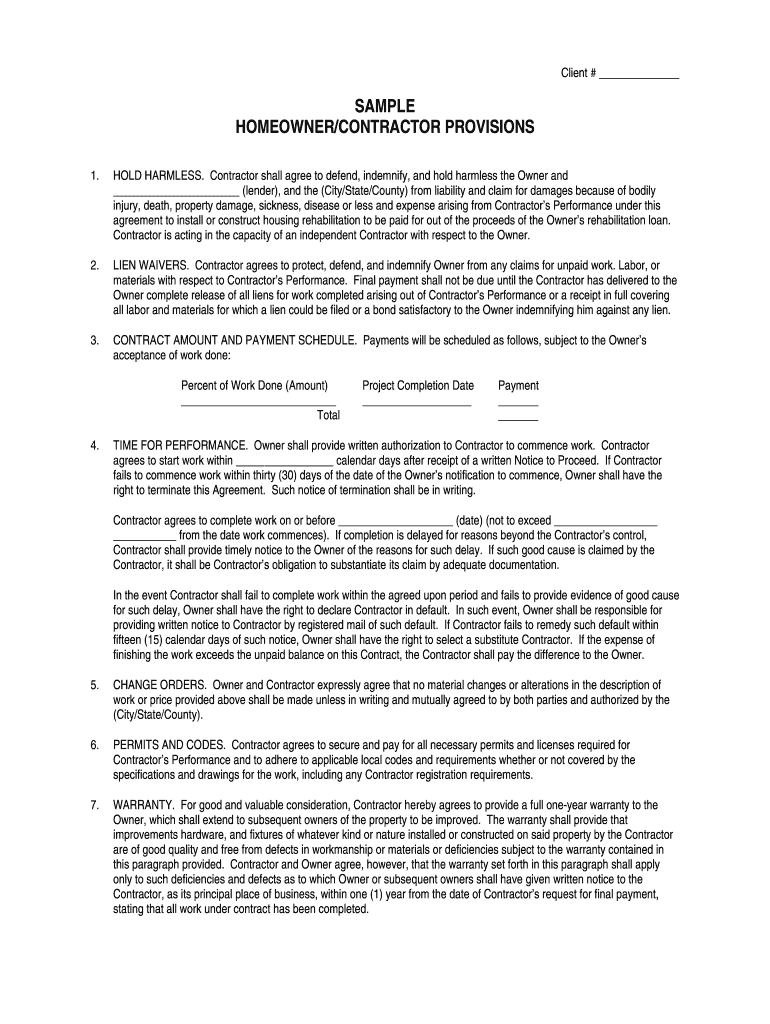
  1. Click ‘Get Form’ to open the contractor provisions document in the editor.
  2. Begin by filling in the 'Client #' field at the top of the form. This identifies the specific project and client involved.
  3. In the 'HOLD HARMLESS' section, ensure you accurately list any lenders and local authorities involved, as this protects all parties from liability.
  4. For 'LIEN WAIVERS', provide details about any claims for unpaid work. Ensure that you understand what documentation is required for final payment.
  5. Complete the 'CONTRACT AMOUNT AND PAYMENT SCHEDULE' section by specifying payment percentages and amounts based on work completed.
  6. Fill in the 'Project Completion Date' and ensure that you adhere to timelines outlined in the 'TIME FOR PERFORMANCE' section.
  7. Review sections on 'CHANGE ORDERS', 'PERMITS AND CODES', and 'WARRANTY' to confirm compliance with local regulations and warranty terms.
  8. Finally, ensure all signatures are obtained where necessary before saving or exporting your completed document.

Start using our platform today to streamline your contractor provisions process for free!

be ready to get more

Complete this form in 5 minutes or less

Get form

Got questions?

We have answers to the most popular questions from our customers. If you can't find an answer to your question, please contact us.
Contact us

If you often work with documents kept in your Google Drive, DocHub is an excellent solution for you to easily and quickly fill out, modify, and approve them. This editor integrates properly with Google apps, so you can export your contractor provisions from your Google Drive to the editor without downloading and re-uploading it. Right-click on your document, select Open With → DocHub PDF Sign and Edit. In our editor, add and assign Signature Fields for all people involved, then click on the Menu option above → Send → choose how you want to share your paperwork.

You need only an internet connection and a web browser to complete your contractor provisions on an iOS phone. Open the DocHub website and authenticate. Then, add your file or select it from the list in your dashboard. Then use our editing instruments to complete your form and preserve all your adjustments. You can also send it to a dedicated recipient immediately.

In legal terms, a provision is a specific requirement or rule within a legal document or law, also known as a contract clause. In accounting, it refers to profits set aside for particular expenses.
Learn about our editorial policies. Definition. A contract provision is a stipulation in a legal document that outlines obligations or requirements that protect the interests of the involved parties.
Contractual provisions (or clauses) are the essential building blocks of every contract they set out who does what, when, and what happens if something goes wrong. Clear, tailored provisions help manage risk, avoid disputes, and ensure your contract is legally enforceable.

Security and compliance

At DocHub, your data security is our priority. We follow HIPAA, SOC2, GDPR, and other standards, so you can work on your documents with confidence.

Learn more
ccpa2
pci-dss
gdpr-compliance
hipaa
soc-compliance
be ready to get more

Complete this form in 5 minutes or less

Get form

People also ask

In negotiated procurements, an offerors responsibility goes to its ability to perform the contract and includes elements of capability, competency, capacity, credit, integrity, perseverance, and tenacity.
In United States government contracting, a provision or solicitation provision is a written term or condition used in a solicitation. A solicitation provision applies only before a contract is awarded to a vendor. This distinguishes provisions from clauses, which apply after contracts are awarded (and possibly before).
Contract enforcement is generally regarded as the process of ensuring that the terms agreed upon by the parties in a contract are met and executed as intended. This process helps to maintain trust and fairness between parties and is essential for the smooth functioning of business and personal transactions.

Related links