




Here's how it works



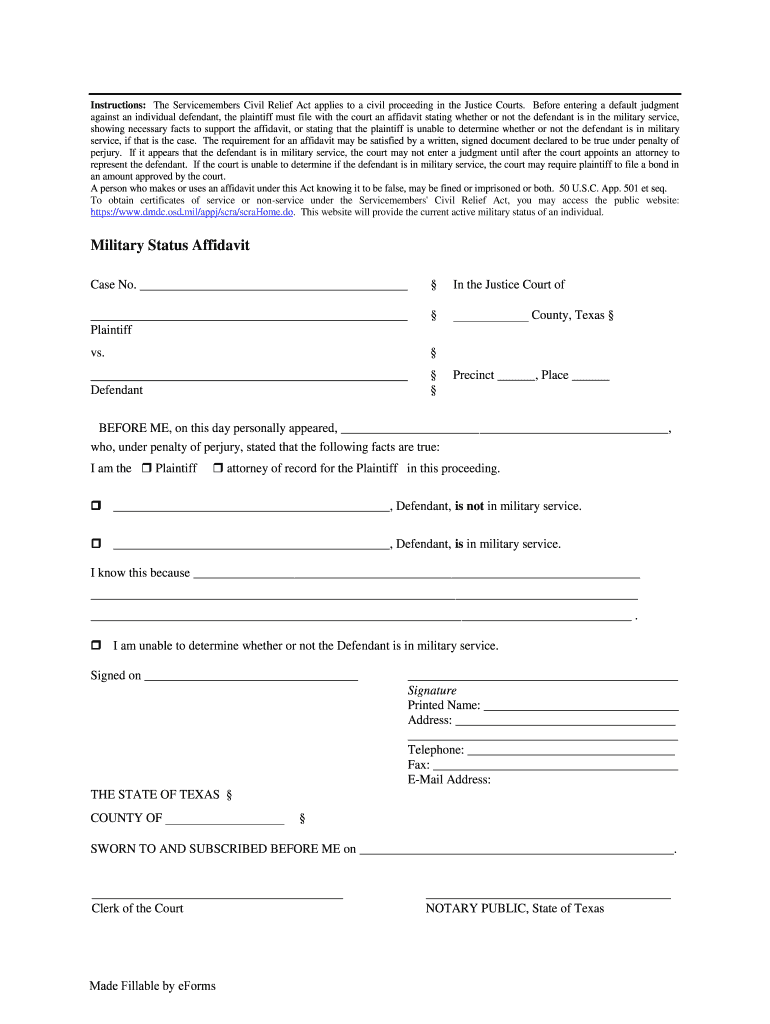
How to use or fill out Texas Eviction Military Affidavit Form with DocHub

- Click ‘Get Form’ to open the Texas Eviction Military Affidavit Form in our editor.
- Begin by entering the case number at the top of the form. This is essential for identifying your specific legal proceeding.
- Fill in the name of the county where the Justice Court is located, along with the precinct and place numbers.
- Indicate whether you are the Plaintiff or the attorney of record by checking the appropriate box.
- State whether the Defendant is in military service by selecting one of the options provided. If applicable, provide a brief explanation supporting your statement.
- If you cannot determine the Defendant's military status, check that option and proceed to sign and date the affidavit.
- Complete your contact information including printed name, address, telephone number, fax, and email address.
- Finally, ensure that a notary public signs and dates your affidavit before submission to validate it legally.
Start using our platform today to fill out your Texas Eviction Military Affidavit Form online for free!
It's free
Got questions?
Can I sign my military status affidavit harris county on a mobile?
Yes, you’ll find numerous apps for this on the web. Nonetheless, if you need to eSign your military status affidavit harris county without installing additional software, DocHub is the optimum choice you can make. This powerful editor works on mobile devices just like on desktops. Open our editor in your preferred internet browser, register or sign in to your account, and start managing your forms.
How do you get military affidavit texas?
You can find the latest and most relevant version of the military affidavit texas in our DocHub forms library. Browse it by categories or use the search field to find the exact template that fits your case. You can open this form for editing after you find it.
Security and compliance
At DocHub, your data security is our priority. We follow HIPAA, SOC2, GDPR, and other standards, so you can work on your documents with confidence.
Learn more


