




Here's how it works



How to use or fill out Oregon Child Support with our platform

- Click ‘Get Form’ to open the Oregon Child Support document in the editor.
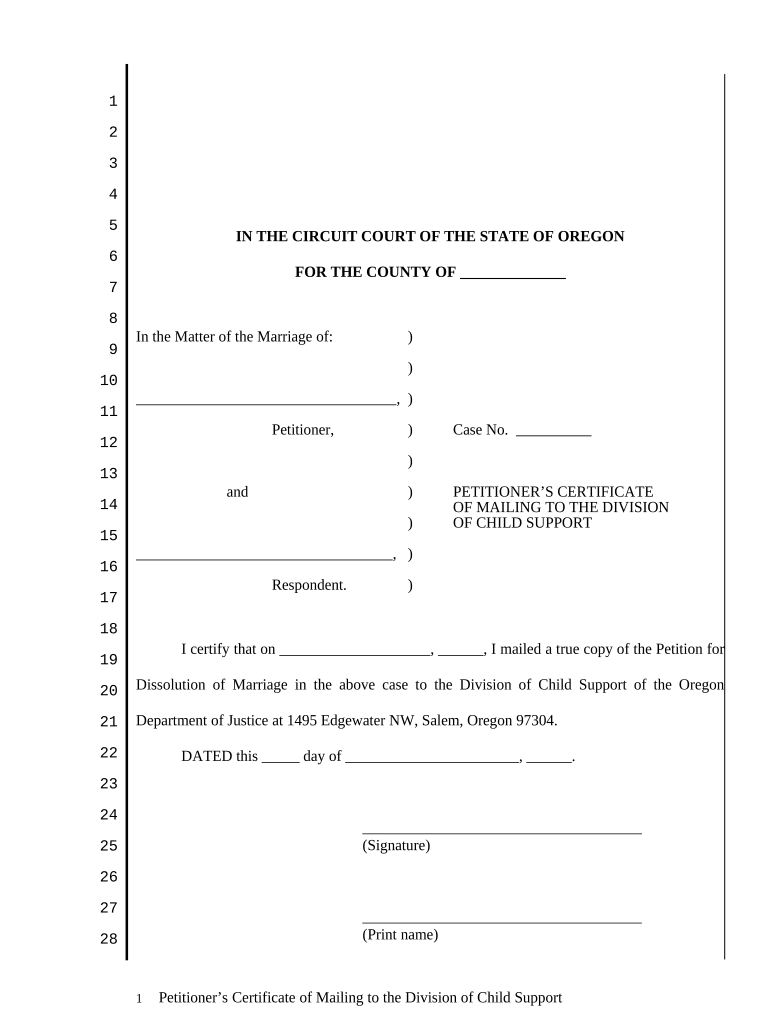
- Begin by filling in the 'County' field at the top of the form, specifying where your case is being filed.
- In the section labeled 'In the Matter of the Marriage of', enter your name as the Petitioner and the name of the Respondent.
- Complete the 'Case No.' field with your assigned case number, if applicable.
- Fill in the date you mailed a true copy of your petition to the Division of Child Support in the designated area.
- Sign and print your name at the bottom of the form, ensuring all required contact information is provided, including address and telephone number.
- For the Certificate of Document Preparation, check all applicable boxes regarding how you completed this document and provide any necessary signatures.
Start using our platform today to fill out your Oregon Child Support forms easily and for free!
It's free
Got questions?
What do I need to sign my cherokee nation site dochub com electronically?
Electronic document approval demands a software solution that works in compliance with data security and eSignature standards. DocHub is a perfect tool for that, since it meets all the aforementioned requirements. Whatever method you like to sign your cherokee nation site dochub com in DocHub, your eSignature will be legally binding and court-admissible.
How to manage my child support login oregon from Gmail?
In case your go-to electronic mail service is Gmail, you can easily incorporate your DocHub editor into your work. Modify your child support login oregon with DocHub tools and attach it to your drafts in Gmail. See how easy it is to exchange files and collaborate having a swift PDF editing solution at hand.
Is there a minimum child support in Oregon?
How is Oregon child support determined?
Does Oregon have a statute of limitations on child support?
Security and compliance
At DocHub, your data security is our priority. We follow HIPAA, SOC2, GDPR, and other standards, so you can work on your documents with confidence.
Learn more


