Type text, add images, blackout confidential details, add comments, highlights and more.

02. Sign it in a few clicks
Draw your signature, type it, upload its image, or use your mobile device as a signature pad.

03. Share your form with others
Send self appraisal form via email, link, or fax. You can also download it, export it or print it out.

How to use or fill out self appraisal form with our platform
Ease of Setup
DocHub User Ratings on G2
Ease of Use
DocHub User Ratings on G2
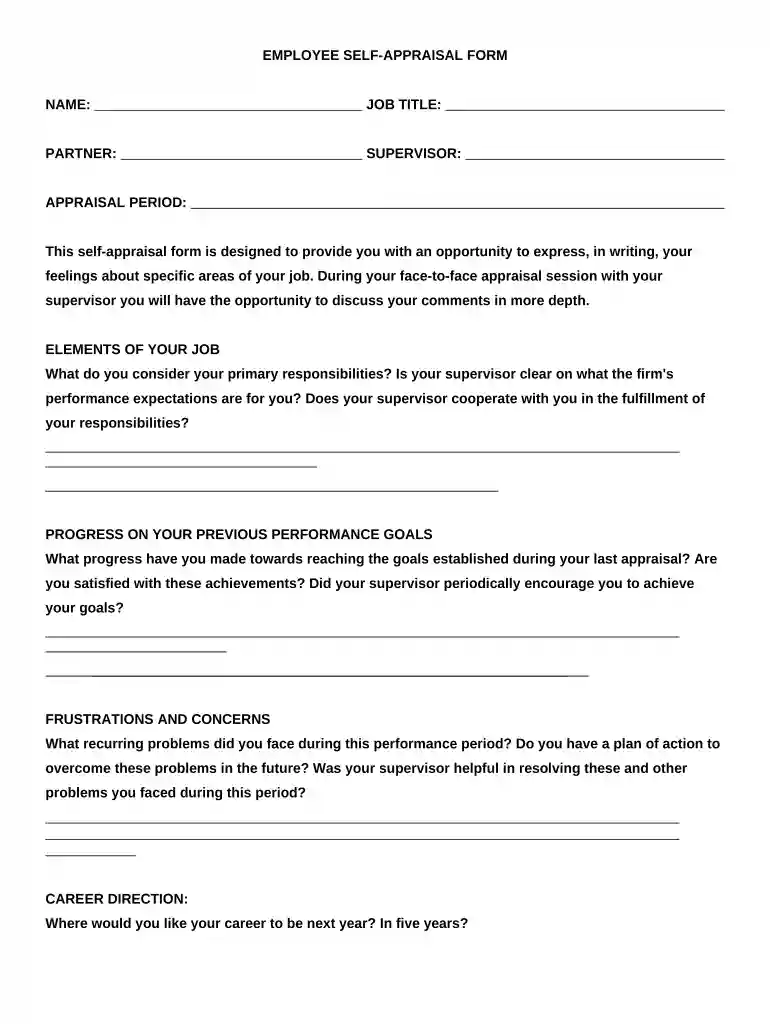
Click ‘Get Form’ to open the self-appraisal form in the editor.
Begin by entering your name, job title, partner, and supervisor details at the top of the form. This information is essential for identifying your appraisal context.
In the 'Elements of Your Job' section, articulate your primary responsibilities. Reflect on whether your supervisor's expectations are clear and if they support you in fulfilling these responsibilities.
Move to 'Progress on Your Previous Performance Goals.' Here, detail your achievements since the last appraisal and assess your satisfaction with these outcomes. Mention any encouragement received from your supervisor.
Address any frustrations or concerns you've encountered during this period. Outline a plan for overcoming these challenges and evaluate your supervisor's assistance in resolving them.
In the 'Career Direction' section, express where you envision your career heading in the next year and five years.
Provide suggestions on how supervisors and partners can enhance workplace satisfaction in the designated area.
Finally, summarize your major contributions to the team and firm during this appraisal period, reflecting on recognition received for these efforts.
Start using our platform today to complete your self-appraisal form effortlessly!
Self appraisal form templateSelf appraisal form pdfSelf appraisal form for employeesSelf appraisal form template wordSample appraisal form filled by employeeFree self appraisal formSelf Appraisal Form for Teachers PDFPerformance appraisal Form Word
Security and compliance
At DocHub, your data security is our priority. We follow HIPAA, SOC2, GDPR, and other standards, so you can work on your documents with confidence.
The Self-Appraisal Form is provided as an instrument for employees to share their perspective on their job duties and any challenges they might be facing inRead more
ACCOMPLISHMENTS/ACHIEVEMENTS Please list or discuss the most important accomplishments you achieved during the past performance appraisal period.Read more
Cookie consent notice
This site uses cookies to enhance site navigation and personalize your experience.
By using this site you agree to our use of cookies as described in our Privacy Notice.
You can modify your selections by visiting our Cookie and Advertising Notice.