South carolina affidavit 2026

Get Form
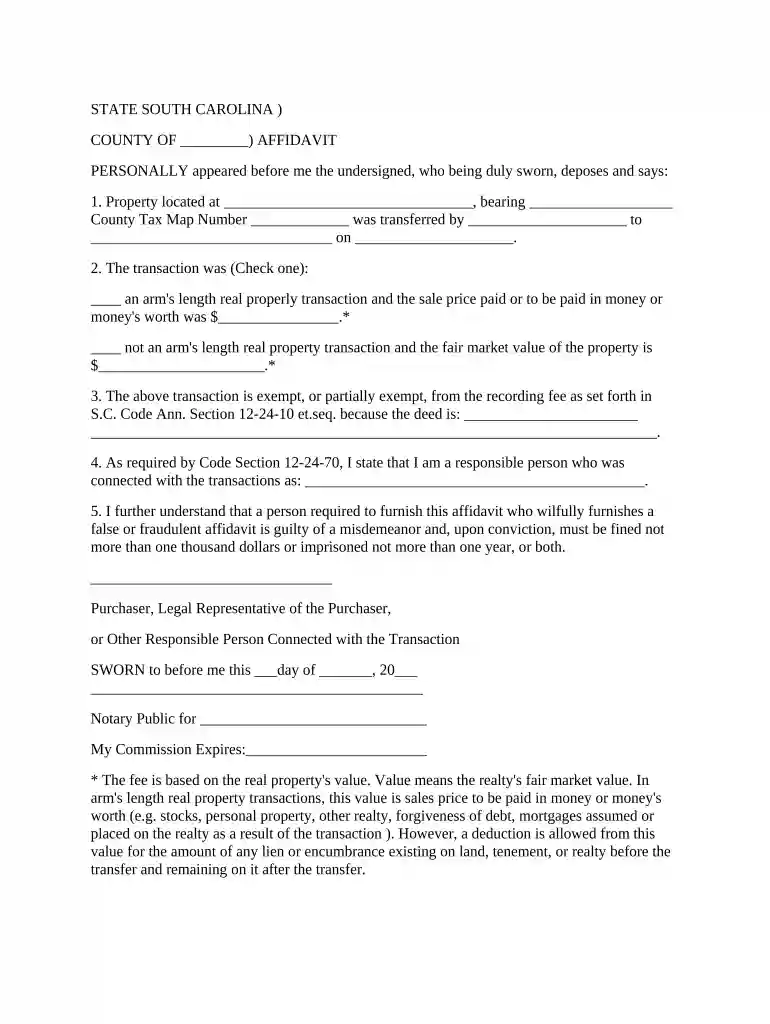
affidavit of consideration sc Preview on Page 1

Here's how it works

01. Edit your affidavit of consideration sc online
Type text, add images, blackout confidential details, add comments, highlights and more.

02. Sign it in a few clicks
Draw your signature, type it, upload its image, or use your mobile device as a signature pad.

03. Share your form with others
Send affidavit of consideration south carolina via email, link, or fax. You can also download it, export it or print it out.

How to use or fill out South Carolina Affidavit with DocHub

Form edit decoration
9.5
Ease of Setup
DocHub User Ratings on G2
9.0
Ease of Use
DocHub User Ratings on G2
  1. Click ‘Get Form’ to open the South Carolina Affidavit in our editor.
  2. Begin by entering the property address in the designated field, ensuring accuracy for legal purposes.
  3. Fill in the County Tax Map Number, which is essential for identifying the property within county records.
  4. Indicate who transferred the property and to whom it was transferred, along with the date of transfer.
  5. Select whether the transaction was an arm's length transaction or not by checking the appropriate box and providing either the sale price or fair market value as required.
  6. In the exemption section, specify why the transaction is exempt from recording fees according to S.C. Code Ann. Section 12-24-10 et.seq.
  7. State your role in the transaction clearly, as this identifies your responsibility regarding this affidavit.
  8. Finally, ensure you sign and date the affidavit before a notary public to validate your statements.

Start using our platform today to fill out your South Carolina Affidavit online for free!

be ready to get more

Complete this form in 5 minutes or less

Get form

Got questions?

We have answers to the most popular questions from our customers. If you can't find an answer to your question, please contact us.
Contact us
I am executing this affidavit to attest to the truth of the foregoing facts and statements and for whatever purpose this may serve. IN WITNESS WHEREOF, I have hereunto affixed my signature this day of , 2020 at , Philippines.
Affidavits can occur any time a formal promise is made, and they are often used as a form of documentation tied to a specific person in the proceedings. They are often used in court to serve as evidence toward a singular side in a dispute, or to affirm a claim that someone is making.
What to include in your affidavit. Title. This is either your name (Affidavit of Jane Doe) or the specific case information. Statement of identity. The next paragraph tells the court about yourself. Statement of truth. Statement of facts. Closing statement of truth. Sign and docHub.
An affidavit (/ˌfɪˈdeɪvɪt/ AF-ih-DAY-vit; Medieval Latin for he has declared under oath) is a written statement voluntarily made by an affiant or deponent under an oath or affirmation which is administered by a person who is authorized to do so by law.
Affidavits are written statements signed under oath in front of a notary public. All affidavits must be docHubd. The person signing the affidavit must appear personally in front of the notary.

Security and compliance

At DocHub, your data security is our priority. We follow HIPAA, SOC2, GDPR, and other standards, so you can work on your documents with confidence.

Learn more
ccpa2
pci-dss
gdpr-compliance
hipaa
soc-compliance
be ready to get more

Complete this form in 5 minutes or less

Get form

People also ask

The evidence in an affidavit comes directly from the witness who swears it (the affiant). Regardless of the lawyers drafting skills, the affidavits strength lies in the quality of the evidence it contains.
Who can execute an affidavit in the Philippines? An Affidavit can be created by any one with legal capacity and must be docHubd by a public notary.

notarized signature affidavit form south carolina