Production divorce 2026

Get Form
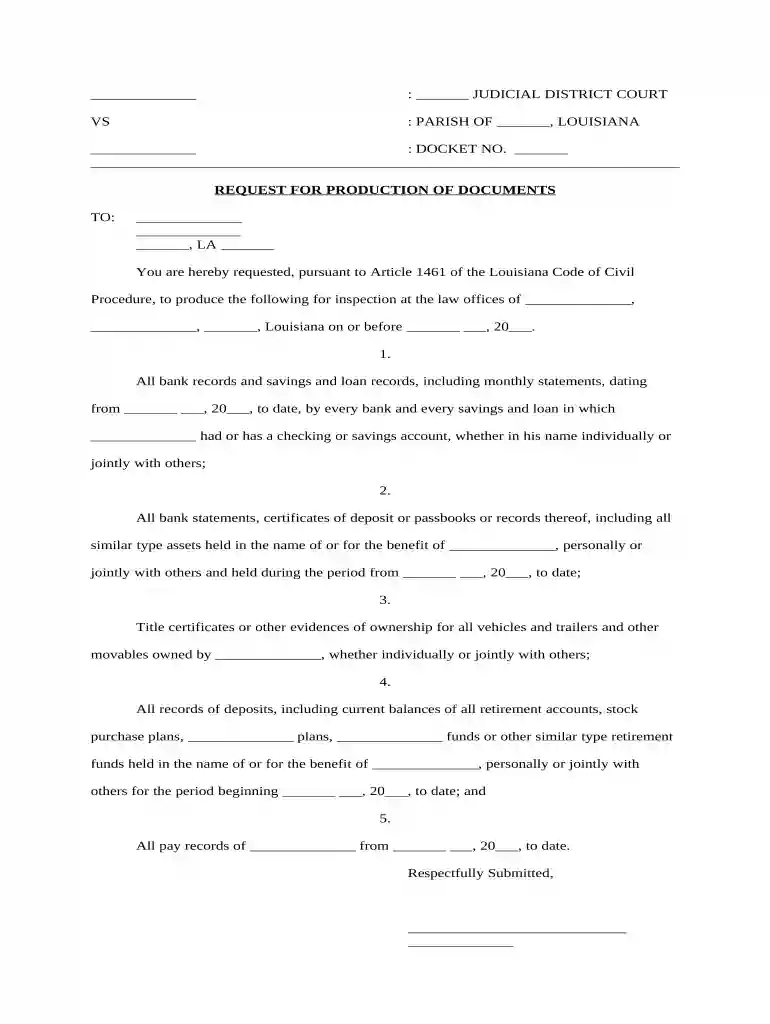
production divorce Preview on Page 1

Here's how it works

01. Edit your form online
Type text, add images, blackout confidential details, add comments, highlights and more.

02. Sign it in a few clicks
Draw your signature, type it, upload its image, or use your mobile device as a signature pad.

03. Share your form with others
Send it via email, link, or fax. You can also download it, export it or print it out.

How to use or fill out production divorce with our platform

Form edit decoration
9.5
Ease of Setup
DocHub User Ratings on G2
9.0
Ease of Use
DocHub User Ratings on G2
  1. Click ‘Get Form’ to open the production divorce document in the editor.
  2. Begin by filling in the judicial district court and parish information at the top of the form. This sets the context for your request.
  3. Enter the docket number in the designated field, ensuring it matches any existing case references.
  4. In the 'TO' section, input the name and address of the party from whom you are requesting documents. Make sure all details are accurate.
  5. List each document requested clearly, starting with bank records. Specify dates and types of accounts as needed for clarity.
  6. Continue detailing other requests such as vehicle ownership records and retirement account statements, ensuring each item is numbered for easy reference.
  7. Finally, sign and date the document at the bottom before submitting it through our platform for a streamlined process.

Start using our platform today to easily complete your production divorce form online for free!

be ready to get more

Complete this form in 5 minutes or less

Get form

Got questions?

We have answers to the most popular questions from our customers. If you can't find an answer to your question, please contact us.
Contact us

Yes, you can utilize DocHub for signing any business and private paperwork, including your production divorce. All electronic signatures you create with our tool are legally binding and court-admissible, as DocHub complies with standards required by ESIGN and UETA. Save your completed paperwork with a detailed Audit Trail if necessary.

It is a no-brainer on a computer or via a mobile device to complete a production divorce with DocHub. All you need to do is open any installed web browser on your smartphone and proceed to the DocHub website. Once authenticated, add your file and open it in editing mode. Use our toolbar to make your edits and save modifications. Optionally, keep your file in your files or send it to a recipient immediately.

Change and Uncertainty: Divorce often brings docHub life changes, including shifts in living arrangements, finances, and social circles. The uncertainty about the future can create anxiety and fear. Grief and Mourning: The end of a marriage can trigger feelings of grief, similar to mourning a death.
Divorce To End With Season 3 On HBO As Sarah Jessica Parker Ramps Up Development At Pretty Matches Prods. Exclusive: The six-episode third season of HBOs comedy Divorce, which premieres tonight, will be its last.
Grey divorce refers to separations or divorces occurring among individuals over 50, often after spending decades together. In some cases, couples may not legally divorce but choose to live separately, whether with their children or in their own spaces.

Security and compliance

At DocHub, your data security is our priority. We follow HIPAA, SOC2, GDPR, and other standards, so you can work on your documents with confidence.

Learn more
ccpa2
pci-dss
gdpr-compliance
hipaa
soc-compliance
be ready to get more

Complete this form in 5 minutes or less

Get form

People also ask

How To Rebuild And Survive Divorce At 60 Acknowledge Your Feelings. The end of a marriage invariably brings a torrent of emotions. Rethink Your Finances. Cultivate a Support Network. Focus on Physical Health. Rediscover Yourself. Embrace Lifes Possibilities. Plan for the Future. Creating a Fulfilling New Chapter with Us.

Related links