




Here's how it works

01. Edit your invesco resp withdrawal form online
Type text, add images, blackout confidential details, add comments, highlights and more.

02. Sign it in a few clicks
Draw your signature, type it, upload its image, or use your mobile device as a signature pad.

03. Share your form with others
Send invesco resp withdrawal via email, link, or fax. You can also download it, export it or print it out.
How to use or fill out Invesco RESP Withdrawal Form with our platform

- Click ‘Get Form’ to open the Invesco RESP Withdrawal Form in the editor.
- Begin by completing Section A, where you will specify the type of withdrawal. Enter the date, subscriber name, RESP account number, and the beneficiary's details including their SIN and permanent home address.
- In Section B, select which funds you wish to redeem by entering the fund code and amount. Ensure that you double-check for any discrepancies between fund codes and names.
- Proceed to Section C for payment instructions. Choose whether the payment should be made to the beneficiary or subscribers, and provide a signature guarantee if necessary.
- Complete Section D with post-secondary education enrolment information. Fill in details such as student name, school name, program length, and current semester dates.
- Finally, in Section E, ensure proof of enrolment is attached or confirmed by the school registrar’s office. This section must include a signature and stamp from the registrar.
Start using our platform today to easily fill out your Invesco RESP Withdrawal Form online for free!
Fill out invesco resp withdrawal form online
It's free
It's free
Security and compliance
At DocHub, your data security is our priority. We follow HIPAA, SOC2, GDPR, and other standards, so you can work on your documents with confidence.
Learn more


Related forms

Southern california edison owner tenant aghreement cancel forms
The document is a Cancellation Form for customers wishing to terminate their Owner Authorization Agreement with Southern ...

PDF Study Leave Form - Teachers Service Commission
The document outlines the application process for study leave for teachers under the Teachers Service Commission in Keny ...

Expiration Date: 04 30 2027
The document is a VA Advance Directive form (VA Form 10-0137) that allows individuals to outline their health care prefe ...

Universal Credit capability for work questionnaire (UC50)
The document is a Capability for Work questionnaire for individuals applying for Universal Credit. It outlines the proce ...

Model order c calpers edit
The document provides model domestic relations orders for dividing California Public Employees' Retirement System (CalPE ...

2015 Insertion Progress Note - colorado
The document is a progress note for the insertion of Nexplanon, a contraceptive implant. It includes sections for subjec ...
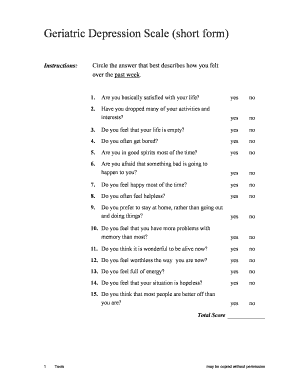
Gds scale pdf
The document presents the Geriatric Depression Scale (short form), a questionnaire designed to assess depression in elde ...