







Definition and Overview of the UI2 7 Form
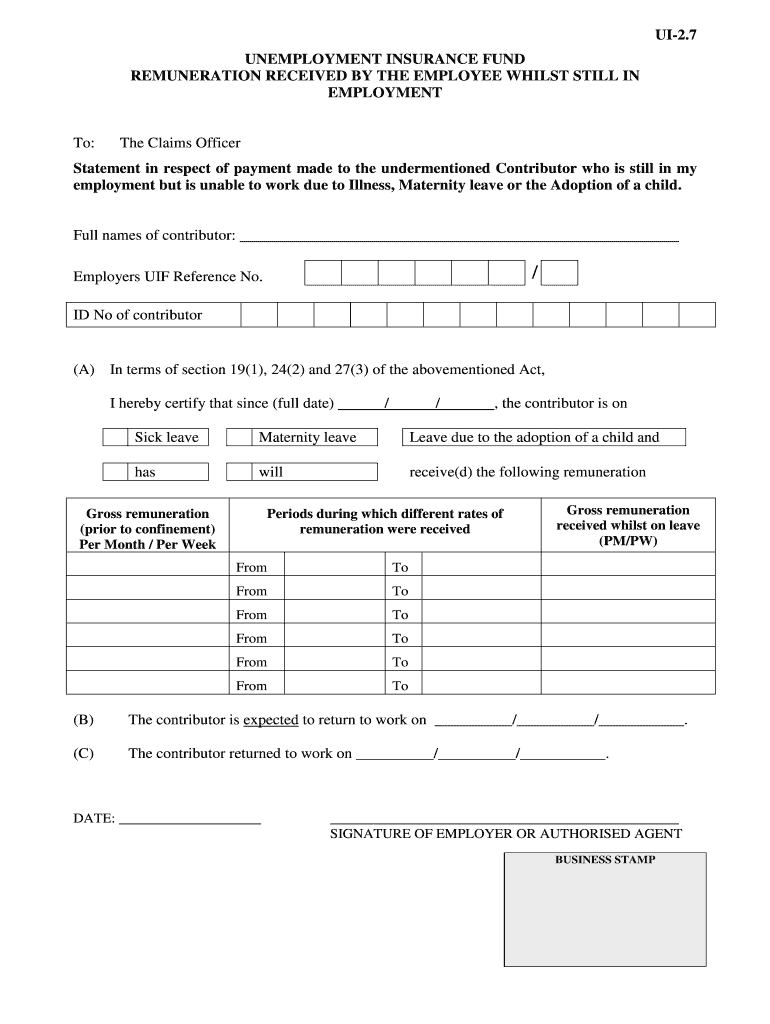
The UI2 7 form, essential for managing unemployment benefits and insurance in the United States, functions as a certification document. It is typically used to confirm the remuneration received by employees who are still employed but unable to work due to valid leave reasons, such as illness, maternity leave, or adoption leave. This form collects critical information to ensure individuals receive the appropriate benefits, and it is a vital component of the unemployment insurance process.
Key Components of the UI2 7 Form
The UI2 7 form includes several mandatory sections that require specific details:
- Personal Information: Contributors must provide their full name, address, and Social Security Number to identify themselves clearly within the system.
- Leave Status Details: This section captures the exact nature of the leave taken, including the start and end dates, to assess the eligibility for benefits.
- Gross Remuneration: It is crucial to declare the gross remuneration received during the leave periods, as this information directly affects the benefit calculations.
- Expected Return to Work Date: Providing an anticipated return date helps in processing benefits and managing insurance claims effectively.
These components collectively ensure that the data submitted is transparent, allowing for accurate calculations and allocations of benefits.
Instructions for Completing the UI2 7 Form
Filling out the UI2 7 form requires careful attention to detail to ensure compliance and avoid delays.
Step-by-Step Process for Completing the UI2 7 Form
- Gather Necessary Information: Collect your personal details and any leave documentation before starting to fill out the form.
- Fill Out Personal Information: Enter your full name, address, and Social Security Number accurately in the designated fields on the form.
- Detail Your Leave Status: Specify the type of leave you are applying for. Be precise with dates and reasons to avoid any misinterpretations.
- Report Gross Remuneration Received: Accurately input the total gross remuneration you received during your leave periods. This figure is crucial for determining the associated benefits.
- Indicate Expected Return Date: Use the space provided to document your intended return date to work, ensuring it reflects your plans following the leave.
Taking these steps carefully provides clarity and completeness to your application, leading to a smoother processing experience.
Common Scenarios for UI2 7 Form Usage
The UI2 7 form is utilized across various scenarios, typically involving employees who are temporarily unable to work.
Situations Where the UI2 7 Form is Necessary
- Medical Leave: Employees unable to work due to health issues must complete the UI2 7 to document their remuneration and claim benefits.
- Maternity Leave: Individuals on maternity leave can use this form to certify their income and maintain access to unemployment benefits during their absence.
- Adoption Leave: Similar to maternity leave, employees who take time off for adoption purposes are required to submit the UI2 7 form to validate their earnings during this period.
In each of these cases, submitting the UI2 7 form allows employees to access financial support while ensuring their employment status remains secure.
Legal and Compliance Considerations
Completing the UI2 7 form accurately is not just important for benefit eligibility; it also has legal implications.
Compliance Requirements for the UI2 7 Form
- Accurate Reporting: Providing false information can lead to serious consequences, including penalties or disqualification from benefits.
- Timely Submission: Submitting the form within designated timelines ensures that you comply with state regulations governing unemployment benefits.
Understanding these legal facets ensures that individuals protect themselves while navigating the unemployment insurance system.
Conclusion on UI2 7 Form Utilization
The UI2 7 form is a critical tool in the unemployment insurance framework, ensuring employees receive the appropriate benefits during their temporary absences. Understanding its components, usage scenarios, and legal implications is essential for efficiently managing claims and benefits. By adhering to the guidelines set out in the UI2 7 form and maintaining compliance, users can navigate the complexities of unemployment insurance with confidence and ease.




