




Here's how it works



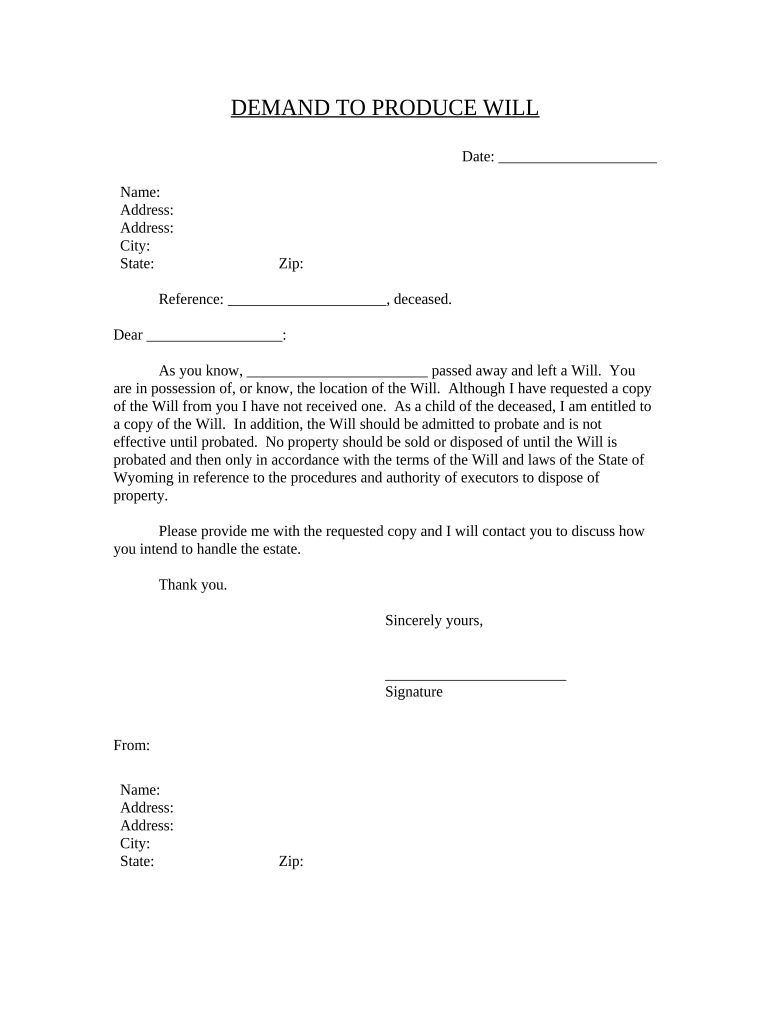
How to use or fill out Demand to Produce Copy of Will from Heir to Executor or Person in Possession of Will - Wyoming with our platform

- Click ‘Get Form’ to open it in the editor.
- Begin by entering the date at the top of the form. This is essential for record-keeping and establishing a timeline.
- Fill in your name and address details accurately. Ensure that all fields are completed, including city, state, and zip code.
- In the 'Reference' section, write the name of the deceased individual whose will you are requesting.
- Address the letter to the executor or person in possession of the will by filling in their name in the designated space.
- In the body of the letter, clearly state your relationship to the deceased and your entitlement to receive a copy of the will.
- Conclude with your signature and provide your contact information again at the bottom for clarity.
Start using our platform today for free to streamline your document editing and ensure a smooth process!
It's free
Got questions?
How do I sign my Demand to Produce Copy of Will from Heir to Executor or Person in Possession of Will - Wyoming free of charge?
Most eSignature services require users to have a paid subscription. With DocHub, there are two options for you to add an electronic signature to your Demand to Produce Copy of Will from Heir to Executor or Person in Possession of Will - Wyoming at no cost:
- You can do it during a 7-day trial period;
- You can subscribe to a free plan.
The second option, though, has restrictions on the number of signatures, sign requests, emails, and forms for adjusting available per month. You can check for full information here.
How do you create an e-signature for the Demand to Produce Copy of Will from Heir to Executor or Person in Possession of Will - Wyoming on iOS?
Apart from a comprehensive toolset for editing PDFs on mobile phones, DocHub enables you to sign your Demand to Produce Copy of Will from Heir to Executor or Person in Possession of Will - Wyoming along the way. Open our editor in your internet browser, make changes using DocHub’s toolset, and complete your editing by eSigning the finished form.
Security and compliance
At DocHub, your data security is our priority. We follow HIPAA, SOC2, GDPR, and other standards, so you can work on your documents with confidence.
Learn more


