Type text, add images, blackout confidential details, add comments, highlights and more.
02. Sign it in a few clicks
Draw your signature, type it, upload its image, or use your mobile device as a signature pad.
03. Share your form with others
Send quantum meruit example via email, link, or fax. You can also download it, export it or print it out.
How to use or fill out quantum meruit with our platform
Ease of Setup
DocHub User Ratings on G2
Ease of Use
DocHub User Ratings on G2
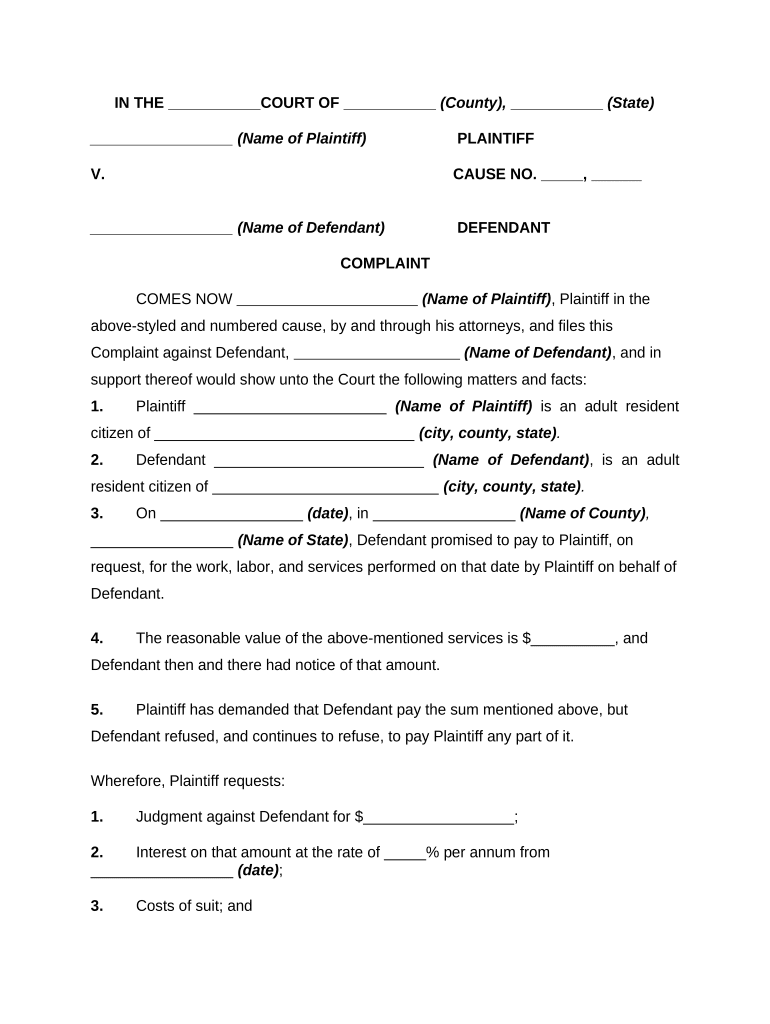
Click ‘Get Form’ to open the quantum meruit document in the editor.
Begin by entering the court name, county, and state at the top of the form. This sets the jurisdiction for your complaint.
Fill in the names of both the plaintiff and defendant in their respective sections. Ensure accuracy as this information is crucial for legal identification.
In section three, specify the date and location where services were rendered. This establishes a timeline for your claim.
State the reasonable value of services provided in section four. Be clear and precise about this amount, as it forms the basis of your claim.
Complete section five by detailing any demands made to the defendant regarding payment and their response.
Finally, review all entries for accuracy before submitting your completed form through our platform’s submission feature.
Start filling out your quantum meruit form online for free today!
Quantum meruit exampleQuantum meruit vs unjust enrichmentQuantum meruit in contract lawQuantum meruit PronunciationIs quantum meruit an equitable remedyIs Quantum meruit the same as restitutionQuantum meruit case lawQuantum meruit elements
Security and compliance
At DocHub, your data security is our priority. We follow HIPAA, SOC2, GDPR, and other standards, so you can work on your documents with confidence.
Cookie consent notice
This site uses cookies to enhance site navigation and personalize your experience.
By using this site you agree to our use of cookies as described in our Privacy Notice.
You can modify your selections by visiting our Cookie and Advertising Notice.