California real form printable 2026

Get Form
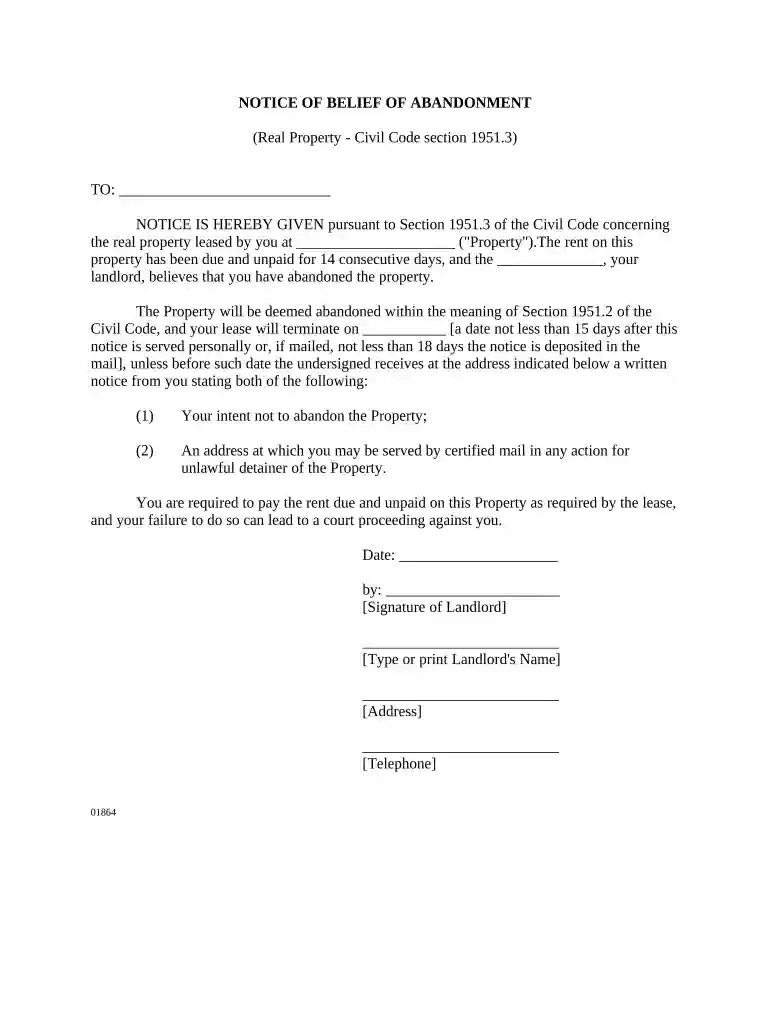
california real form printable Preview on Page 1

Here's how it works

01. Edit your form online
Type text, add images, blackout confidential details, add comments, highlights and more.

02. Sign it in a few clicks
Draw your signature, type it, upload its image, or use your mobile device as a signature pad.

03. Share your form with others
Send it via email, link, or fax. You can also download it, export it or print it out.

How to use or fill out california real form printable with our platform

Form edit decoration
9.5
Ease of Setup
DocHub User Ratings on G2
9.0
Ease of Use
DocHub User Ratings on G2
  1. Click ‘Get Form’ to open the California Real Form Printable in the editor.
  2. Begin by filling in the recipient's name in the first blank space, indicating who the notice is addressed to.
  3. In the next section, enter the address of the property that is subject to abandonment. This is crucial for clarity.
  4. Specify the landlord's name in the designated area, ensuring that it reflects accurately for legal purposes.
  5. Fill in the date when this notice is being issued. This should be current and reflect when you are sending this notice.
  6. Indicate a termination date for the lease, which must be at least 15 days from personal service or 18 days if mailed.
  7. Provide a space for your signature as the landlord, along with your printed name, address, and telephone number at the bottom of the form.

Start using our platform today to easily complete your California Real Form Printable for free!

be ready to get more

Complete this form in 5 minutes or less

Get form

Got questions?

We have answers to the most popular questions from our customers. If you can't find an answer to your question, please contact us.
Contact us
Utility bills (electric, gas, water) Bank statements Lease agreements or rental contracts Government documents (like tax documents, Social Security statements) Pay stubs with your address
As of May 7, 2025, state-issued drivers licenses and IDs that are not REAL ID compliant are no longer accepted as valid forms of identification at airports. Passengers should either travel with an acceptable alternative form of ID, like a passport, or enroll for a state-issued REAL ID through their state DMV offices.
Online requests only allow for viewing online and printing to your printer. If you would like a printout mailed to you, please complete the INF 1125 (PDF) form. Mail the completed form and the fee to the DMV Headquarters address displayed on the form.
Check mark the document below that youll use as your proof of identity. Valid U.S. passport or passport card (Preferred) Original or Certified copy of U.S birth certificate (issued by a city, county, or state vital statistics office). Valid Permanent Resident Card.
Proof of a Social Security number - You can provide your Social Security card, Form W-2, which shows your earnings for tax purposes, or a pay stub or paycheck from your job.

Security and compliance

At DocHub, your data security is our priority. We follow HIPAA, SOC2, GDPR, and other standards, so you can work on your documents with confidence.

Learn more
ccpa2
pci-dss
gdpr-compliance
hipaa
soc-compliance