motion set aside judgment Preview on Page 1

Motion set aside judgment 2026

Here's how it works

  • 01. Edit your form online

    Type text, add images, blackout confidential details, add comments, highlights and more.

  • 02. Sign it in a few clicks

    Draw your signature, type it, upload its image, or use your mobile device as a signature pad.

  • 03. Share your form with others

    Send it via email, link, or fax. You can also download it, export it or print it out.

How to use or fill out motion set aside judgment with our platform

Form edit decoration
9.5
Ease of Setup
DocHub User Ratings on G2
9.0
Ease of Use
DocHub User Ratings on G2
  1. Click ‘Get Form’ to open the motion set aside judgment in the editor.
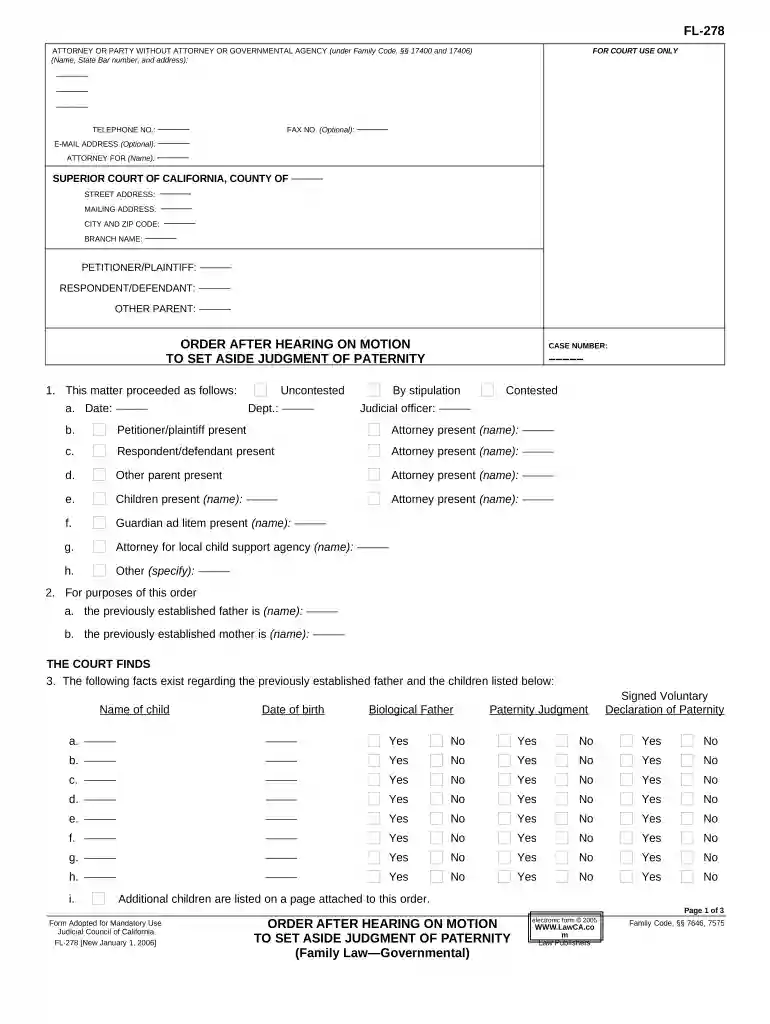
  2. Begin by filling in your name, address, and contact information at the top of the form. Ensure accuracy as this information is crucial for court correspondence.
  3. In the 'Petitioner/Plaintiff' and 'Respondent/Defendant' sections, enter the names of all parties involved in the case. This helps establish who is affected by the judgment.
  4. Proceed to section 1, where you will indicate whether the hearing was contested or uncontested. Fill in details such as date, department, and names of present parties.
  5. In section 3, list each child’s name and date of birth. Specify if a paternity judgment or voluntary declaration exists for each child.
  6. Complete section 5 by indicating which judgments are being set aside. Use checkboxes to clarify your requests regarding each child listed.
  7. Finally, review all entries for accuracy before saving your document. Utilize our platform's features to sign and distribute your completed form seamlessly.

Start using our platform today to fill out your motion set aside judgment easily and for free!

be ready to get more

Complete this form in 5 minutes or less

Got questions?

We have answers to the most popular questions from our customers. If you can't find an answer to your question, please contact us.

If the judge grants your motion and sets aside the default judgment, any money taken from you should be returned (unless the judge orders something different). The case is not over though. Once the judgment is set aside, the case starts up again.
A set aside in simple terms means that a court vacates or voids a prior order, as if the order never existed. Before a court will set aside a judgment or order, there must be a clear statutory basis for the set aside, and facts that warrant the order vacated.
A judgment or order may be set aside if given, entered or made irregularly, illegally or against good faith: r 36.15(1). The focus of r 36.15(1) is on the judgment or order that is attacked and the question is whether it was given, entered or made irregularly, illegally or against good faith.

Security and compliance

At DocHub, your data security is our priority. We follow HIPAA, SOC2, GDPR, and other standards, so you can work on your documents with confidence.
be ready to get more

Complete this form in 5 minutes or less

Related links

Rule 60. Relief from a Judgment or Order - Law.Cornell.Edu

The court may relieve a party or its legal representative from a final judgment, order, or proceeding for the following reasons:Read more

Learn more
Motion to Set Aside Default or Judgment

A Motion to Set Aside Default or Judgment is used to ask the court to set aside or undo a default or judgment or final order in a case, and to allow the caseRead more

Learn more
Remedies for Real Property Disputes in Florida

Several statutory tools are available to attack a fraudulent transfer, including setting aside the transfer and levying upon the assets transferred or otherRead more

Learn more
If you believe that this page should be taken down, please follow our DMCA take down process here