




Here's how it works



How to use or fill out scale factor worksheet with answers pdf

- Click ‘Get Form’ to open the scale factor worksheet in our editor.
- Begin by entering your name and the date at the top of the worksheet. This personalizes your document and keeps track of when it was completed.
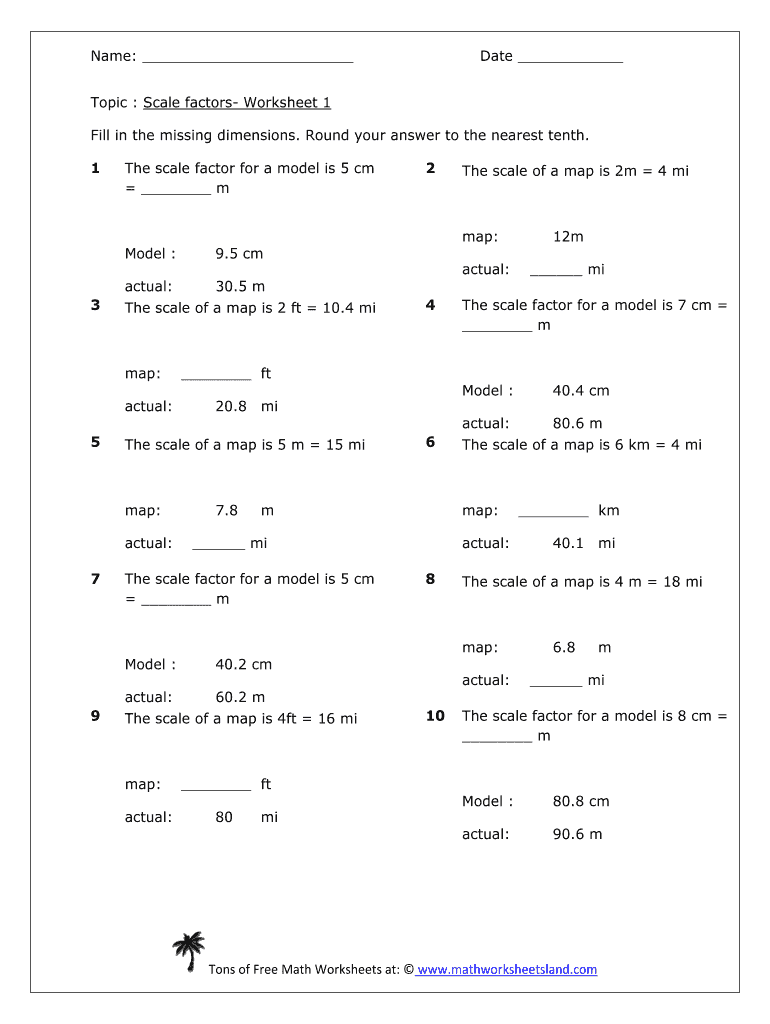
- Review each section carefully. The worksheet consists of various problems where you need to fill in missing dimensions based on given scale factors.
- For each problem, identify the scale factor provided (e.g., 'The scale factor for a model is 5 cm = __ m'). Use this information to calculate the missing dimension and enter your answer in the blank space provided.
- Once all fields are filled, review your answers for accuracy. You can easily edit any mistakes directly within our platform.
- Finally, save your completed worksheet or export it as a PDF for submission or printing.
Start using our platform today to effortlessly complete your scale factor worksheet!
It's free
Got questions?
What is the optimum way to electronically sign my scale worksheets 7th grade?
Many software applications are available out there for document modifying and signing. DocHub is one of the most widely used online solutions that comply with all data protection and compliance requirements and guarantees your electronically signed paperwork is legally enforceable. All you need to try it out is to sign up for an account, add your scale worksheets 7th grade, fill out the required information, and click Sign. Generate your electronic signature by typing, drawing it, uploading its picture to your form, or scanning a unique QR code.
How do you get scale factor worksheet pdf grade 7?
You can find the latest and most relevant version of the scale factor worksheet pdf grade 7 in our DocHub forms library. Search it by categories or utilize the search field to find the exact template that suits your case. You may open this form for editing after you find it.
What is the scale factor worksheet?
What is a scale factor Grade 7?
What is scale factor 3 in math?
Security and compliance
At DocHub, your data security is our priority. We follow HIPAA, SOC2, GDPR, and other standards, so you can work on your documents with confidence.
Learn more


