2306 form vibrating-2026

Get Form
2306 form vibrating Preview on Page 1

Here's how it works

01. Edit your form online
Type text, add images, blackout confidential details, add comments, highlights and more.
02. Sign it in a few clicks
Draw your signature, type it, upload its image, or use your mobile device as a signature pad.
03. Share your form with others
Send it via email, link, or fax. You can also download it, export it or print it out.

How to use or fill out 2306 form vibrating with our platform

Form edit decoration
9.5
Ease of Setup
DocHub User Ratings on G2
9.0
Ease of Use
DocHub User Ratings on G2
  1. Click ‘Get Form’ to open the 2306 form vibrating in the editor.
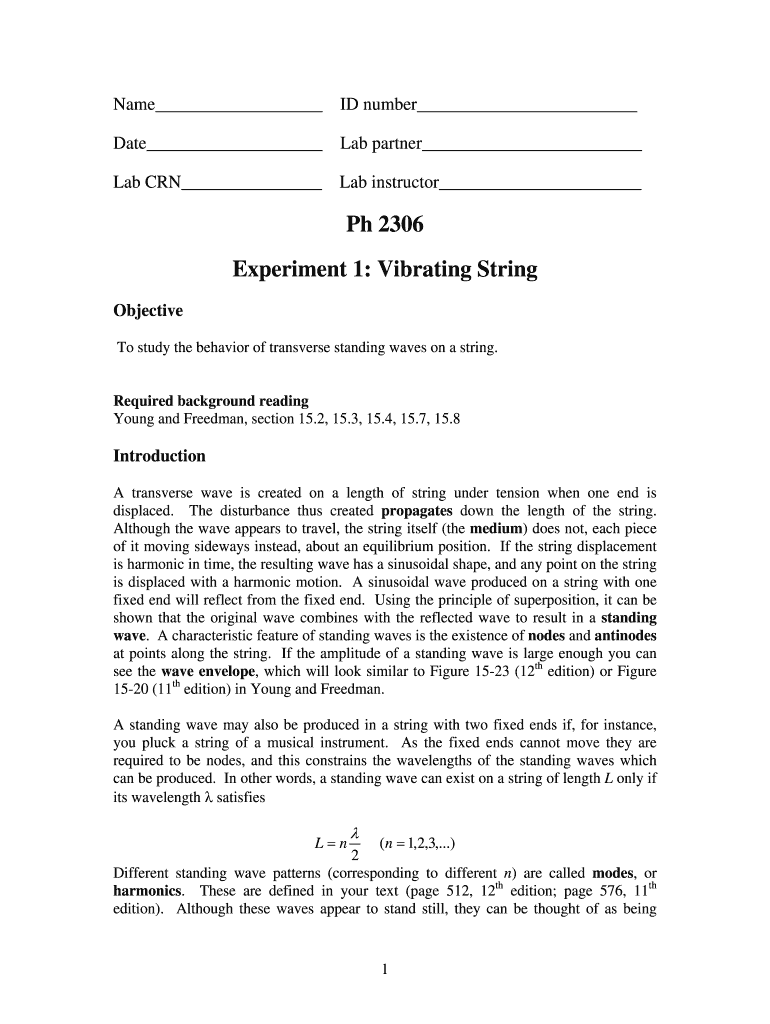
  2. Begin by entering your name and ID number in the designated fields at the top of the form. Ensure accuracy as this information is crucial for identification.
  3. Fill in the date, lab partner's name, and lab CRN. These details help in organizing your lab work and ensuring proper submission.
  4. Proceed to the objective section where you will summarize the purpose of your experiment. This should reflect your understanding of transverse standing waves on a string.
  5. In the prelab assignment section, answer all questions thoroughly. Use our platform’s text tools to format your equations clearly for better readability.
  6. Review each section for completeness before saving or exporting your filled form. Utilize our platform’s features to ensure everything is correctly formatted.

Start using our platform today to fill out your 2306 form vibrating easily and for free!

be ready to get more

Complete this form in 5 minutes or less

Get form

Got questions?

We have answers to the most popular questions from our customers. If you can't find an answer to your question, please contact us.
Contact us

Electronic document signing requires a software solution that complies with data protection and eSignature regulations. DocHub is an excellent tool for that, as it meets all the aforementioned requirements. Whatever method you like to sign your 2306 form vibrating in DocHub, your eSignature will be legally binding and court-admissible.

If you are searching for a state-specific 2306 form vibrating sample, you will find it in our DocHub Forms & Templates catalog. Use the search field, enter your form’s name, and search through the results for your state. You can also filter out irrelevant results while searching our catalog by groups.

Security and compliance

At DocHub, your data security is our priority. We follow HIPAA, SOC2, GDPR, and other standards, so you can work on your documents with confidence.

Learn more
ccpa2
pci-dss
gdpr-compliance
hipaa
soc-compliance