Type text, add images, blackout confidential details, add comments, highlights and more.
02. Sign it in a few clicks
Draw your signature, type it, upload its image, or use your mobile device as a signature pad.
03. Share your form with others
Send it via email, link, or fax. You can also download it, export it or print it out.
How to use or fill out fop grievance language with our platform
Ease of Setup
DocHub User Ratings on G2
Ease of Use
DocHub User Ratings on G2
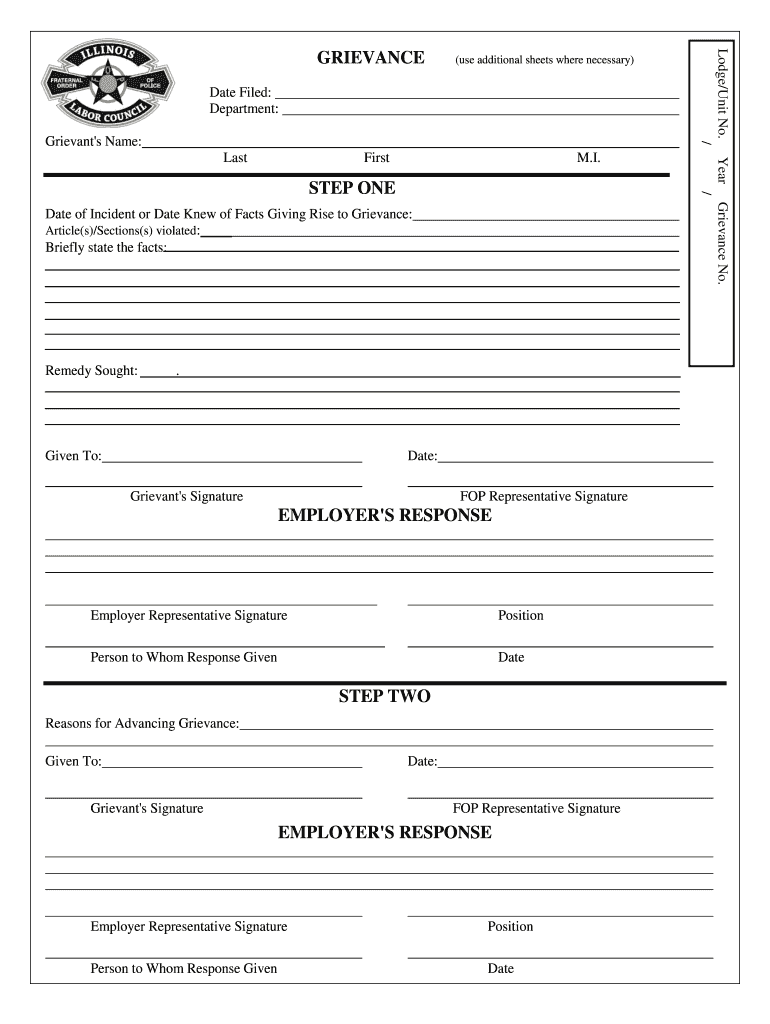
Click ‘Get Form’ to open the fop grievance language document in the editor.
Begin by filling in the Lodge/Unit No. and Date Filed at the top of the form. Ensure you accurately enter your Department and Grievant's Name, including First, M.I., and Last.
In the Grievance No. section, assign a unique number for tracking purposes. Then, specify the Date of Incident or when you became aware of the facts leading to this grievance.
Identify any Article(s)/Section(s) that have been violated and provide a brief statement of facts regarding your grievance. This is crucial for clarity.
Clearly articulate the Remedy Sought to resolve your grievance. After completing these sections, sign where indicated as Grievant and ensure your FOP Representative also signs.
For each subsequent step, repeat similar processes for Reasons for Advancing Grievance and ensure all signatures are collected from both parties involved.
Start using our platform today to streamline your grievance process for free!
b) The representatives shall be permitted reasonable time to investigate, present, and process formal grievances on the Universitys property without the lossRead more
Collective Bargaining Agreement - Ohio Public Sector
Dec 31, 2025 Section 7.1 The Labor Council understands and agrees that the filing of frivolous grievances can be disruptive to good labor-managementRead more
Cookie consent notice
This site uses cookies to enhance site navigation and personalize your experience.
By using this site you agree to our use of cookies as described in our Privacy Notice.
You can modify your selections by visiting our Cookie and Advertising Notice.