Absence Form - Monash College 2026

Get Form
monash absence form Preview on Page 1

Here's how it works

01. Edit your monash absence form online
Type text, add images, blackout confidential details, add comments, highlights and more.
02. Sign it in a few clicks
Draw your signature, type it, upload its image, or use your mobile device as a signature pad.
03. Share your form with others
Send monash onedrive via email, link, or fax. You can also download it, export it or print it out.

How to use or fill out Absence Form - Monash College with our platform

Form edit decoration
9.5
Ease of Setup
DocHub User Ratings on G2
9.0
Ease of Use
DocHub User Ratings on G2
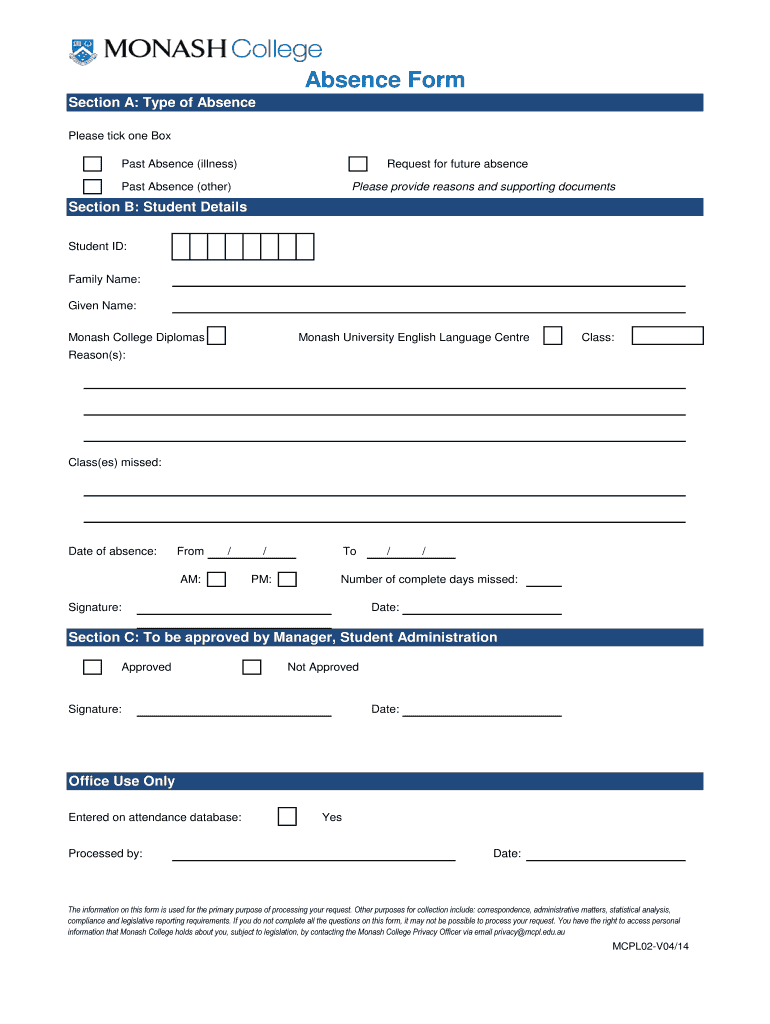
  1. Click ‘Get Form’ to open the Absence Form in the editor.
  2. In Section A, select the type of absence by ticking the appropriate box. You can choose from options like 'Past Absence (illness)', 'Request for future absence', or 'Past Absence (other)'. If applicable, provide reasons and attach supporting documents.
  3. Move to Section B and fill in your Student Details. Enter your Student ID, Family Name, Given Name, and specify your class. Clearly state the reason(s) for your absence and list any classes missed along with the dates of absence.
  4. Indicate the duration of your absence by filling in the start and end dates, as well as the times (AM/PM). Specify the number of complete days missed.
  5. Sign and date the form at the bottom of Section B. This confirms that all information provided is accurate.
  6. Section C requires approval from Manager, Student Administration. Ensure this section is completed after submission.

Start using our platform today to easily fill out your Absence Form for free!

be ready to get more

Complete this form in 5 minutes or less

Get form

Got questions?

We have answers to the most popular questions from our customers. If you can't find an answer to your question, please contact us.
Contact us

If you regularly work with documents kept in your Google Drive, DocHub is a perfect option for you to easily and quickly fill out, adjust, and sign them. This editor integrates properly with Google services, so you can export your onedrive monash from your Google Drive to the editor without the need of downloading and re-uploading it. Right-click on your file, select Open With → DocHub PDF Sign and Edit. In our editor, add and assign Signature Fields for all parties involved, then click on the Menu button above → Send → select how you want to share your paperwork.

You may find and edit your Absence Form - Monash College online by using DocHub. Its straightforward but feature-rich design enables you to start productive work immediately after you sign up your account. Create your profile and add your file, and then our interface will guide you through our stress-free form completion experience.

Clayton campus has around 26,000 students and is the largest of all eight campuses. It is located 20km south-east of Melbourne.
Monash is a top-tier public research university in Australia. With an acceptance rate of around 40%, Monash offers 266 undergraduate and graduate programs for students.
To find out your attendance (actual rate%* and projected rate%**), you can email Student Administration at student.admin@monashcollege.edu.au from your Monash account. Alternatively, you may check with your class teachers for your attendance. Please include your: Monash ID Number.

Security and compliance

At DocHub, your data security is our priority. We follow HIPAA, SOC2, GDPR, and other standards, so you can work on your documents with confidence.

Learn more
ccpa2
pci-dss
gdpr-compliance
hipaa
soc-compliance

People also ask

Monash is a modern, global, research-intensive university, delivering education and research excellence in Australia and across the Indo-Pacific. Were making a positive impact on todays global challenges whether thats by mitigating climate change, easing geopolitical insecurity or fostering healthy communities.
You should docHub out to the Monash Alumni team via email monashalumni@monash.edu or phone 61 3 9903 4602.
We have four local campuses throughout the state of Victoria, as well as international locations in Malaysia, China, Italy, Indonesia and India.
Contact Telephone. 1800 MONASH (1800 666 274) +613 9903 4788 (if calling from outside Australia) Enquiry form. Submit your questions via our online form. Course adviser appointments. Book a phone appointment with one of our course advisers based on your area of interest below:

Related links