






Definition and Meaning of Autopass Refund
The autopass refund refers to the process of reclaiming funds associated with the Autopass program, which is primarily used for vehicle toll payments in transit systems. Typically, this includes refunds for unused balances from expired or cancelled Autopass cards. An Autopass card enables drivers to pass through toll gates without stopping to pay cash. When the card is no longer in use, individuals may seek a refund for the remaining balance or any applicable charges.
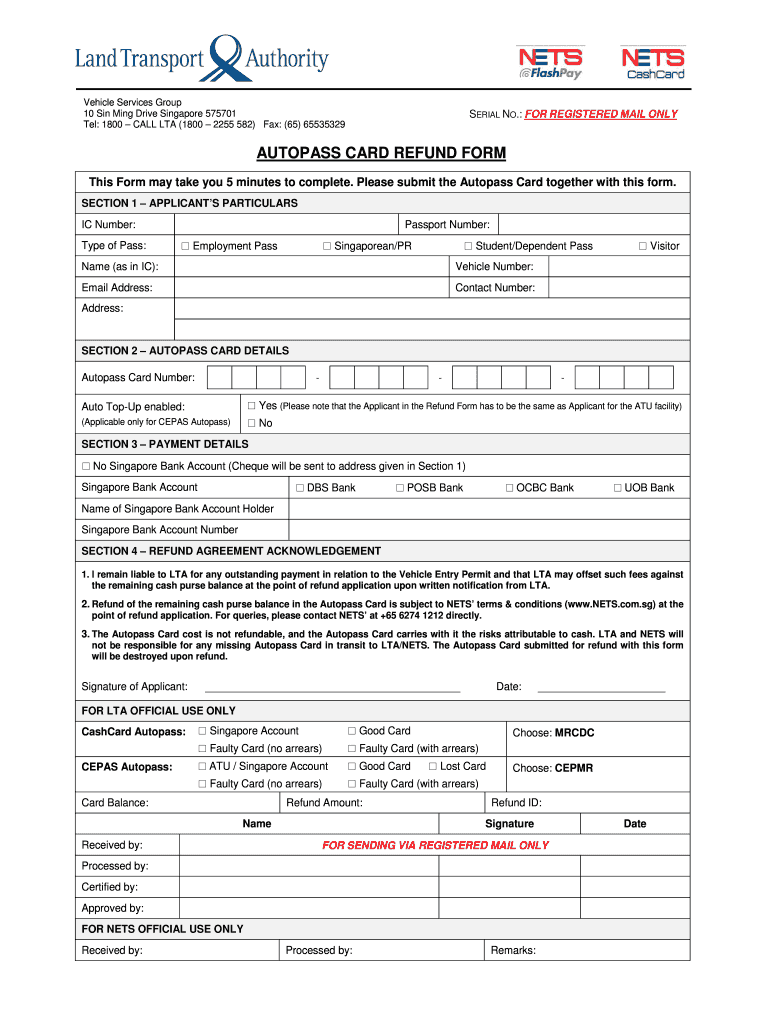
This refund process usually involves filling out an Autopass refund form that requests specific details regarding the cardholder and the card itself. It is essential for users to understand that all requests must comply with the program's guidelines, including any deadlines or conditions outlined.
Steps to Complete the Autopass Refund
To initiate the autopass refund, you must follow a series of specific steps. Here’s a structured approach:
-
Gather Necessary Information
- Collect your Autopass card details, including card number and personal identification.
- Ensure that you have records indicating your account balance and usage (if available).
-
Obtain the Autopass Refund Form
- Access the official form through the designated agency's website.
- The form may also be available at designated service centers or through customer support.
-
Complete the Form
- Fill out all required fields accurately, providing personal data and card specifics.
- Make sure to indicate the reason for the refund request clearly.
-
Submit the Form
- Choose your submission method: online, by mail, or in person at authorized locations.
- If submitting online, follow prompts to attach any required documents.
-
Await Confirmation and Funds
- After submission, monitor your email or account for confirmation of your refund request.
- Be aware that processing times may vary depending on the method of submission and agency policies.
Important Terms Related to Autopass Refund
Familiarizing yourself with relevant terminology can facilitate a smoother refund process. Some key terms include:
- Autopass Card: A prepaid card allowing automatic toll payments.
- Refund Request: The official appeal submitted for reclaiming funds.
- Usage History: A record of transactions associated with your Autopass card.
- Submission Methods: Various platforms or formats through which the refund form can be submitted, including online and paper documentation.
Understanding these terms is vital for accurately completing the refund form and navigating the associated procedures effectively.
Who Typically Uses the Autopass Refund
The autopass refund is applicable to a variety of users:
- Frequent Toll Pass Holders: Individuals who regularly use toll roads may find themselves needing refunds upon card expiration or cancellation.
- Limited Use Users: People who rarely use the toll services but still maintain an Autopass card may request refunds for unused balances.
- Expired Card Holders: Those whose cards have expired and have remaining balances are eligible to claim a refund.
- Account Holders: Anyone with an Autopass account that has encountered discrepancies or overcharges may consider this process.
Each of these categories must adhere to the established protocols for submitting a refund request efficiently.


Legal Use of the Autopass Refund
The legality of the autopass refund process is governed by the terms and conditions of the Autopass program. Essential aspects include:
- Compliance: All refund requests must align with the regulations set forth by the issuing authority.
- Time Limits: There may be specific deadlines for submitting refund requests after a card’s expiration.
- Valid Reasons: Users must provide legitimate explanations for refund requests, such as card expiry or overcharges.
Understanding these legal parameters is crucial to ensuring that your refund request is processed correctly and without delays.
Required Documents for Autopass Refund
To facilitate the autopass refund process, specific documentation is required. This may typically include:
- Autopass Refund Form: The filled-out request form.
- Proof of Ownership: Documentation verifying that you are the registered cardholder.
- Transaction History: If applicable, a statement showing your card usage to help substantiate your refund request.
Having these documents ready can expedite the review and processing time of your refund claim.
Any Penalties for Non-Compliance
While seeking an autopass refund, it is essential to understand potential penalties associated with non-compliance. Failing to:
- Submit requests within the required timeframe.
- Provide accurate information can lead to delays or rejection of your refund request.
- Adhere to the guidelines may not only prolong the process but could also result in losing the ability to obtain a refund altogether.
Awareness of these penalties strengthens the necessity for careful attention to detail during the refund submission process.
Key Elements of the Autopass Refund Process
For a successful autopass refund, it is important to focus on core elements:
- Accurate Information: Ensure that all information provided in the refund form matches official records.
- Submission Method: Choose the most efficient method for your circumstances, whether it's online, mail, or in person.
- Follow-Up: Maintain communication with the issuing authority to track the status of your refund request.
By focusing on these key elements, users can navigate the refund process with greater ease and likelihood of success.