




Here's how it works



How to use or fill out Healthy Lifestyle Prescription Pad Contract - Alabama Department of ... with our platform

- Click ‘Get Form’ to open the Healthy Lifestyle Prescription Pad Contract in the editor.
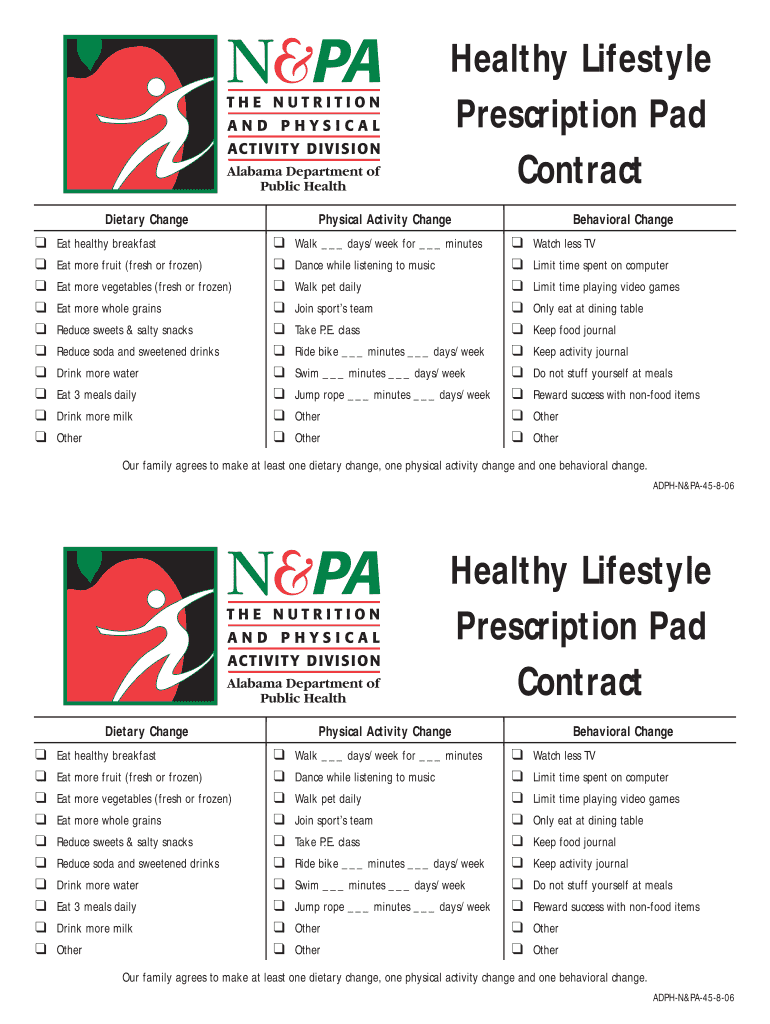
- Begin by reviewing the Dietary Change section. Here, you can select at least one dietary change by checking the appropriate boxes, such as 'Eat healthy breakfast' or 'Drink more water'.
- Next, move to the Physical Activity Change section. Fill in your chosen activities and frequency by checking the boxes and entering details like 'Walk ___ days/week for ___ minutes'.
- Proceed to the Behavioral Change section. Again, check at least one option that resonates with your family's goals, such as 'Keep food journal' or 'Limit time spent on computer'.
- Finally, ensure that you review all selections made. Once satisfied, save your changes and proceed to sign if required.
Start using our platform today for free to easily complete your Healthy Lifestyle Prescription Pad Contract!
It's free
Got questions?
Can I sign my Healthy Lifestyle Prescription Pad Contract - Alabama Department of ... with my mobile phone?
Yes, it is possible with DocHub. This secure and compliant online service has a phone-based signing option. When you log in to your DocHub account and import your Healthy Lifestyle Prescription Pad Contract - Alabama Department of ... to our editor, complete all empty fields and utilize the Sign feature on the upper barf. Click on Create your signature and select Phone from the available choices. Here, you scan a QR code with your smartphone and draw your signature on your phone screen, as you usually do when signing hard copies. If you access DocHub right from your mobile device, you can eSign your form by drawing your eSignature, adding its photo, or simply with a typed name.
How do you get Healthy Lifestyle Prescription Pad Contract - Alabama Department of ...?
You can find the latest and most relevant version of the Healthy Lifestyle Prescription Pad Contract - Alabama Department of ... in our DocHub forms library. Search it by categories or utilize the search field to find the exact template that fits your case. You may open this form for editing once you find it.
What to do if you lose a prescription pad?
How do I request a prescription?
How to create a prescription pad?
Security and compliance
At DocHub, your data security is our priority. We follow HIPAA, SOC2, GDPR, and other standards, so you can work on your documents with confidence.
Learn more


